




Running a service business is very different from running a product-based company. Your work happens in the field. Jobs change daily. Teams are mobile. Customers expect fast updates and clear communication. As operations grow, many owners start searching for the best CRM for service business needs—not because they want new software, but because their current tools stop keeping up.
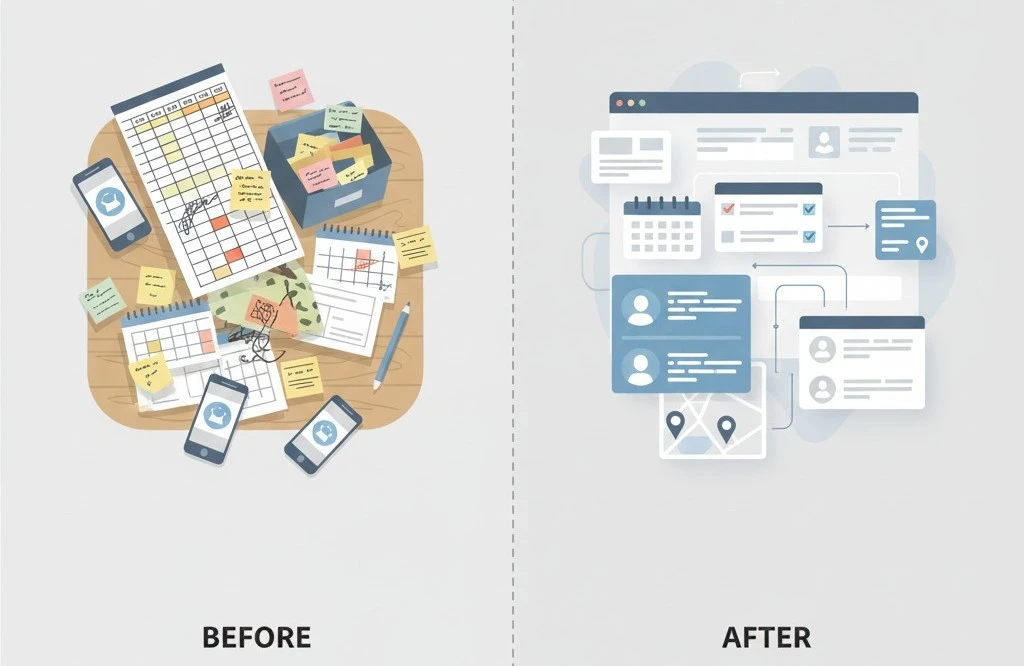
Spreadsheets, disconnected apps, and manual follow-ups may work early on. But over time, they create delays, errors, and missed opportunities. Choosing the right system becomes less about features and more about control, visibility, and consistency.
This guide explains how to choose a CRM that actually fits service businesses. We’ll break down what CRMs mean in a service context, how they differ from a job management tool, what challenges they solve, and what to look for before making a decision.
What Does a CRM Mean for a Service Business?
A CRM (Customer Relationship Management system) is often misunderstood in service industries. Many people think it’s only for sales teams. In reality, a CRM for service businesses supports day-to-day operations, not just leads.
For service businesses, a CRM connects:
- Customers and service history
- Jobs and schedules
- Technicians and availability
- Invoices and payments
- Communication and follow-ups
Unlike traditional CRMs built for sales pipelines, service-focused CRMs are designed to handle ongoing relationships, repeat work, and field operations.
This is where field service management and CRM functionality overlap.
Why Service Businesses Struggle Without the Right CRM
As service businesses grow, operational complexity increases faster than revenue. Common issues include:
- Jobs are getting missed or duplicated
- Scheduling conflicts
- Inconsistent customer communication
- Delayed invoicing
- Lack of visibility across teams
These problems are rarely caused by poor management. They are usually caused by tools that weren’t designed for dynamic, field-based work.
Manual systems don’t scale well when jobs, technicians, and customers are constantly moving.
CRM vs Job Management Tool: What’s the Difference?
This is one of the most common questions service business owners ask.
What Is a Job Management Tool?
A job management tool focuses primarily on:
- Scheduling jobs
- Assigning technicians
- Tracking job status
It helps teams know what work needs to be done and when.
What Is a CRM for Service Businesses?
A CRM goes further. It manages:
- Customer relationships
- Job history
- Communication
- Billing and payments
- Team coordination
In simple terms:
- A job management tool focuses on tasks
- A CRM focuses on relationships and operations
Many modern platforms combine both. But understanding the difference helps you choose a system that fits your actual needs.
When Does a Job Management Tool Stop Being Enough?
Job management tools work well when:
- Job volume is low
- Teams are small
- Communication is simple
They become limiting when:
- Customers expect updates and transparency
- Teams grow beyond a few technicians
- Invoicing and follow-ups need automation
At that stage, businesses often start searching for the best CRM for service business operations—not because they want more software, but because they need more structure.
What Operational Problems Should the Right CRM Solve?
Before choosing any system, it helps to be clear about what problems you want to solve.
A CRM built for service businesses should help with:
- Centralised job and customer data
- Real-time scheduling visibility
- Reduced manual admin work
- Accurate billing and payment tracking
- Consistent customer communication
Educational resources on CRM fundamentals explain how CRM systems support long-term customer relationships across industries, including service-based businesses, by improving visibility, consistency, and communication.
What to Look for in the Best CRM for Service Business Growth
Not all CRMs are created equal. Many are too complex. Others are too basic. The best option sits in the middle.
1. Built for Service Workflows
Avoid tools designed primarily for sales teams. Look for systems that support:
- Job-based workflows
- Repeat service calls
- Field teams
2. Integrated Job Management
Your CRM should act as a job management tool, not require a separate system. Job details, schedules, and updates should live in the same place as customer data.
3. Simple Scheduling and Dispatch
Scheduling should:
- Update in real time
- Be visible to the whole team
- Reduce double bookings
4. Customer History at a Glance
Technicians and admins should instantly see:
- Past jobs
- Notes
- Invoices
- Communication history
This improves service quality without extra effort.
How Does CRM Adoption Affect Daily Operations Over Time?
The impact of adopting a CRM is rarely dramatic on day one. The real value shows up gradually, as daily operations become more structured and predictable.
In the early weeks, teams often notice small improvements. Job details are easier to find. Schedules feel more organised. Fewer updates get lost between the office and the field. While the workload may feel similar at first, the mental load starts to reduce.
As job volume grows over the months, the difference becomes clearer. Instead of reacting to problems, teams work from a single source of truth. Job statuses are visible. Customer history is easy to access. Follow-ups happen on time without manual reminders. This reduces last-minute stress and constant context switching.
Over time, consistency replaces chaos. Processes stop depending on individual memory or spreadsheets. New team members onboard faster because workflows are clear. Managers spend less time fixing mistakes and more time planning ahead.
When Simple Systems Outperform Feature-Heavy Tools
One of the biggest mistakes service businesses make is choosing software that’s too complex.
If a system:
- Requires heavy training
- Feels slow in the field
- Is hard to use on mobile
…it won’t be adopted properly.
The best CRM for service business teams feels intuitive. It supports work instead of interrupting it.
Can a CRM Support Both Office Teams and Field Technicians?
For a CRM to work in a service business, it must support both office teams and field technicians equally. If it only works well for one side, adoption usually fails.
Office teams focus on scheduling, customer communication, invoicing, and coordination. They need visibility across jobs, technicians, and timelines without jumping between tools. A CRM helps centralise this information so updates happen once and stay consistent.
Field technicians have different needs. They care about speed, simplicity, and mobility. Mobile access is critical. Technicians need to view job details, update status, add notes, and access customer information directly from the field. If a system is slow or complicated, they’ll avoid using it.
Centralized customer management allows office teams and field technicians to access the same information without switching tools. Office staff can plan and monitor operations, while technicians update jobs in real time. Everyone works from the same information.
When both teams rely on one system, communication improves naturally. Fewer calls. Fewer missed updates. Less confusion. Over time, this shared workflow creates smoother operations and stronger accountability—without adding friction to daily work.
How Field Service Management Fits Into CRM Selection
Field service management focuses on coordinating people, jobs, and resources in real time.
A CRM with strong field service management capabilities helps:
- Track technician availability
- Monitor job progress
- Improve response times
According to field service management principles, real-time visibility is a key factor in improving operational efficiency and customer satisfaction.
This is especially important for businesses with mobile teams.
CRM vs Contractor Software: Are They the Same?
They overlap, but they’re not identical.
Contractor software often focuses on:
- Estimates and invoices
- Compliance
- Job costing
A CRM focuses more on:
- Relationships
- Communication
- Operational coordination
For many service businesses, the best solution combines elements of both—without becoming overly complicated.
How to Evaluate CRM Options Without Getting Overwhelmed
When comparing systems, avoid feature lists at first. Instead, ask:
- Does this reflect how my business actually works?
- Will my team use it daily?
- Does it reduce manual work?
Then evaluate:
- Mobile usability
- Reporting clarity
- Integration with billing
- Customer communication tools
This comparison mindset leads to better long-term decisions.
Common Mistakes Service Businesses Make When Choosing a CRM
Choosing a CRM is an important decision for service businesses. The right system can simplify operations, while the wrong one can slow teams down and create frustration. Many issues arise not because CRMs don’t work, but because of how the choice is made.
Choosing Based on Price Alone
Cost is always a factor, but focusing only on the lowest price often leads to higher expenses later. Cheaper tools may lack automation, mobile access, or proper support. This forces teams to rely on manual workarounds, spreadsheets, or multiple tools. Over time, inefficiency costs more than the software itself. A CRM should be evaluated based on how well it supports daily operations, not just its monthly fee.
Overbuying Features That Don’t Fit
Some service businesses choose complex platforms with advanced features they never use. While powerful on paper, overloaded systems often slow adoption. Teams spend more time learning the software than using it. Unused features add confusion without delivering value. A practical CRM should match how jobs, schedules, and customers are managed in real life—without unnecessary layers.
Ignoring Team Input
One of the most common mistakes is choosing a CRM without involving the people who will use it daily. Field technicians, coordinators, and office staff interact with the system constantly. If the tool feels complicated or slows them down, adoption suffers. Ignoring team feedback often results in incomplete data, skipped updates, and resistance to change. Systems work best when they support existing workflows instead of forcing new ones.
Rushing the Decision
Switching systems is easier when done thoughtfully. Some businesses rush into a CRM during periods of growth or operational stress. Without proper evaluation, data cleanup, or training plans, even good tools feel disruptive. Taking time to assess needs, test usability, and plan onboarding leads to smoother transitions and better long-term results.
Choosing a CRM is not about finding the most popular or cheapest option. It’s about selecting a system that supports how your service business actually operates—today and as it grows.
How the Right CRM Improves Customer Experience
Customers don’t see your software. They feel the results.
A good CRM helps deliver:
- Faster responses
- Clear communication
- Accurate invoices
- Reliable follow-ups
This builds trust and repeat business without extra effort.
Where Fieldified Fits in the CRM Landscape
Not every CRM is built with service businesses in mind. Many tools are designed for sales teams first, then adapted for operations later. Fieldified sits in a different category. It’s built around how service work actually happens day to day.
Instead of adding layers of complexity, Fieldified focuses on core operational needs such as job scheduling, customer information, invoicing, and team coordination—all within a single, connected system. This helps reduce fragmented workflows without forcing teams to change how they already operate.
For growing service businesses that have outgrown spreadsheets but aren’t looking for heavy enterprise software, tools like Fieldified offer a practical middle ground. The emphasis is on clarity, consistency, and usability across office staff and field teams, rather than advanced features that rarely get used.
The role of a CRM in this context isn’t to overhaul processes overnight. It’s to provide structure that supports growth, improves visibility, and keeps daily operations running smoothly as job volume increases.
How to Know You’re Ready for a CRM
You may be ready if:
- Admin work is increasing faster than revenue
- Jobs feel reactive instead of organised
- Customer communication is inconsistent
These are signals that systems—not effort—need improvement.
Choosing the Right System Takes Time
There’s no single “perfect” CRM for everyone. The best CRM for service business needs is one that fits how your team actually works today, while supporting growth tomorrow.
When you’re ready, exploring modern systems can bring clarity without disruption. The right tools don’t force change. They support it.
FAQs
What is the best CRM for service business operations?
The best CRM for service business operations combines job tracking, scheduling, customer management, and billing in one system, helping teams stay organised without adding unnecessary complexity.
Is a CRM better than a job management tool?
Yes. A CRM includes job management but also manages customer relationships, communication history, and long-term service data, making it more scalable as a business grows.
Can small service businesses use CRM software?
Absolutely. Small service businesses benefit from better organisation, fewer manual errors, and improved customer communication, even with small teams and lower job volume.
Does CRM software work for field teams?
Yes. Modern CRM platforms for field service management offer mobile access, real-time updates, and simple on-site usability for technicians in the field.
When should a service business switch from spreadsheets to a CRM?
When spreadsheets lead to missed jobs, billing delays, data confusion, or admin overload, it’s a clear sign that switching to a CRM is necessary.
Summary
Why CRMs Matter for Service Businesses
As service operations grow, spreadsheets and disconnected tools create errors, delays, and visibility gaps—making a structured CRM essential for consistency and control.
CRM vs Job Management Tools
While job management tools handle tasks and schedules, the best CRM for service businesses also manages customer history, communication, billing, and long-term operations.
How to Choose the Right CRM
The right system supports real workflows, works for both office teams and field technicians, scales gradually, and improves customer experience without adding complexity.