EN
EN DE
DE ES
ES FR
FR NL
NL PT
PT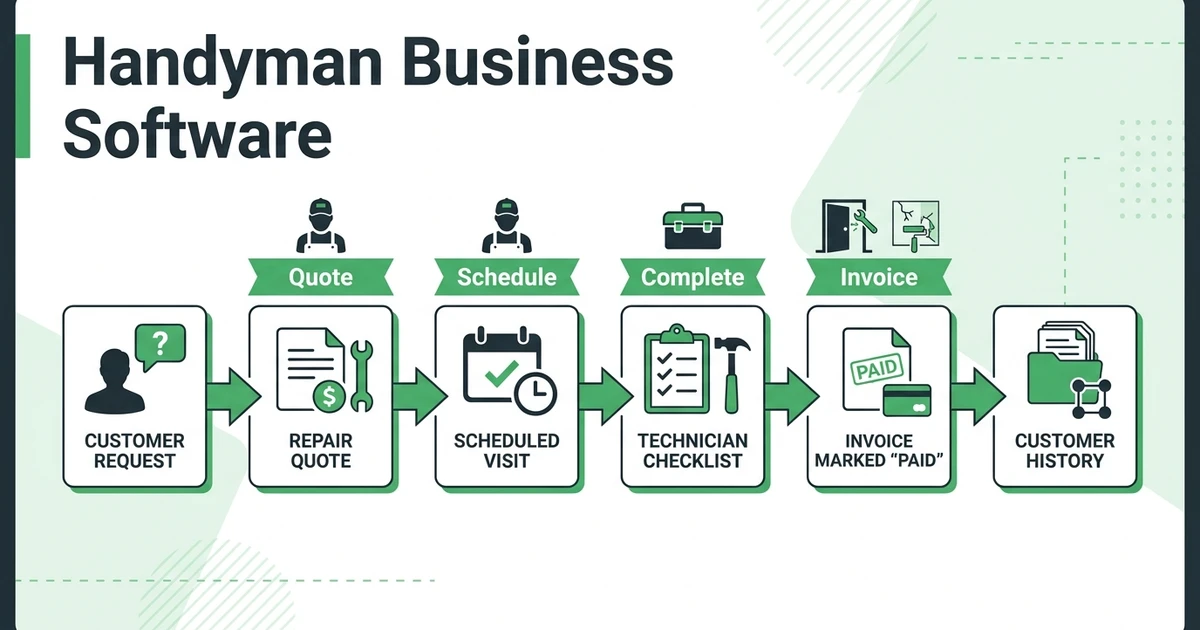





Quick Answer: Choose handyman business software by following a repair from the first call through approval, field notes, invoice, and payment follow-up. Start with the seven options below, then require each finalist to complete your own mixed-job test before you commit.
A handyman crew needs to handle a sticking door, a drywall estimate, and a repeat maintenance visit without losing the details between them. For an owner managing two to twenty technicians, the buying question is practical: can the office see what happened and what still needs attention?
Use this shortlist to organize your evaluation:
- Fieldified
- Jobber
- Housecall Pro
- Workiz
- Kickserv
- Service Fusion
- ServiceTitan
The order starts with Fieldified, the publisher’s product. Treat the remaining names as candidates to test, not a verified performance ranking. Their entries below assign different demonstration challenges; they don’t claim particular features, prices, or suitability without evidence.
What should handyman business software handle from first call to payment?
Start with a job record you can follow. The customer, service address, requested repair, approved scope, assigned technician, completion evidence, invoice, and payment status should be easy to trace. During a demonstration, ask the presenter to open the same job at each step.
Define the terms before comparing screens. A handyman CRM is your customer relationship record: who called, which property needs attention, and what happened previously. Handyman job management software should be evaluated on how that information follows the work, rather than how many separate menus appear in the presentation.
For context, the U.S. Bureau of Labor Statistics projects about 148,700 annual openings for general maintenance and repair workers over 2025–35. That is the broader occupation, not a count of vacancies at independent handyman businesses. BLS occupational outlook.
Use that context to ask a practical question: could a new technician understand tomorrow’s assignment from the record alone? Write acceptance criteria around the information that person needs:
| Work stage | What your test should reveal | Reason to pause the purchase |
|---|---|---|
| Customer intake | Contact, property, access instructions, repair request | Information must be copied from a separate inbox |
| Estimate approval | Itemized scope, exclusions, recorded decision | Nobody can identify the approved version |
| Scheduling | Technician, visit purpose, time window | A moved appointment leaves conflicting instructions |
| Field completion | Work performed, materials, photos, unresolved items | The office must call to reconstruct the visit |
| Billing and follow-up | Invoice, outstanding balance, next action | Completed and paid are treated as the same status |
Keep the customer’s identity separate from the service location in your test. Imagine a property manager responsible for several addresses. Ask the vendor to show how a technician finds the correct unit’s history without exposing another property’s instructions on the job sheet.
Which seven handyman software options fit different business sizes and workflows?
Choose finalists around the work your crew actually performs. A team handling short household repairs should test rapid intake and closeout. A growing maintenance operation should add repeat visits, office handoffs, and multiple properties to the same evaluation.
1. Fieldified: can a growing crew keep the whole repair together?
Fieldified’s published handyman offering includes itemized estimates, crew scheduling, mobile job documentation, and invoicing. Use those capabilities as the starting point for a connected-workflow demonstration. Bring a door-repair request and follow it through approval, assignment, completion photos, billing, and payment follow-up.
For a small crew, focus on everyday usability. Have a technician enter notes while the office checks the job. For a larger crew, add a reassignment and an unresolved item requiring another visit. Confirm which proposed plan covers your requirements and ask the presenter to demonstrate each handoff rather than skipping to a completed example.
2. Jobber: can your team complete a short repair without rebuilding it?
If Jobber is on your shortlist, use a small repair as its first challenge. Ask the presenter to start with a customer’s request, create the estimate, record approval, and finish with an invoice. Watch for information your office would need to enter again.
Then request a written proposal for your actual roster, including the owner and office staff. Ask which demonstrated steps belong to that proposal. Keep the decision tied to the workflow you saw and the terms you received, rather than an assumed pricing model or a remembered feature list.
3. Housecall Pro: what happens when the customer adds another task?
Give Housecall Pro a scope-change challenge. The technician arrives to adjust a door, and the customer asks for a separate shelf repair. Request a demonstration of how the original approval, additional estimate, customer decision, and final bill would be handled.
Ask to view the result from both the technician’s and customer’s perspective. Could each person distinguish the initial work from the extra request? Your acceptance condition should be a clear record of authorization, with no need to infer approval from a final invoice alone.
4. Workiz: can the office recover the details of a changed request?
For Workiz, prepare a customer who calls back after the initial booking. The repair address stays the same, but the access instructions and requested arrival window change. Ask the presenter to demonstrate where the office records the update and where the technician sees it.
Then hand the job to someone who wasn’t present for intake. Have that person explain the current instructions using only the record. This is your test of information continuity, not a claim about the vendor’s communications tools or which subscription includes them.
5. Kickserv: can a small crew close a job without owner intervention?
Use Kickserv’s evaluation to test delegation. Give a technician a maintenance assignment and ask them to record completion, flag unfinished work, and prepare the information needed for billing. Let your own team member navigate after the presenter demonstrates the process.
Have the office explain what needs approval before sending the invoice. If the owner must interpret every note, revise your process or investigate the configuration before deciding. Ask for a proposal covering the people who will actually perform these steps, including occasional office help.
6. Service Fusion: can a larger schedule absorb an urgent repair?
For Service Fusion, create a busier schedule with several technicians and an urgent door repair. Ask the presenter to demonstrate the proposed assignment, identify the appointment that moves, and show how the changed instructions reach everyone affected.
Add a technician who cannot take the new assignment and repeat the exercise. Your aim is to judge the workflow under your operating conditions. Don’t assume a particular dispatch capability, notification method, or included feature until the vendor demonstrates it in the plan being quoted.
7. ServiceTitan: does the proposed setup fit your actual operation?
For ServiceTitan, begin with an implementation challenge. Ask the vendor to map your ordinary repair, quoted drywall job, and maintenance visit into the proposed setup. Request an explanation of what your staff would configure and maintain after launch.
Then ask for the complete commercial proposal and onboarding responsibilities. Judge whether the demonstrated process fits your crew’s available administrative time. Avoid deciding from assumptions about company size: the relevant evidence is the work your team can complete and the commitments in the proposal.
Book a Fieldified demo around your own repair workflow, from the estimate and approved scope to field documentation, the invoice, and payment follow-up. Bring a real example so you can inspect each handoff.
How should a handyman team price and approve small repair work?
Separate your pricing policy from the software purchase. Decide when you quote a fixed scope, when you charge for an assessment, and when uncertain work needs a revised estimate. Then test whether the proposed system can represent those decisions clearly for your staff and customer.
For the door repair, describe the requested adjustment and what your price covers. For the drywall estimate, distinguish assessment from approved repair work. If painting or another return visit is excluded, put that in the scope instead of leaving the office to explain it later.
Follow a consistent approval sequence:
- Record the reported problem and service address.
- Describe the proposed work, materials, assumptions, and exclusions.
- Present the price and identify who can approve it.
- Keep the accepted scope available to the assigned technician.
- Record additional work and its approval separately.
Fieldified’s quote management workflow includes customer approvals and quote follow-up. In your demonstration, ask to revise a pending estimate, then inspect how your team identifies the version it should work from. Confirm your required approval process before choosing the plan.
Avoid setting your charge rate from a wage figure alone. BLS reports a May 2025 median annual wage of $49,590 for general maintenance and repair workers. This is an occupational wage benchmark, not handyman business revenue or a recommended customer billing rate. BLS wage data.
Build your own pricing assumptions around labor, materials, travel, overhead, and the margin you intend to earn. Label demonstration amounts as examples. The purchase test is whether staff can apply your pricing rules and explain the approved charge, not whether software supplies a universally correct repair price.
Can the office turn field notes into an invoice without duplicate entry?
Ask the technician to write a useful completion note: the sticking door was adjusted, specified hardware was replaced, and the customer requested a separate shelf estimate. The office should be able to distinguish completed billable work from a new sales opportunity when reviewing that record.
Run the handoff without a phone explanation. Ask the office to find the accepted estimate, review materials and notes, and prepare the invoice. Count each place where someone retypes information, searches another conversation, or asks the technician what happened.
Use three closeout decisions in your test: ready to invoice, waiting for review, and requiring a return visit. Decide who can move work between those states. A technician marking the visit finished should not automatically settle your internal question about whether the bill is ready.
Fieldified describes job-linked billing and payment reminders in its invoicing workflow. Test your own review sequence within that workflow. Ask how staff handle a disputed line item and how they identify the next follow-up action without confusing an unpaid invoice with unfinished repair work.
The record should also help the next technician. If a second visit is needed, specify the remaining task and required materials. For a deeper checklist of the information to retain, use the guide to handyman job tracking and customer history.
A one-day software test: maintenance visit, quoted repair, and repeat customer
Use this hypothetical day with every finalist. Your two-technician business receives an urgent door repair, conducts an on-site estimate for a larger drywall job, and completes a recurring property-maintenance visit. The scenario is an evaluation script, not a customer case study or promised result.
Morning: can you move the maintenance visit without losing its scope?
Create a maintenance visit for a returning property manager. Include the service address, access instructions, agreed checklist, and prior unresolved item. Ask the technician to find the history before opening any new notes.
Now insert the urgent door repair. Move the maintenance appointment and inspect the revised schedule from the office and field views. Ask what the customer would receive and confirm that the visit’s checklist and billing instructions remain attached to the right assignment.
Midday: can you keep an estimate separate from approved work?
Send the other technician to assess drywall damage. Enter photos, measurements, proposed materials, and exclusions. Keep the repair unapproved while the customer considers the estimate, and ask the office to identify its next action.
Then simulate an approval with a requested change. Check whether the technician can identify the accepted scope before booking the repair. Don’t accept a walkthrough that jumps from the original estimate to an invoice without showing the decision in between.
Afternoon: can you close the repair and find the unpaid balance?
Finish the door repair with notes, material use, and completion photos. Have the office prepare the invoice from that record. Next, leave the demonstration invoice unpaid and ask someone else to find it and explain the follow-up action.
Finally, open the property manager’s next maintenance visit. Check that today’s completion evidence remains identifiable and that unfinished work has an owner. Mark each test passed, unresolved, or failed, with a note explaining why. Require demonstrations for unresolved essentials before signing.
Is Fieldified right for a handyman business with a growing crew?
Fieldified is worth evaluating when you want customer records, quotes, scheduling, job documentation, and billing in a connected workflow. For a small handyman crew, start with the ordinary repair test. For a growing team, add office permissions, reassignment, and repeat-property history to your acceptance criteria.
Its paid-plan pricing uses a base plan with an included user allowance; additional users can add cost. Ask for a written total for your current roster and expected growth. Flat plan pricing should not be read as unlimited users or identical features across every tier.
Compare that proposal with each finalist using the same requirements. Include implementation, required subscriptions, payment processing terms, and any paid additions in your questions. Ask which costs are recurring and which apply only at setup, without assuming the answers are identical across vendors.
If you already use another system, make migration part of the demonstration. Prepare sample customer records, open estimates, upcoming visits, unpaid invoices, and job photos. Ask which information can transfer, what needs manual work, and how your office will reconcile the result.
Frequently Asked Questions
What should handyman business software include for a small crew?
Prioritize customer and property records, estimates, scheduling, field documentation, invoicing, and payment status. Test whether approved work stays connected through those steps without someone rebuilding the job record.
How do I compare handyman business software prices?
Request a written total for your current crew and your planned team size. Include office users, required features, onboarding, payment charges, and any additional subscriptions in the comparison.
What should handyman scheduling software do when an urgent repair arrives?
Your test should show who is available, which appointment would move, and how the affected technician and customer receive the change. Reject a workflow that leaves the office maintaining a separate schedule to explain the real plan.
Can I use the same workflow for repairs and recurring maintenance?
Use a shared customer history while keeping each visit’s scope, completion record, and billing status distinct. Ask each vendor to demonstrate both a one-off repair and a repeat visit before choosing a plan.
How should a handyman team handle extra work requested on site?
Record the additional scope and price separately from the original approval. Agree on who can authorize it, capture that decision, and check that the final invoice reflects only the approved work.
Conclusion
Choose the option that passes your mixed-job test and fits the written budget. Keep the accepted scope, technician’s evidence, invoice, and payment follow-up at the center of the decision. An attractive schedule alone doesn’t answer whether your office can finish the administrative work.
Bring an ordinary repair and an awkward exception to the final demonstration. Request a Fieldified demo of your handyman workflow, including the estimate, approved work, field documentation, invoice, and payment follow-up. Use the completed records to decide whether the proposed setup fits your crew.