EN
EN DE
DE ES
ES FR
FR NL
NL PT
PT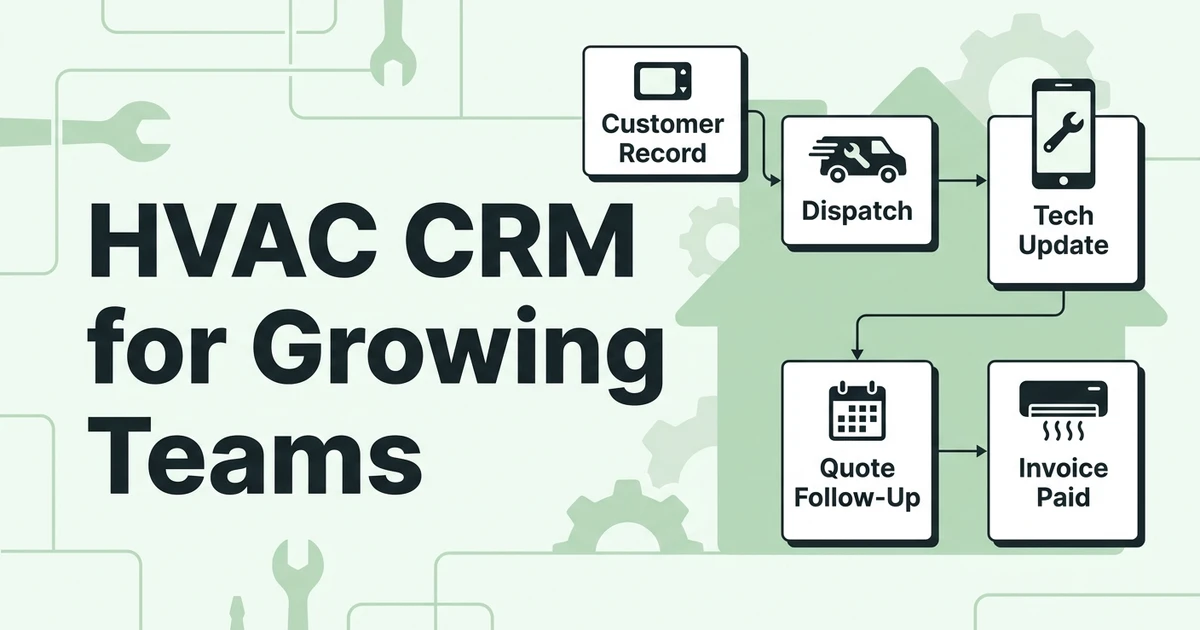





Quick Answer:
HVAC CRM for growing teams connects customer records, service calls, sales follow-ups, scheduling, dispatch, technician updates, invoices, and payments in one workflow. Fieldified is the strongest fit for HVAC companies that want CRM plus field service operations without moving between disconnected sales, office, and technician tools.
When your HVAC company has two techs, you can survive with memory and a shared calendar.
When you have five, ten, or twenty-five techs, that setup starts leaking work. Sales does not know which quotes need follow-up. Dispatch does not know who is closest to the next emergency call. Technicians arrive without the full service history. Invoices wait because job details are stuck in texts.
That is where the right HVAC CRM becomes a serious buying decision. This is not just contact storage. The right system keeps service, sales, dispatch, customer communication, and technician updates connected as the business grows.
This guide compares HVAC CRM software options through that lens: which tools stay practical as your team grows, what pricing style to watch, and where Fieldified fits.
Why HVAC Teams Outgrow Basic CRM Software
Generic CRM software can work when your HVAC business only needs to store leads and customer names. The problem starts when that CRM is separate from daily work.
HVAC companies do not sell from a desk all day. Your team handles emergency calls, tune-ups, replacements, quote approvals, schedules, and payment collection. If the CRM cannot connect those moving parts, it becomes one more place to update.
Labor demand adds more pressure. The Bureau of Labor Statistics projects employment for heating, air conditioning, and refrigeration mechanics and installers to grow 8% from 2024 to 2034, with about 40,100 openings each year in its Occupational Outlook Handbook.
That growth is good news, but it changes the software question. A CRM for HVAC company growth has to keep a busier team coordinated.
Best HVAC CRM Options for Growing Teams
Most ranking pages answer “what CRM software is best for HVAC contractors” with a long list of tools. That is useful, but it can miss the real issue: the best CRM depends on your team stage.
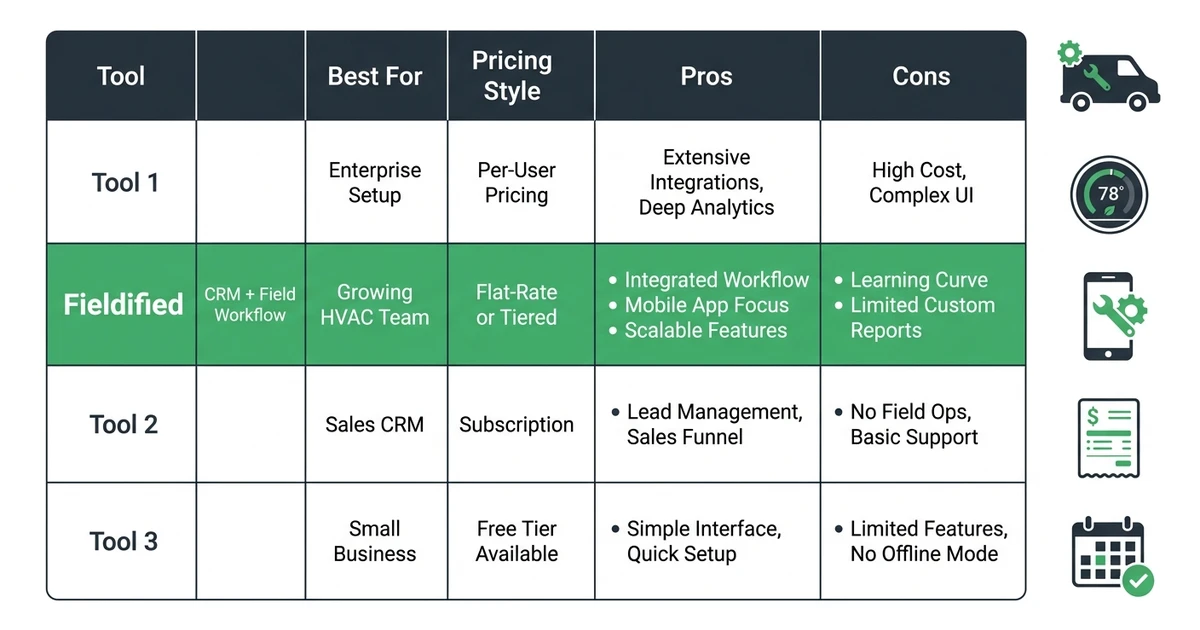
A five-tech HVAC business does not need the same system as a multi-location enterprise contractor. A growing team needs enough structure to stop missed handoffs, but not so much complexity that technicians avoid it.
| Tool | Best for | Pricing style | Pros | Cons |
|---|---|---|---|---|
| Fieldified | Growing HVAC teams that want CRM, scheduling, dispatch, quoting, invoicing, payments, and technician updates in one workflow | Flat plan pricing | Full job lifecycle, AI Receptionist, mobile workflow, quote and invoice follow-ups, easier adoption for office and field teams | Not built as a heavy enterprise ERP |
| Jobber | Small service teams that want simple scheduling and invoicing | Tiered, user-based pricing model | Polished interface, familiar contractor brand, strong client communication | Costs can rise as the team grows, and some advanced workflows may need higher tiers or add-ons |
| ServiceTitan | Large HVAC operations with enterprise needs | Custom enterprise pricing | Deep reporting, advanced workflows, strong trade depth | Can be expensive and complex for smaller growing teams |
| Housecall Pro | Small residential service teams | Tiered, user-based pricing model | Easy mobile experience, good basic field service workflow | Growing teams may hit feature, reporting, or cost limits |
| FieldEdge | HVAC and plumbing companies centered around accounting workflows | Custom or tiered pricing style | HVAC-specific workflows and accounting orientation | May feel less flexible for teams that want simpler adoption or broader trade coverage |
| Zoho CRM | Sales-led teams that need CRM customization | User-based CRM pricing style | Flexible sales pipeline and broad business suite | Not built around HVAC service calls, dispatch, and job completion by default |
| HubSpot CRM | Marketing and sales alignment | Tiered CRM suite pricing style | Strong marketing tools and pipeline visibility | Needs extra setup to support HVAC field service workflows |
For growing HVAC teams, the winner is not always the platform with the longest feature list. The better question is: which HVAC platforms maintain performance as HVAC services teams scale and team collaboration gets harder?
Fieldified is built for the answer most growing teams need. It keeps CRM, quotes, scheduling, dispatch, technician updates, invoices, payments, and customer communication in one field service workflow. That makes it different from generic CRM software for HVAC companies that starts with sales pipeline management and then asks your team to bolt on the field operation later.
Enterprise platforms can fit large contractors with dedicated admin staff and bigger implementation budgets. Generic sales CRMs can fit companies with dedicated sales reps and a separate operations system. But if your HVAC company needs one practical command center for office, sales, dispatch, and field work, Fieldified should be at the top of the shortlist.
What HVAC CRM for Growing Teams Should Connect
A CRM for a growing HVAC team should connect the path from first contact to paid invoice. If it only stores customer names and sales notes, your team will still rely on texts, spreadsheets, and memory.
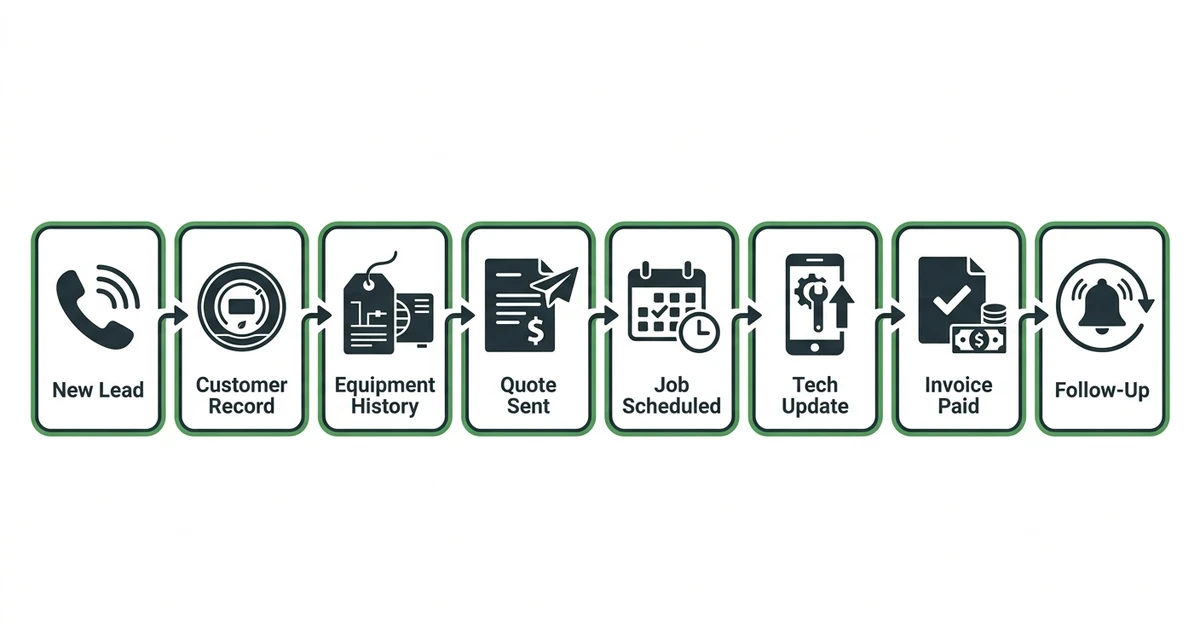
The practical workflow should look like this:
- A lead or service request comes in.
- The office creates or updates the customer record.
- The estimate, equipment details, and service history stay attached.
- The job gets scheduled and assigned to the right technician.
- The technician sees notes, photos, and prior work from mobile.
- The quote, invoice, payment request, and follow-up stay tied to the same job.
That connection matters because repeat HVAC work depends on history. A customer may call about a furnace, condenser, duct issue, thermostat, or maintenance agreement months after the last visit. If your CRM does not show what was installed, what was recommended, and what the technician noticed, the customer has to repeat the story.
This is also where a CRM with HVAC equipment tracking capabilities becomes more valuable than a general contact database. A growing HVAC team needs a CRM that tracks HVAC equipment and service records alongside scheduling, quotes, invoices, and customer communication.
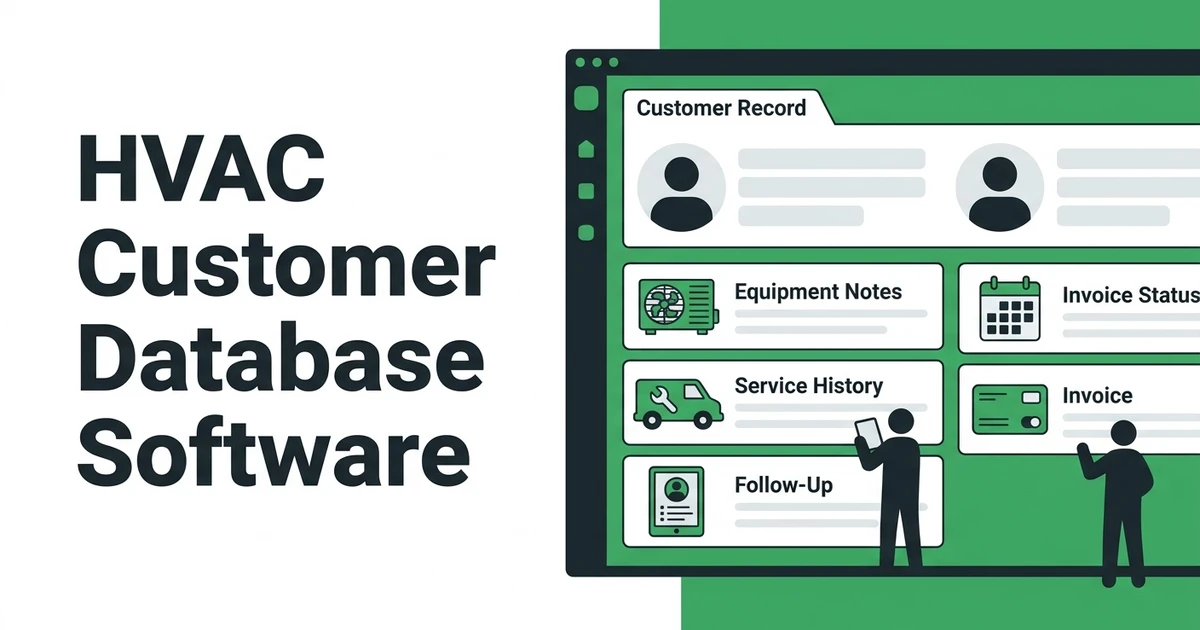
Fieldified supports that workflow by keeping customer records connected to job details, notes, quotes, invoices, payments, and technician updates. For a deeper customer-record angle, the related guide on HVAC customer database software explains what service history and equipment notes should include.
How Team Collaboration Breaks When Service, Sales, and Technicians Use Different Tools
The handoff problems usually start small. A salesperson sends a quote, but no one follows up because the job board is separate from the sales pipeline. Dispatch moves a technician, but the customer does not get an update. A technician finds an upsell opportunity, but the note never reaches the office.
Salesforce reports that mobile workers estimate 18% of working hours, more than 7 hours per week, are wasted on admin duties such as forms and hunting for information in its customer service research.
HVAC teams feel that waste fast because every lost minute can affect the next time window. If a technician has to call the office for model details, warranty notes, prior repair history, or quote status, the job slows down. If the office has to reconstruct what happened after the truck leaves, invoices get delayed.
Collaboration improves when every role sees the same current record:
- Sales sees which quotes are open and which customers need follow-up.
- Dispatch sees availability, schedule pressure, and technician status.
- Technicians see customer notes, equipment details, and job scope.
- The office sees completed work, invoice status, and payment follow-up.
- Owners see estimates, jobs, revenue, and team performance without chasing updates.
That is why HVAC service call management software and HVAC CRM software should not live in separate worlds. The service call shows what needs to happen today. The CRM shows the history and next opportunity.
How Fieldified Keeps HVAC Service Calls, Sales, and Technicians Aligned
Fieldified works well for HVAC companies because it treats CRM as part of the job lifecycle, not as a separate sales database.
With CRM and contact management, your office can keep customer details, history, and communication in one place. Scheduling and dispatch help the team assign work based on availability and job context. Mobile access gives technicians the job details where the work happens.
Picture a customer calling about weak cooling. The office checks the prior record, sees the last recommendation, and books the call. The dispatcher assigns the right technician. The technician updates the job, sends a quote if extra work is needed, and the office can invoice without rebuilding the visit from scratch.
Fieldified also helps with sales. Quote follow-ups keep open estimates from going quiet. Invoicing and payment reminders help completed work turn into collected revenue. Client communication keeps customers updated without every message becoming another office task.
The AI Receptionist is useful when call volume spikes during heat waves, cold snaps, and after-hours emergencies. Fieldified can capture and organize those requests so the office is not starting from a voicemail pile the next morning.
See how Fieldified connects HVAC leads, dispatch, technician updates, invoices, and payments in one workflow. Book a demo and walk through a real service call from first contact to paid invoice.
HVAC CRM Features That Matter Once Your Team Starts Scaling
Once your HVAC team starts scaling, the right feature set changes. You need fewer shiny extras and more reliable handoffs.
Use this checklist while comparing CRM software for HVAC companies:
| Feature | Why it matters for a growing HVAC team | How Fieldified helps |
|---|---|---|
| Customer and equipment history | Technicians need prior work, system notes, recommendations, and customer preferences before arrival | Keeps customer and job information connected in one workflow |
| Dispatch visibility | Office staff need to assign the right tech without constant phone calls | Connects scheduling, dispatch, and technician updates |
| Mobile job updates | Field teams need to update work without paper notes or end-of-day cleanup | Gives technicians access from mobile devices |
| Quote and sales follow-up | Open estimates get lost when sales and service use different systems | Tracks quotes and follow-ups in the job flow |
| Invoices and payment reminders | Completed jobs should not sit unbilled until Friday | Helps send invoices and follow-up reminders faster |
| Reporting and job visibility | Owners need to see work orders, revenue, paid jobs, and ongoing work | Gives performance visibility without separate spreadsheets |
| Ease of use | Software fails if office staff and technicians avoid it | Keeps the workflow practical for daily field service work |
The right CRM should help the dispatcher, technician, office manager, and owner understand what is happening without chasing updates.
If you are comparing “best CRM for HVAC” options, do not stop at lead tracking. Ask whether the platform can carry the job from quote to schedule to invoice without rebuilding the same information.
Is Fieldified Right for Your HVAC Business?
Fieldified is a strong fit if your HVAC business has enough job volume that manual handoffs are costing time, money, or customer trust.
It makes sense if:
- You have 5-25 technicians or plan to grow toward that range.
- Your team manages service calls, estimates, replacements, maintenance, and invoices.
- Sales, dispatch, and technicians need one shared workflow.
- You want flat plan pricing that is easier to forecast as your team grows.
- You want customer records, quotes, scheduling, invoices, and payments connected.
Fieldified is also a good fit if you are comparing a generic CRM against field service software. Generic CRM tools can track leads, but HVAC teams also need job notes, dispatch, mobile updates, invoice timing, payment reminders, and repeat-service communication.
It may not be the right fit if you only do a few service calls a month and can still manage everything with a calendar and invoice template. It may also be too light if you need a heavy enterprise ERP, deep warehouse inventory controls, or a custom implementation team for a multi-branch operation.
For most growing HVAC teams, the buying decision is practical: can your system show who called, who is going, what was quoted, what was completed, and whether the invoice was paid?
If the answer is no, HVAC service software built around the field workflow is likely a better fit than another disconnected sales database. You can also review Fieldified pricing to see how flat plan pricing compares with tools that become more expensive as every new user is added.
How to Choose CRM Software for HVAC Companies Without Creating Another Mess
The best CRM implementation service for growing HVAC businesses is often not a service at all. It is choosing software the team can adopt without months of setup.
Before you pick a CRM, map the work your company already does:
- Write down the first-call-to-paid-invoice workflow. Include the lead source, estimate, schedule, dispatch, job update, invoice, payment, and follow-up.
- Check whether technicians will actually use the mobile workflow. If the field team avoids it, the office will still chase notes.
- Confirm equipment and service details stay tied to the customer. HVAC repeat work depends on knowing what happened last time.
- Review pricing as the team grows. A plan that looks affordable for three users can feel very different at fifteen.
- Test the handoffs. Create a quote, schedule the job, update it from mobile, send the invoice, and check whether the record stays connected.
This is how you answer the question, “what are some effective CRM systems for HVAC businesses that help manage customer relationships and sales?” Effective systems help the team keep promises after the sale.
If a platform looks impressive but needs a dedicated admin to keep workflows clean, think carefully. Growing HVAC companies need software that makes daily work easier for the office and field, not a second job for the owner.
Pricing and Implementation Questions Growing HVAC Teams Should Ask
Pricing can be hard to compare because HVAC CRM platforms package features differently. Some charge by user, some use custom quotes, some offer flat plan pricing, and some charge extra for automation, AI, phone, marketing, or reporting.
Ask these questions before signing:
- Does the price change every time we add a technician or office user?
- Are mobile users included or billed separately?
- Are quote follow-ups, invoice reminders, and automation included?
- Does the platform require a long onboarding project?
- Can we start with the core workflow and expand later?
- Will the team need separate tools for calls, scheduling, invoices, payments, or customer communication?
This is where Fieldified’s flat plan pricing is useful for growing teams. You can plan software cost more clearly before hiring another technician or adding office support.
Implementation should stay practical. Start with customer records, scheduling, dispatch, quotes, invoices, and payment follow-up. Once the team uses that daily workflow, add reporting, automation, and communication improvements.
If you already use another platform, do not frame the decision only around monthly price. Compare how much work the software removes. If your team still copies notes between tools, rebuilds invoices by hand, and loses quote follow-ups, the cheaper tool may not actually be cheaper.
Frequently Asked Questions
What is HVAC CRM for growing teams?
HVAC CRM for growing teams is software that connects customer records, service history, sales follow-ups, scheduling, dispatch, technician updates, invoices, and payments. It helps HVAC companies keep office staff, sales, and field technicians working from the same job record.
What CRM software is best for HVAC contractors?
The best CRM software for HVAC contractors is the one that fits the full service workflow, not only the sales pipeline. Fieldified is a strong fit for growing HVAC teams that need CRM, scheduling, dispatch, quotes, invoices, payments, and mobile updates in one place.
Is HVAC CRM software different from HVAC service call management software?
Yes, but the best systems overlap. HVAC CRM software manages customers, leads, service history, and communication, while HVAC service call management software focuses on assigning and completing service jobs. Fieldified connects both workflows so the customer record and service call stay tied together.
Can Fieldified track HVAC equipment and service records?
Yes. Fieldified helps HVAC teams keep customer details, job notes, equipment information, service history, quotes, invoices, and communication attached to the customer and job workflow. That makes repeat calls easier because the technician can see what happened before arriving.
Do growing HVAC businesses need a customer experience platform or a CRM?
Most growing HVAC businesses need a field-service CRM before they need a separate customer experience platform. A connected CRM handles the practical work that shapes customer experience: booking, reminders, technician updates, quote follow-ups, invoices, and payment communication.
How should a growing HVAC company implement CRM software without slowing the team down?
Start with the workflow your team already runs: first call, quote, schedule, dispatch, job update, invoice, payment, and follow-up. Then choose software your office and technicians can use daily without months of setup. Fieldified is built for that kind of practical adoption.
Conclusion: Keep Every HVAC Team Working From the Same Job Record
Growth exposes weak handoffs. What worked for a small HVAC crew can start failing when sales, dispatch, technicians, invoices, and customer follow-ups all move at once.
The right CRM should keep those handoffs connected. The customer record should not be separate from the service call. The quote should not be separate from the job. The technician update should not be separate from the invoice.
That is the reason Fieldified stands out in this comparison. It gives growing HVAC companies a practical way to manage customer records, quotes, schedules, service calls, technician updates, invoices, and payments without jumping between disconnected tools.
Book a Fieldified demo to see how your HVAC team can manage the full workflow from first call to paid invoice in one place.