EN
EN DE
DE ES
ES FR
FR NL
NL PT
PT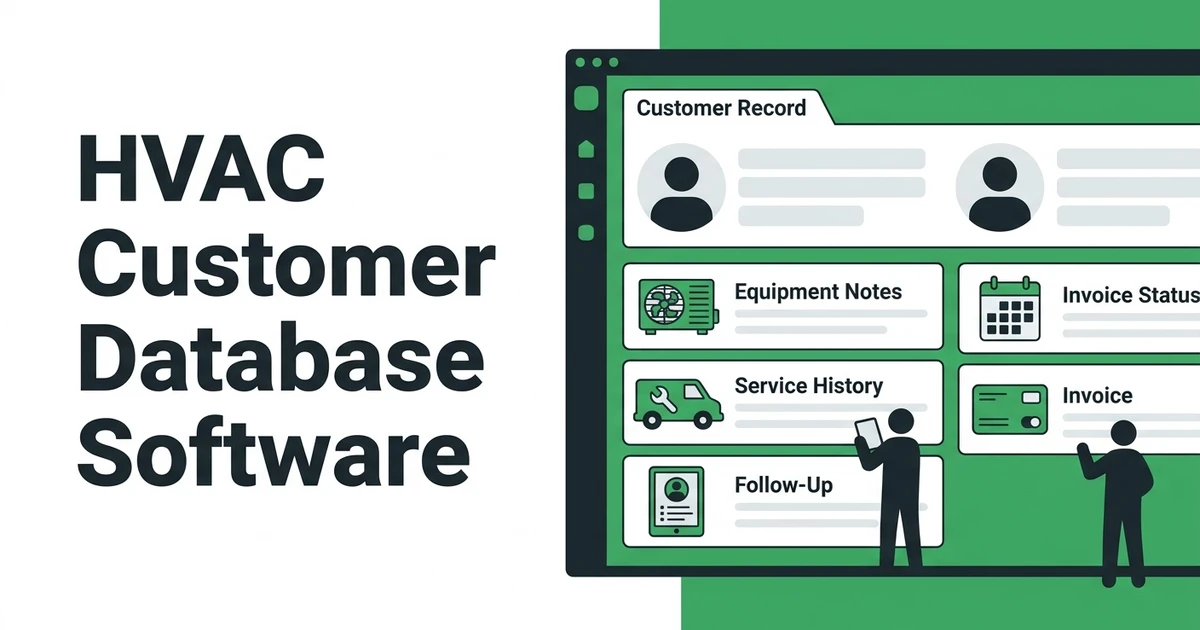





Quick Answer
HVAC customer database software keeps customer records, service history, equipment details, follow-ups, invoices, and communication notes in one place. For growing HVAC companies, the best setup gives the office and field technicians the same customer context before, during, and after every service call.
An HVAC customer database sounds simple until the phone rings during a busy afternoon. A homeowner calls about a unit your team serviced last year. The customer name is in one spreadsheet, the equipment photo is on a technician’s phone, the declined replacement quote is buried in email, and nobody knows if the maintenance reminder went out.
That is the point where a customer list stops being enough.
Fieldified helps HVAC teams keep customer records, service history, equipment notes, scheduling, invoices, payments, and follow-ups connected in one workflow. Instead of asking the office to remember where every detail lives, Fieldified keeps the job story attached to the customer record your team already needs.
This guide is for HVAC owners and operations managers who are done juggling phone calls, notes, spreadsheets, and scattered follow-ups.
What Is HVAC Customer Database Software?
It is a system for keeping customer details, property information, equipment notes, service history, job updates, invoices, and follow-ups organized under one customer record. It is not just a digital address book.
A plain contact list tells you who called. A useful HVAC customer database tells you what system they have, when it was serviced, what the technician found, what quote was sent, whether the invoice was paid, and what should happen next.
For an HVAC business, that context matters because the work is rarely one-and-done. A no-cool call can become a maintenance plan. A repair can lead to a replacement quote. A furnace tune-up can reveal a part that needs follow-up before winter.
The database should answer questions like:
- Who is the customer and which property are we servicing?
- What equipment is installed at this location?
- What did we do on the last visit?
- Were photos, notes, or signatures collected?
- Is there an open quote or unpaid invoice?
- Should this customer receive a maintenance reminder?
That is why a customer database should sit close to the daily field workflow. If the database is separate from scheduling, dispatch, job notes, invoices, and payments, the office still has to copy details from one place to another.
Fieldified keeps that customer context close to the work. The customer record is not a storage drawer. It becomes the place your team returns to before and after every HVAC job.
Why HVAC Companies Outgrow Spreadsheets, Notes, and Phone Calls
Spreadsheets work when the owner handles every call, every job, and every follow-up. They feel flexible. They cost almost nothing. They are also easy to outgrow.
The problems usually show up slowly. One technician stores photos on a phone. The office writes a callback note in a paper notebook. A quote follow-up gets pushed to Friday, then Friday becomes Monday. A customer calls back six months later and nobody can find the old service note.
That matches what many HVAC owners describe when they start shopping for CRM or field service tools. The issue is not that the team is careless. The issue is that calls, notes, service records, and follow-ups live in too many places.
HVAC demand makes that harder to manage. The Bureau of Labor Statistics projects employment for heating, air conditioning, and refrigeration mechanics and installers to grow 8 percent from 2024 to 2034, with about 40,100 openings projected each year on average over the decade in its Occupational Outlook Handbook. More demand means more calls, more customer records, and more chances for information to get lost.
BLS also notes that HVAC technicians may be on call for emergencies and may work overtime or irregular schedules during peak heating and cooling seasons in the same occupational profile. During those peaks, a database that depends on memory becomes a risk.
The breaking point is usually a pile of small misses:
- A repeat customer has to explain the same unit issue again.
- A technician arrives without the last repair note.
- An estimate goes quiet and no one follows up.
- A service call is marked done, but photos or sign-off are missing.
- An invoice is sent late because the office is waiting for job details.
A good system does not only store information. It makes the next action obvious.
What Should an HVAC Customer Database Track?
Your database should track the details your team needs during real service calls, not just the fields a generic CRM gives you. HVAC work is tied to properties, equipment, repeat visits, seasonal demand, and maintenance history.
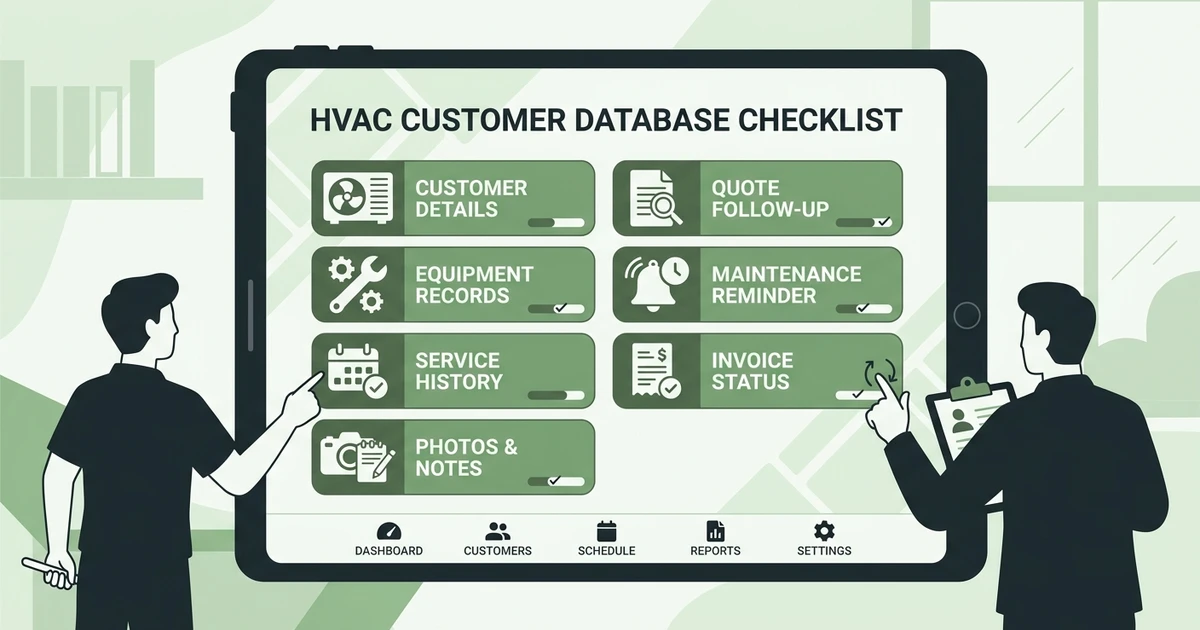
Here is the practical checklist:
| Database Field | Why It Matters For HVAC |
|---|---|
| Customer and property details | Keeps the right contact tied to the right service location |
| Equipment records | Helps techs see unit age, model, serial number, and past issues |
| Service history | Stops repeat troubleshooting from starting from zero |
| Photos and job notes | Gives proof and context for the next visit |
| Estimate and quote history | Helps the office follow up on open opportunities |
| Maintenance agreement status | Supports recurring tune-ups and renewal reminders |
| Invoice and payment status | Keeps billing tied to the service record |
Equipment context deserves special attention. HVAC companies often need software for tracking hvac equipment by serial number, model, install date, warranty status, and service notes. If that information lives only in a technician’s memory or on a paper form, the next tech arrives blind.
Fieldified can keep equipment notes, model details, serial numbers, photos, and service context attached to the customer or job record through the workflow your team already uses. That gives the office a cleaner record and gives technicians a better starting point before they knock on the door.
Service history also supports maintenance work. ACCA’s ANSI/ACCA 4 QM standard establishes minimum tasks for HVAC equipment maintenance inspections and gives contractors a common platform for creating maintenance programs in its Quality Maintenance standard page. A customer database helps keep those maintenance notes and follow-up needs from disappearing after the visit.
The goal is not more data entry. The goal is making every important detail easier to find.
How Customer Records Improve HVAC Service Calls
Customer records improve HVAC service calls because they give the office and technician the same version of the job. That sounds basic. In a busy HVAC company, it is often the difference between a clean visit and a messy handoff.
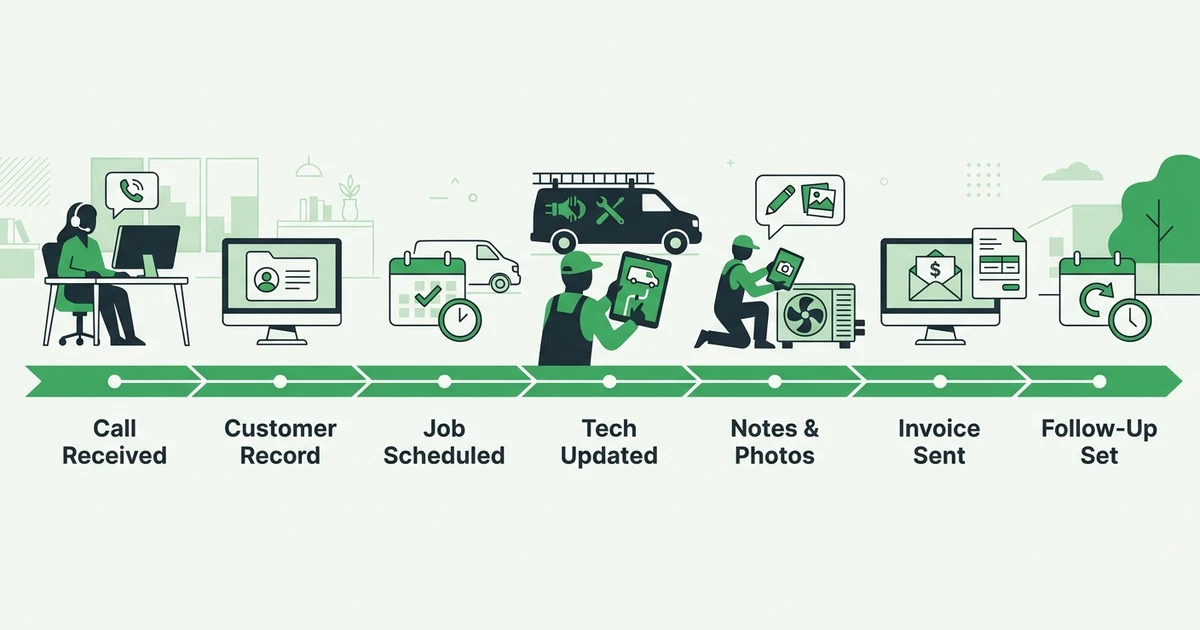
Without a connected customer database, a service call can look like this:
- A customer calls about a system issue.
- The office searches old texts, spreadsheets, emails, and invoices.
- The technician arrives with limited history.
- Notes get added somewhere else after the job.
- Follow-up depends on someone remembering it later.
That process may still produce a completed job. It just makes every step harder.
With Fieldified, the same service call can run cleaner:
- The request comes in and the office opens the customer record.
- Job history, property notes, equipment details, and past estimates are visible.
- The job is scheduled and assigned to the right technician.
- The technician sees job details from the field.
- Completion notes, photos, invoice status, payment follow-up, and next steps stay tied to the record.
This is where HVAC service software becomes more useful than a standalone contact list. Your customer record is connected to the work your team is doing today.
It also helps define what “job done” means. A finished HVAC service call should include more than a technician saying the work is complete. It should have the right notes, photos where needed, customer sign-off if required, invoice handoff, payment status, and follow-up reminder.
See how Fieldified keeps HVAC customer records, job history, scheduling, invoices, and follow-ups connected from the first call to payment. Book a Fieldified demo and walk through a real HVAC service workflow.
HVAC Customer Database vs HVAC CRM Software
An HVAC customer database and HVAC CRM software overlap, but they are not always the same thing. The difference matters when you are choosing what to fix first.
A customer database is the record layer. It stores customer details, property notes, equipment information, job history, photos, communication notes, invoices, and follow-up needs.
HVAC CRM software usually goes wider. It may include lead tracking, sales pipelines, quote follow-ups, marketing campaigns, customer communication, and reporting. If you want a broader comparison of CRM tools, this HVAC CRM software comparison is the better page to review.
FSM software goes wider again. It connects customer records with scheduling, dispatch, job tracking, invoicing, payments, reporting, and technician mobile access. For many growing HVAC teams, the right answer is not “database or CRM.” It is a system where the database, CRM, and field workflow work together.
Fieldified is built around that full job lifecycle. Your customer record does not sit apart from the job. It supports the quote, schedule, dispatch, field update, invoice, payment, and next follow-up.
That matters when your team is busy. A CRM that stores names but does not connect to job status still leaves the office chasing updates. A scheduling tool that does not show customer history still leaves technicians guessing. A database that does not connect to invoices still leaves billing in another system.
What Makes the Best HVAC Customer Database?
The best system should make customer history useful during the workday. If your team has to dig, export, copy, or ask around, the database is not doing enough.
Use this checklist before choosing:
- Fast customer lookup: The office should find a record while the customer is still on the phone.
- Property and equipment context: Technicians should see what equipment is at the location and what happened last time.
- Service history: Every job should leave a clean record for the next visit.
- Field notes and photos: Techs should be able to add proof and context without waiting until they return to the office.
- Quote follow-up visibility: Open estimates should not disappear after the first send.
- Scheduling connection: Customer records should connect to appointments and technician assignments.
- Invoice and payment history: Billing status should be visible without switching tools.
- Maintenance reminders: Repeat service should not depend on memory.
- Mobile adoption: The system should be easy enough for technicians to use from the field.
- Pricing that fits growth: Adding technicians should not create a surprise software bill.
Fieldified checks these boxes by tying customer management to the rest of the field workflow. Its client management tools keep customer details and job history close to scheduling, invoicing, payments, and follow-ups.
Pricing matters here too. Fieldified uses flat plan pricing across Basic, Standard, and Premium plans, with included users in each tier and additional users available when needed. That gives HVAC owners a clearer budget as the team grows, compared with software that charges heavily per user.
The buyer question is simple: will your office and technicians use it every day? If not, the database becomes another stale record.
Is a Free HVAC Customer Database Enough?
A free HVAC customer database can be enough when your HVAC company is very small, the owner handles most calls, and the customer list is still easy to remember. A spreadsheet can store names, phone numbers, addresses, and basic notes.
The problem starts when several people need the same information at once.
A free spreadsheet usually cannot manage the full HVAC service path:
- Customer intake
- Service history
- Equipment notes
- Technician assignment
- Mobile job updates
- Photos and sign-off
- Estimate follow-up
- Invoice and payment status
- Maintenance reminders
That does not mean every small HVAC company needs enterprise software. It means the tool should match the workflow. If you have multiple technicians, repeat customers, service agreements, and open quotes, you need the customer record connected to daily operations.
Service agreements make that connection even more important. ACCA notes that recurring service agreements represent 55 percent of HVACR industry revenue and lists automated scheduling and reminders as service-agreement benefits in its service agreement sales guidance. Those reminders are hard to manage if customer records are disconnected from scheduling and follow-up.
Free tools also hide a cost: manual work. If the office spends time copying notes, checking who followed up, and asking technicians for missing details, the software may be free but the process is not.
How Fieldified Helps HVAC Companies Keep Customer Data Useful
Fieldified helps HVAC companies keep customer data useful by connecting it to the work that happens before, during, and after each job. That is the difference between a database your team trusts and a database your team ignores.
For the office, Fieldified gives one place to manage customer details, job history, quotes, invoices, payment status, and follow-up reminders. When a customer calls, the office can see context instead of searching across texts and spreadsheets.
For technicians, Fieldified keeps the job details close to the field workflow. Techs can see notes, update job status, add photos, and send completion context back to the office without making someone retype the same information later.
For owners, Fieldified makes the customer record part of the revenue workflow. A completed job can move toward invoicing. An unpaid invoice can trigger follow-up. A past customer can be reminded about maintenance. An old quote can be reviewed before it goes cold.
Fieldified supports:
- Customer and contact management
- HVAC scheduling and dispatch
- Job tracking with field updates
- Quote and invoice workflows
- Online payments and payment reminders
- Repeat-business reminders
- Mobile access for technicians
- Flat plan pricing for growing teams
This is also why Fieldified fits teams that do not want a heavy enterprise rollout. You get the practical customer database and the connected field workflow without needing a dedicated software admin just to keep records clean.
Is Fieldified Right for Your HVAC Business?
Fieldified is a strong fit if your HVAC company has moved beyond one person’s notebook. It is especially useful when multiple people touch the same customer: office, dispatcher, technician, owner, and billing.
You are probably ready for Fieldified if:
- You have 3-20 technicians.
- Customer history is spread across spreadsheets, texts, and memory.
- Quote follow-ups are slipping.
- Technicians need clearer service context before arrival.
- The office wants one place for scheduling, job notes, invoices, and payments.
- You want predictable software costs as the team grows.
Fieldified may not be the right first step if you only need a static contact list, have one technician, and rarely see repeat customers. In that case, a simple customer list may hold you for now.
It may also be too lightweight if your company needs enterprise asset management for thousands of commercial assets, complex multi-location controls, and a dedicated internal software admin. That is a different buying problem.
For most small and growing HVAC companies, the harder problem is simpler: customer details are scattered, follow-ups are inconsistent, and the office cannot trust the record. Fieldified solves that by keeping the customer database connected to scheduling, job tracking, invoices, payments, and follow-ups.
Frequently Asked Questions
What is the best HVAC customer database for growing teams?
The best HVAC customer database is the one your office and technicians can both use during real service work. Fieldified is a strong fit for growing HVAC teams because it connects customer records, service history, scheduling, invoices, payments, and follow-ups in one workflow.
Is an HVAC customer database different from HVAC CRM software?
Yes. A customer database is the record layer that stores customer details, service history, equipment notes, and communication context. HVAC CRM software usually goes broader by adding lead tracking, sales follow-ups, scheduling, dispatch, and reporting.
Can an HVAC customer database track equipment by serial number?
A good HVAC customer database should let your team store model details, serial numbers, install notes, warranty context, photos, and service history. Fieldified can keep those details connected to the customer or job record so technicians do not start every visit from scratch.
Is there free HVAC customer database software?
A spreadsheet or basic free CRM can work when you have a small customer list and one person managing the office. It usually starts to break when several people need the same customer history, job notes, invoices, and follow-ups at the same time.
What CRM do HVAC companies use?
HVAC companies usually compare lighter field service CRMs, broader HVAC management platforms, and larger enterprise systems. Growing teams often do best with field service software that connects customer records to scheduling, technician updates, invoices, and payment follow-up.
Which software is used for HVAC customer management?
HVAC customer management software should store contact details, property notes, equipment information, service history, quotes, invoices, and reminders. Fieldified gives HVAC teams one place to manage that customer context alongside daily field work.
Conclusion: Keep Every HVAC Customer Record Connected
HVAC customer records are not just names and phone numbers. They should carry job history, equipment notes, photos, estimates, invoices, payments, and follow-up reminders.
HVAC customer database software helps your team keep that record useful. The office can answer faster. Technicians can arrive with context. Owners can see which follow-ups, invoices, and repeat-service opportunities still need attention.
If your HVAC customer history is scattered across calls, notes, and spreadsheets, Fieldified can help your office and technicians work from the same record. Book a Fieldified demo to see how customer records, jobs, invoices, and follow-ups stay connected.