




Running an HVAC business is not just about fixing systems. It is about managing time, people, and cash flow, often all at once.
Most HVAC teams do not struggle because of a lack of work. They struggle because scheduling jobs and sending invoices still rely on calls, messages, spreadsheets, or memory. That is where HVAC scheduling automation becomes essential, not as a tech upgrade, but as an operational reset.
This guide explains how HVAC job scheduling and invoicing automation actually works, why manual systems break as businesses grow, and how automation supports smoother operations without adding pressure on technicians or office staff.
Need a better way to manage HVAC jobs?
Fieldified helps HVAC teams manage scheduling, dispatch, customer history, quotes, invoices, payments, and follow-ups from one platform.
What Is HVAC Scheduling and Why Does It Break at Scale
HVAC scheduling is the process of assigning service jobs to technicians based on availability, location, and urgency. In small teams, this often works informally. As job volume increases, cracks appear quickly.
How HVAC job scheduling works in small teams
In early stages, scheduling is usually handled by:
- Phone calls
- WhatsApp messages
- Whiteboards or shared spreadsheets
- One person coordinating everything
This works when there are few technicians and limited daily jobs.
Related Read: Best Affordable Field CRMs for Startups Software Solutions
Why manual scheduling fails as jobs increase
As the business grows:
- Jobs overlap
- Technicians get double-booked
- Office staff spend more time coordinating than planning
- Invoices are delayed or forgotten
Manual scheduling does not fail suddenly. It slowly becomes unreliable.
Related Read: How to Automate Follow-Ups and Invoicing for Field Jobs
Why Choosing the Right HVAC Invoicing Tool Matters for Growing Teams
An HVAC invoicing tool is not just about sending bills faster. It directly affects cash flow, customer trust, and internal coordination. When invoicing is disconnected from scheduling, delays and errors become common.
A reliable HVAC invoicing tool automatically generates invoices the moment a job is marked complete. This removes manual follow-ups and ensures technicians, office staff, and customers stay aligned.
More importantly, a modern HVAC invoicing tool connects payment status, job history, and service details in one place. This visibility helps HVAC businesses reduce disputes, track outstanding payments, and maintain predictable revenue without increasing admin workload.
Common Problems With Manual HVAC Scheduling and Invoicing
Manual systems create issues that affect both operations and customer experience.
Missed jobs
Appointments get lost between calls and messages.
Delayed invoices
Invoices are sent days later, slowing payments.
Poor technician coordination
Field teams lack clarity on job details and timing.
Admin overload
Office staff spend hours tracking updates instead of improving processes.
Over time, these issues reduce efficiency and increase stress across the team.
Related Read: 5 Signs Your Contracting Business Has Outgrown Spreadsheets
What HVAC Scheduling Automation Actually Means
Automation does not mean replacing people. It means reducing repetitive manual work.
Difference between scheduling software and automation
- Scheduling software stores job information
- Automation connects actions
For example:
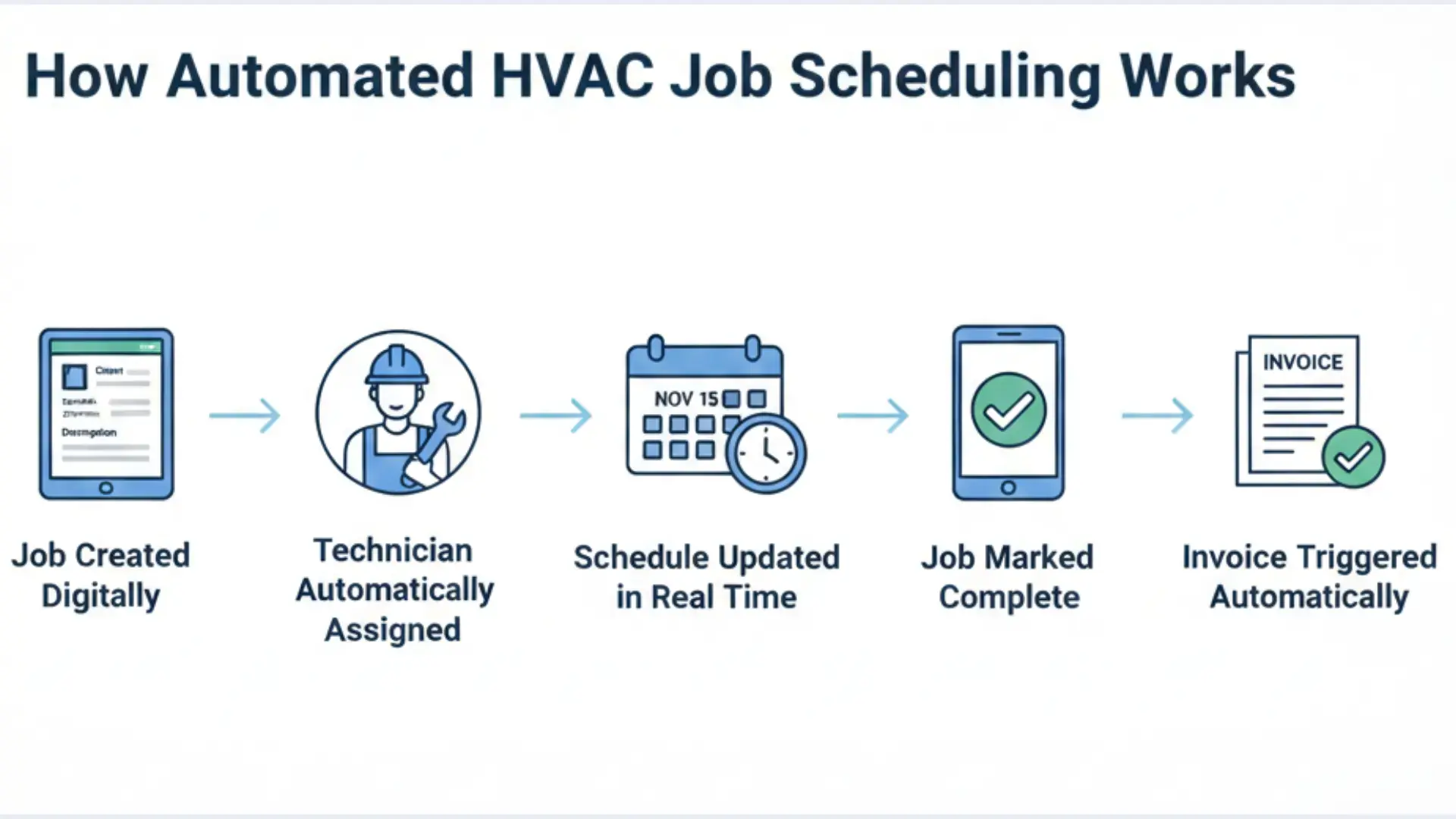
- A job is created
- A technician is assigned automatically
- Status updates trigger the next step
- Completion triggers invoicing
Automation removes the need for constant follow-ups.
Related Read: The Complete Guide to Contractor Scheduling Software
How automation connects jobs, technicians, and invoices
Automation links:
- Job creation
- Technician assignment
- Job completion
- Invoice generation
- Payment tracking
Everything moves forward without manual intervention at each step.
How Automated HVAC Job Scheduling Works
Automated HVAC job scheduling follows a clear flow.
Job creation
Jobs are logged with service type, location, urgency, and customer details.
Technician assignment
The system assigns technicians based on:
- Availability
- Skill set
- Location proximity
Status updates
Technicians update job status in real time:
- En route
- In progress
- Completed
Completion triggers
Once marked complete, the system triggers invoicing automatically.
This removes guesswork and constant coordination.
How HVAC Invoicing Automation Fits Into Scheduling
Scheduling and invoicing work best when they are connected.
Job completion → invoice generation
Invoices are generated immediately after job completion.
No reminders needed.
Reducing billing delays
Faster invoicing leads to:
- Faster payments
- Fewer follow-ups
- Better cash flow predictability
Payment tracking visibility
Office teams can instantly see:
- Paid invoices
- Pending payments
- Overdue accounts
For general invoicing best practices, the U.S. Small Business Administration offers clear guidance on billing workflows and cash flow management.
HVAC Scheduling Software vs HVAC Field Service Software
These terms are often used interchangeably, but they serve different purposes.
HVAC scheduling software
- Focuses on assigning jobs
- Handles calendars and availability
- Limited operational visibility
HVAC field service software
- Manages jobs end-to-end
- Connects scheduling, invoicing, and reporting
- Supports both field and office teams
For growing HVAC businesses, this end-to-end approach reduces errors, improves coordination, and creates smoother daily operations without adding extra administrative work.
Key Features to Look for in HVAC Scheduling and Invoicing Tools
Not all tools are built to support real HVAC operations at scale. The right features should reduce manual effort while improving clarity across teams.
Real-time job tracking
Provides live visibility into job status, helping office teams respond faster and technicians stay aligned without constant calls.
Technician availability management
Prevents overbooking, reduces downtime, and ensures jobs are assigned based on real capacity, not assumptions.
Automated invoicing
Generates invoices immediately after job completion, reducing billing delays and improving cash flow.
Customer communication
Sends clear updates on job status and arrival times, lowering confusion and service complaints.
Reporting
Offers insights into job volume, payments, and performance to support better operational decisions.
How Automation Improves HVAC Operations Long-Term
Automation impacts more than daily tasks.
Scheduling predictability
Teams plan instead of reacting.
Lower admin costs
Less manual coordination.
Faster payments
Improved cash flow stability.
Better crew utilization
Fewer gaps and overlaps in schedules.
Over time, operations become calmer and more reliable.
Automation Reducing Dispatcher Burnout
Dispatchers are often the first to feel operational strain.
Automation:
- Reduces constant calls and messages
- Eliminates manual tracking
- Creates clarity across teams
When dispatchers are not overwhelmed, coordination improves naturally.
Keep your HVAC office and technicians on the same page.
Use Fieldified to schedule jobs, manage service calls, send invoices, and track customer communication.
How Technicians Benefit From Clearer Schedules
Automation is not only for management.
Technicians benefit from:
- Clear job details
- Accurate schedules
- Fewer last-minute changes
This leads to better job focus and higher satisfaction.
Related Read: What Challenges Field Teams Face (And How CRM Solves Them)
How Fewer Billing Errors Reduce Customer Disputes
Manual invoicing increases the risk of:
- Incorrect charges
- Missing details
- Delayed billing
Automated invoicing improves accuracy and trust, reducing disputes and follow-ups.
Real-Time Visibility and Decision-Making for HVAC Owners
As HVAC businesses grow, owners lose day-to-day visibility without even noticing.
Jobs are booked, but it’s unclear:
- Which technicians are overloaded
- Which jobs are running late
- Which invoices are still pending
Automation restores visibility without requiring constant check-ins.
Real-time scheduling dashboards show what is happening right now, not what was planned in the morning. Owners can see job progress, technician availability, and completion status in one place. This reduces guesswork and reactive decisions.
Visibility also changes how decisions are made. Instead of responding to complaints or delays, owners can spot patterns early:
- Repeated delays in specific service types
- Technicians are consistently underbooked or overbooked
- Invoices are slowing down cash flow
This clarity allows better staffing decisions, smarter routing, and realistic capacity planning. Automation does not replace experience. It strengthens it with accurate, up-to-date information.
Over time, this visibility reduces stress. Owners spend less time chasing updates and more time improving operations.
When HVAC Businesses Should Switch to Automated Scheduling
There is no fixed size, but clear signals appear.
Team size indicators
More than 5–7 technicians.
Job volume indicators
Multiple daily jobs across locations.
Operational stress signals
Frequent rescheduling, billing delays, or missed updates.
Automation becomes necessary when coordination costs more than the tool itself.
Measuring ROI From HVAC Scheduling and Invoicing Automation
Return on investment from automation is rarely immediate, and it is not always obvious on paper.
The biggest gains often come from operational efficiency, not direct cost savings.
Instead of asking, “How much does this software cost?” the better question is, “What problems are no longer happening?”
Meaningful ROI indicators include:
- Faster job completion per technician
- Fewer rescheduled or missed appointments
- Reduced admin hours spent on billing
- Shorter payment cycles after job completion
Even small improvements compound. Saving ten minutes per job across multiple technicians adds up quickly. Faster invoicing improves cash flow without increasing job volume. Fewer errors reduce customer disputes and follow-up calls.
ROI should also be measured in predictability. When scheduling and invoicing are automated, businesses can plan staffing, inventory, and growth with more confidence. This stability has long-term value that is hard to capture in simple numbers.
Automation works best when ROI is viewed as reduced friction across the business, not just as a financial calculation.
How Automation Supports Scalable Growth
As HVAC businesses expand into new service areas or add crews, automation keeps operations consistent.
Platforms like Fieldified support this stage by structuring job scheduling and invoicing workflows without adding administrative burden.
For a broader understanding of how automation improves field service efficiency, enterprise technology research and industry-led insights highlight how integrated field service management systems improve coordination, reduce manual work, and increase operational visibility across field teams.
Building Visibility and Operational Stability Together
Automated HVAC job scheduling and invoicing is not about technology trends. It is about creating systems that support people.
When scheduling is clear and invoicing is timely, teams work better, and customers trust more.
Solutions like Fieldified fit naturally when HVAC businesses are ready to move from reactive coordination to predictable operations.
Explore better systems when the timing feels right.
Ready to simplify HVAC scheduling, CRM, and invoicing?
Book a demo to see how Fieldified works for HVAC service businesses.
Frequently Asked Questions
What is HVAC scheduling automation?
HVAC scheduling automation uses software to assign jobs, track technician status, and trigger next steps automatically, reducing manual coordination and errors.
How does HVAC invoicing automation work?
Invoices are generated automatically when jobs are completed, reducing delays, improving accuracy, and speeding up payment collection.
Is HVAC scheduling software enough for growing businesses?
Basic scheduling tools help early on, but growing HVAC businesses benefit more from integrated job management and invoicing automation.
When should HVAC businesses automate scheduling?
When job volume increases, teams grow, and manual coordination causes delays, automation becomes necessary to maintain efficiency.
Does automation replace office staff?
No. Automation reduces repetitive tasks so office teams can focus on planning, customer communication, and operational improvements.