EN
EN DE
DE ES
ES FR
FR NL
NL PT
PT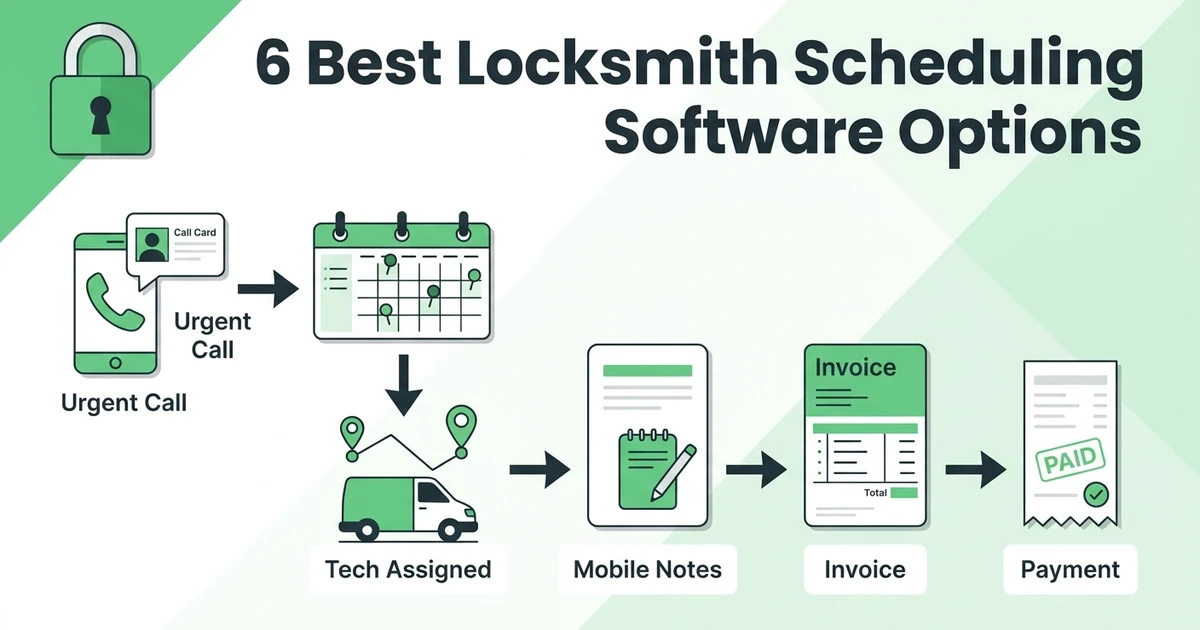





Quick Answer: Locksmith dispatch software helps an office triage an emergency call, assign the appropriate available technician, send the full job context to mobile, and keep the record connected through completion, invoicing, and payment. It should also protect planned rekeys and commercial work when after-hours requests interrupt the schedule.
For a locksmith company, the first minutes of a call set the quality of the job. A dispatcher must capture the location, urgency, service type, and callback details, while also deciding who can take the job without quietly breaking the planned schedule. That requires more than a blank calendar block.
The best locksmith dispatch software puts urgent and planned work in the same operating view. It gives the technician context before arrival and gives the office a reliable trail from incoming call through invoice and payment.
What must happen in the first two minutes of an emergency locksmith call?
The office should capture enough information to make a responsible dispatch decision without delaying the caller. That includes location, callback number, urgency, lock or service type, property context, and any identity-verification steps required by the locksmith company’s own policy.
Then the dispatcher needs an assignment decision. Which technician is available? Who is already nearby? Does the job call for a particular capability? What planned job will be affected if that technician is rerouted? The handoff should be visible to the technician, not held in the dispatcher’s memory.
This is a specialized trade with a clear mobile-work reality. The Bureau of Labor Statistics estimated 14,790 locksmiths and safe repairers nationally in May 2023. BLS locksmith employment and wage estimates The same estimate reported a $25.06 mean hourly wage for the occupation. BLS locksmith geographic wage data
The point of the statistic is not to price a job. It is to underline why the office should treat skilled technician time as a dispatch decision, not a guessing exercise.
How should locksmith dispatch software assign the right technician to a lockout or rekey?
The dispatcher should be able to see the current schedule, technician availability, job location, required skills, and the details already collected from the caller. If an after-hours caller is locked out while a technician is finishing a commercial rekey, the dispatcher needs to make the tradeoff with the planned job visible.
Good assignment is based on context, not just distance. A technician also needs a clear mobile brief: customer name, address, contact, service type, access or property notes, relevant history, and expected next action.
| Assignment input | Why it matters | Job record outcome |
|---|---|---|
| Caller location and urgency | Helps prioritize the first response | Arrival and job status are traceable |
| Service type and property notes | Helps send the right technician prepared | Field notes return to the same record |
| Technician availability and schedule | Protects planned work from being lost | Reroutes are visible to the office |
| Customer and payment status | Helps the office close the job correctly | Invoice follow-up is not forgotten |
Fieldified’s schedule and dispatch capability supports assignments based on technician availability, location, and skills. It is worth evaluating when a locksmith office wants the assignment and the customer record to stay together instead of passing job information through separate calls and texts.
6 best locksmith dispatch software options for mobile teams
These six platforms are reasonable options to compare. Use a real emergency lockout and a planned commercial rekey in every demonstration, because the value lies in how the system handles both at once.
1. Fieldified
Fieldified is a fit for locksmith businesses that want call intake, dispatch, job notes, customer history, invoicing, payments, and planned work to operate in one system. It also offers an AI receptionist for automated call handling and job booking, which is useful to evaluate for after-hours intake.
2. Jobber
Jobber is an option to assess for general field-service management. Ask it to demonstrate the exact emergency-to-payment workflow you use, including what information the technician sees after the dispatcher changes an assignment.
3. Housecall Pro
Housecall Pro is another platform to compare for a mobile service operation. Test whether a lockout call, job note, customer communication, invoice, and payment status remain connected from the same record.
4. ServiceTitan
ServiceTitan may be considered by companies looking at a broader operational platform. Compare its process and implementation requirements against the size of your locksmith team and the urgency of your dispatch workflow.
5. Kickserv
Kickserv is worth evaluating when dispatch and client coordination are priorities. Use an actual commercial rekey and an urgent lockout to test whether planned work remains visible during a schedule change.
6. Workiz
Workiz is another dispatch-led option to examine. Confirm how it handles customer history, assignment changes, job completion, and the billing handoff using the sequence your office follows.
Which dispatch tools keep customer, property, quote, and payment history together?
Ask vendors to open one customer record and follow it through a complete job. The record should show what the caller requested, what property context was collected, who was assigned, what work was completed, and what commercial action comes next.
For locksmith companies, this helps in both directions. A repeat customer is easier to serve when prior property and job context is available. A new emergency caller is easier to follow up with when the completed work and payment status do not disappear into a separate billing system.
Fieldified connects job records with customer details and supports invoicing, online payment, and payment reminders through its invoicing workflow. Compare that with your own current process. The question is whether an office person can answer a customer’s basic job and payment question without tracking down the technician.
Keep urgent and planned work visible to the same team
Emergency work should not become invisible as soon as it is assigned, and planned work should not disappear because the dispatcher handled a lockout. A shared dispatch view gives the office a place to see both the active urgent job and the planned visit that may need a new assignment or customer update.
This is also important when multiple people answer phones. Whoever picks up the next call should be able to see the current status, the assigned technician, and the next action rather than asking the customer to explain the situation again.
How can locksmith companies handle after-hours calls without losing the next planned job?
First, create a consistent intake path. Every urgent call should create a job record with the information the dispatcher needs, even if a team member must clarify details later. That prevents a call from becoming an untracked message after a busy evening.
Second, make the reroute visible. When a technician is moved from a planned rekey to a lockout, the office should know whether the original job needs a new appointment, customer notification, or a different technician. A good dispatch system records that decision instead of relying on a verbal handoff.
Third, close the loop. The technician records completion, the office sees invoice status, and the scheduled work remains in the queue with a clear next action. A mobile workflow is essential here, which is why it is useful to compare your process against a field service mobile app rather than evaluating desktop scheduling alone.
Separate the urgency of the call from the priority of the customer
Not every urgent sounding call has the same operational response, and the dispatcher needs a consistent internal method for making that decision. The software can document the facts, show availability, and record the next action, but the locksmith company should define its own rules for triage, identity verification, arrival expectations, and escalation.
When those rules are clear, the job record becomes a useful operational tool rather than a note-taking exercise. It helps a new dispatcher make the same initial decisions an experienced dispatcher would make, while still giving the team room to handle genuine exceptions.
Test your real after-hours scenario in a Fieldified demo. Bring one emergency lockout and one commercial rekey so you can see call intake, dispatch, mobile job updates, invoicing, and payment follow-up together.
Is Fieldified right for a locksmith business with emergency and commercial work?
Fieldified is worth considering for a locksmith business that needs its urgent calls, planned jobs, customer history, technician updates, invoices, and payment status in one operational system. It is especially relevant if the office is trying to coordinate emergency dispatch in a calendar while keeping commercial work in a separate list or inbox.
The right way to decide is to simulate your own day. Start with an after-hours lockout, assign it to a technician who has a planned job, update the completed work from mobile, and then check how the office bills and reschedules. That test is more revealing than a generic feature tour.
Bring both field and office staff into that test. The technician should confirm whether the mobile job record is practical at the property, while the office should confirm it can find the status and customer context needed after the call. A system only works when the handoff feels clear to both sides.
Set a simple ownership rule before launch as well. One person should own any job that is still waiting on an invoice, payment follow-up, return visit, or rescheduled appointment. That keeps urgent calls from creating a backlog of work that nobody can see clearly after the immediate problem is resolved.
Frequently Asked Questions
What is locksmith dispatch software used for?
Locksmith dispatch software is used to intake, assign, track, and close emergency and planned locksmith jobs. It should keep the call details, customer record, technician assignment, work notes, invoice, and payment status connected.
Can locksmith dispatch software handle emergency lockouts?
It should help the office capture the request, identify an appropriate available technician, and send the relevant details to mobile. Ask vendors to demonstrate an actual emergency-call scenario during evaluation.
How do locksmiths schedule commercial rekeys alongside lockouts?
Keep both job types in one dispatch view with complete customer and property context. When an urgent call changes the plan, the office should be able to reassign, reschedule, or notify the planned customer with a recorded next step.
What should be stored in locksmith customer history?
Store the information your company needs to provide consistent service, including contacts, property notes, prior jobs, completed work, communications, and payment status. Only collect and retain information appropriate to your policies and applicable obligations.
Can locksmith software send invoices after a job?
Connected dispatch software can move a completed record into the invoicing process and make the payment status visible to the office. Confirm the steps for creating, sending, and following up on an invoice in a live product demonstration.
Conclusion
Locksmith dispatch software earns its place when it helps your team act quickly without losing control of the planned schedule. The best workflow captures the emergency call, assigns the right technician, returns clear field updates, and keeps the record useful through invoicing and payment.
See that flow with your own jobs. Request a Fieldified demo and test emergency dispatch alongside commercial work.