EN
EN DE
DE ES
ES FR
FR NL
NL PT
PT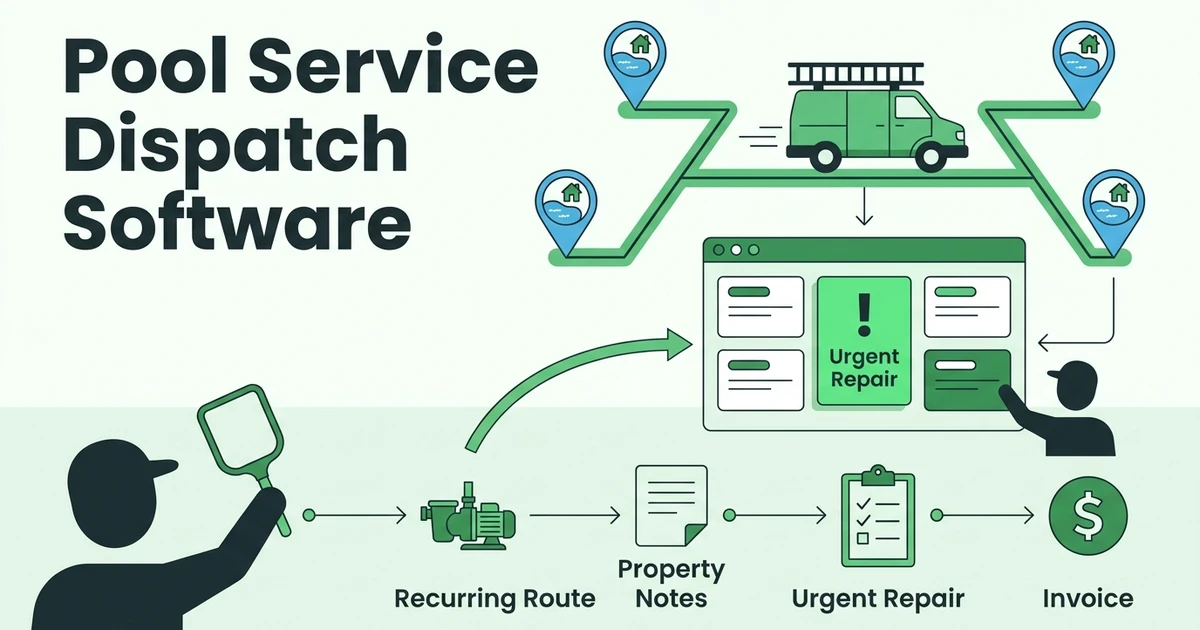





Quick Answer: Compare pool business dispatch software by testing whether an urgent repair can join a recurring route while property history, customer updates, and billing remain connected. Shortlist Fieldified, Skimmer, Pool Brain, PoolCarePRO, Paythepoolman, Jobber, and Housecall Pro, then choose according to the workflow each vendor demonstrates for your operation.
An open calendar slot doesn’t tell you whether a technician should take a pump repair. Your dispatcher also needs the equipment context, access instructions, unfinished work, and a plan for the regular pool stops affected by the change.
Start with these seven candidates:
- Fieldified
- Skimmer
- Pool Brain
- PoolCarePRO
- Paythepoolman
- Jobber
- Housecall Pro
The order below follows a buying conversation, from connected dispatch and billing to specific route exceptions. It isn’t a measured performance ranking. Use the questions to establish fit rather than assuming that every candidate supports every workflow.
Why are recurring pool routes different from ordinary appointment scheduling?
For this evaluation, separate the recurring service commitment from each individual visit. Moving today’s stop should be a different decision from changing the customer’s ongoing service day. Ask the demonstrator to make both changes and show the resulting schedule.
Pool cleaning and maintenance also deserves its own evaluation rather than being treated as construction work. The Census Bureau’s 2022 Economic Census questionnaire lists swimming pool cleaning and maintenance services as a separate service line. That classification supplies context, not evidence of software effectiveness or market size.
Build your test around a repeat customer with a known pool, established visit instructions, and an unresolved equipment issue. Then add a seasonal service request. Can the dispatcher distinguish the regular visit, additional work, and outstanding repair without opening unrelated records?
What dispatch information must stay attached to each pool property?
Prepare a sample property record before arranging demonstrations. Include a customer who manages more than one location so you can test whether the system separates billing contacts from service addresses. Use fictional access credentials during the evaluation.
Keep observations distinct from instructions. A previous technician’s equipment photo, an office note about customer approval, and a current work order serve different purposes. Ask where each belongs, who can edit it, and how another technician finds the latest version.
| Property context | Question for the dispatcher | Evidence to request |
|---|---|---|
| Address and access instructions | Is this the correct entrance and location? | Technician opens the assigned property’s instructions |
| Equipment identification | Which pump or controller is involved? | Equipment details remain available after reassignment |
| Prior visits and photos | What was observed previously? | Earlier documentation is distinguishable from today’s findings |
| Water-care and chemical notes | What context should the technician review? | Notes retain their property and visit association |
| Open repair and approval | What work has the customer authorized? | Approved scope stays separate from recommendations |
| Billing responsibility | Who should receive the invoice? | Service and billing contacts remain correctly assigned |
For publicly accessible aquatic venues, keep the regulatory discussion precise. CDC says its Model Aquatic Health Code applies to aquatic venues open to the public, including those operated by hotels and apartment complexes. That does not establish which requirements apply to your particular account or validate a software product.
If you maintain those properties, bring your actual record requirements to the demonstration. Ask the responsible operator which records and review steps the workflow must support. Don’t accept a generic checklist as a substitute for that assessment.
Which seven pool business dispatch software options should you evaluate?
Give every vendor the same sample route, property record, and repair request. Record whether each step is demonstrated, requires configuration, needs another product, or remains unconfirmed. That creates a useful comparison without inventing feature scores.
These evaluation angles are buying tests, not claims that a competitor has a particular strength or limitation. Ask for a current written quote covering the demonstrated configuration before making a final selection.
| Candidate | Start the demonstration with | Check before moving on |
|---|---|---|
| Fieldified | Repair added to a route | Dispatch-to-invoice handoff |
| Skimmer | One recurring visit moved | Future visits and incomplete stops |
| Pool Brain | Equipment-specific repair | Context after reassignment |
| PoolCarePRO | Unresolved route exceptions | Next action and owner |
| Paythepoolman | Maintenance plus extra repair | Approved and billed scope |
| Jobber | Multiple customer properties | Correct location and history |
| Housecall Pro | Urgent incoming request | Assignment through follow-up |
1. Can Fieldified connect a route change to the repair handoff?
Start with Fieldified when you want to evaluate dispatch alongside quotes, job records, and invoices. Its published scheduling and dispatch tools include calendar views, drag-and-drop rescheduling, route planning, and assignment notifications.
For the pool-specific test, move the pump repair into a recurring route. Ask the demonstrator to open the property history, identify the repair scope, and show the next recurring visit afterward. Require a demonstration of any specialist pool workflow your team needs; general scheduling features don’t establish that fit.
2. Can Skimmer preserve the recurring route when one visit changes?
Give Skimmer the route-continuity test first. Ask the demonstrator to move today’s visit to another technician, leave the future service pattern intact, and show where the original visit’s notes remain. Then reverse the change to test recovery from a dispatcher mistake.
Add an incomplete stop and ask how the office distinguishes it from completed work. Your decision should turn on the demonstrated handling of those exceptions, including what the technician sees, rather than a route screenshot alone.
3. Can Pool Brain keep equipment context visible through reassignment?
Use Pool Brain’s demonstration to test a property with separate pool and spa equipment. Ask where the pump identification, equipment photos, previous findings, and current repair request appear. Have another technician take over the assignment and locate those details without coaching.
Next, introduce a parts delay. Ask the demonstrator to leave the repair open while the regular service continues. Establish whether your preferred record structure is available in the quoted configuration and what your team must configure or maintain.
4. Can PoolCarePRO give the office a clear exception list?
For PoolCarePRO, begin at the end of a disrupted route day. Create an inaccessible property, an unfinished visit, and a repair waiting for approval. Ask the office user to find each item and identify the person responsible for the next action.
Then reopen the following day’s schedule. Check whether unresolved work is visible in a way your dispatcher can use. Ask for the exact steps required to manage a return visit without accidentally treating the original visit as fully completed.
5. Can Paythepoolman distinguish recurring charges from repair billing?
Make the commercial handoff the central Paythepoolman test. Give the sample customer an existing service arrangement, then add a separately quoted pump repair. Ask how the office would distinguish included work, proposed extras, authorized repairs, and invoiced items.
Follow the repair through a partial completion and return appointment. Require the demonstrator to show what remains billable and what has already been billed. Confirm any payment, accounting, or messaging dependencies in the written proposal.
6. Can Jobber model your pool-property records without awkward workarounds?
Evaluate Jobber using a customer with multiple service addresses and different access instructions. Ask the technician to open the assigned stop and identify the correct equipment, visit history, and contact. Treat the exercise as a test of your proposed setup.
Then add the recurring visit and repair under the same customer. Ask how those records relate and how your office would find unfinished work. Note any manual copying required, but don’t assume its presence or absence before seeing the workflow.
7. Can Housecall Pro carry an urgent call through to follow-up?
Ask Housecall Pro to start with an incoming pump-repair request while a recurring route is already underway. Have the dispatcher assign the call, revise the affected schedule, and show the proposed customer communication before it is sent.
Continue through diagnosis, quote approval, a return visit, and invoicing. Check who owns the next action at every handoff. Ask what happens when the customer postpones approval so the repair doesn’t disappear into a completed appointment.
How should the office handle a same-day repair without disrupting the route?
Use an urgent pump call from an existing customer as the acceptance test. Urgent here means the customer’s scheduling request; it is not a diagnosis or a safety determination. The dispatcher should capture the reported problem and route technical decisions to the appropriate person.
- Open the correct property. Review the reported issue, equipment details, access notes, previous findings, and any unfinished repair.
- Check the assignment. Consider technician suitability, availability, travel, and existing commitments rather than proximity alone.
- Revise the route deliberately. Identify each affected visit and confirm whether the change applies once or to the recurring series.
- Review notifications. Show the dispatcher the message, recipient, and timing before using the workflow with real customers.
- Keep the repair traceable. Connect the findings, proposed scope, approval, return work, and billing handoff to the property.
Bring that exact sequence to Fieldified: request a dispatch demo using your recurring route and an urgent repair. Ask to see both the changed technician assignment and the recurring visits that remain afterward.
Which dispatch workflows protect recurring service and repair revenue?
For broader purchasing criteria beyond dispatch, use the pool service business software guide. For this decision, concentrate on the handoffs that your office needs to recognize and act on.
How will you distinguish completed service from unfinished repair work?
In the sample account, let the technician finish the regular service but defer the pump repair. Ask the demonstrator to show separate statuses and explain what each status permits the office to do next. Avoid a setup where staff must guess whether “complete” covers the whole property or one assignment.
Also test an inaccessible stop. Decide how your office will record the attempted visit, contact the customer, and arrange any follow-up under your service terms. Have the vendor demonstrate that agreed process rather than prescribe a billing policy through default settings.
Where will approval, extra work, and invoice review happen?
Ask the technician to propose additional repair work without marking it authorized. Then have the customer accept only part of the proposal. Your reviewer should be able to identify the approved scope, the work actually performed, and the items proposed for invoicing.
Before sending the sample invoice, compare it with the customer’s service arrangement. Ask whether included maintenance, separately approved labor, and any agreed materials can be represented as your business requires. This is a configuration and review exercise, not a promise of higher collections.
Who owns the account when the technician moves on?
Require a named next action for an unanswered quote, an awaited part, a return appointment, and an unpaid invoice. Ask the office user to locate those items without searching individual technician messages. Test reassignment when that employee is absent.
Write down which follow-ups are manual, which are configurable, and which the vendor demonstrates as automatic. Request examples of the actual messages and triggers. Price the process you intend to run, including any required plan, integration, or setup assistance.
Is Fieldified right for a pool-service operation?
Fieldified is worth evaluating if your buying priority is a shared workflow for scheduling, customer records, quotes, invoices, and payments. Its current pricing page lists those core areas, while its dispatch page describes route planning and schedule changes. Those capabilities provide a starting point for your pool-route demonstration.
Be more demanding if you need specialist chemical calculations, equipment integrations, regulated-facility reporting, or a specific offline workflow. This comparison does not establish Fieldified’s support for those requirements. Make each one a separate acceptance item and request a demonstration before committing.
What should a pool company include in the price comparison?
Fieldified’s published plan pricing currently shows Basic at $49 for five users, Standard at $119 for ten, and Premium at $199 for fifteen. The page lists additional users at $5 per user. These are displayed plan figures, not a complete quote for your operation; confirm billing terms, required features, and other applicable charges.
If you already have software, bring sample exports and a list of records that must survive a switch. Test customer-to-property relationships, open repairs, future visits, and invoice status. If you have a small crew, still include an office user and a substitute technician in the evaluation.
Frequently Asked Questions
How should I compare pool business dispatch software?
Use the same recurring route and urgent repair scenario in every demonstration. Check what happens to property notes, technician assignments, customer messages, the next recurring visit, and billing. Choose from demonstrated workflows and a written quote.
Is pool route scheduling software enough for repair work?
Evaluate the repair workflow separately from route planning. Ask the vendor to demonstrate a diagnosis, a customer-approved quote, a parts delay, a return visit, and an invoice without losing the original property record.
What property information should pool service dispatch software retain?
Your evaluation record should include access instructions, equipment identification, prior visits, relevant water-care notes, photos, customer contacts, and open repairs. Confirm that technicians can find and update the information at the correct service location.
Does moving a pool visit change its recurring schedule?
Ask each vendor to show the difference between moving one visit and editing the recurring series. Test both actions with a sample account before importing your actual routes. Do not assume that a calendar change preserves the next visit.
Can dispatch software establish pool compliance?
Do not treat a scheduling record as proof of compliance. Define the applicable requirements with the responsible operator and appropriate authorities, then check whether the proposed software can support the required records and review process.
Conclusion: Choose dispatch software around a disrupted pool route
Choose the system that demonstrates your hardest ordinary day: recurring stops, an urgent pump call, a changed assignment, and repair work awaiting approval. Keep a written record of what was demonstrated, what needs configuration, and what remains unconfirmed.
Request a Fieldified demo with your recurring route and pump-repair scenario. Have the team walk through scheduling, the repair quote, and the invoice handoff so you can judge the fit for your pool operation.