 EN
 DE
 ES
 FR
 NL
 PT
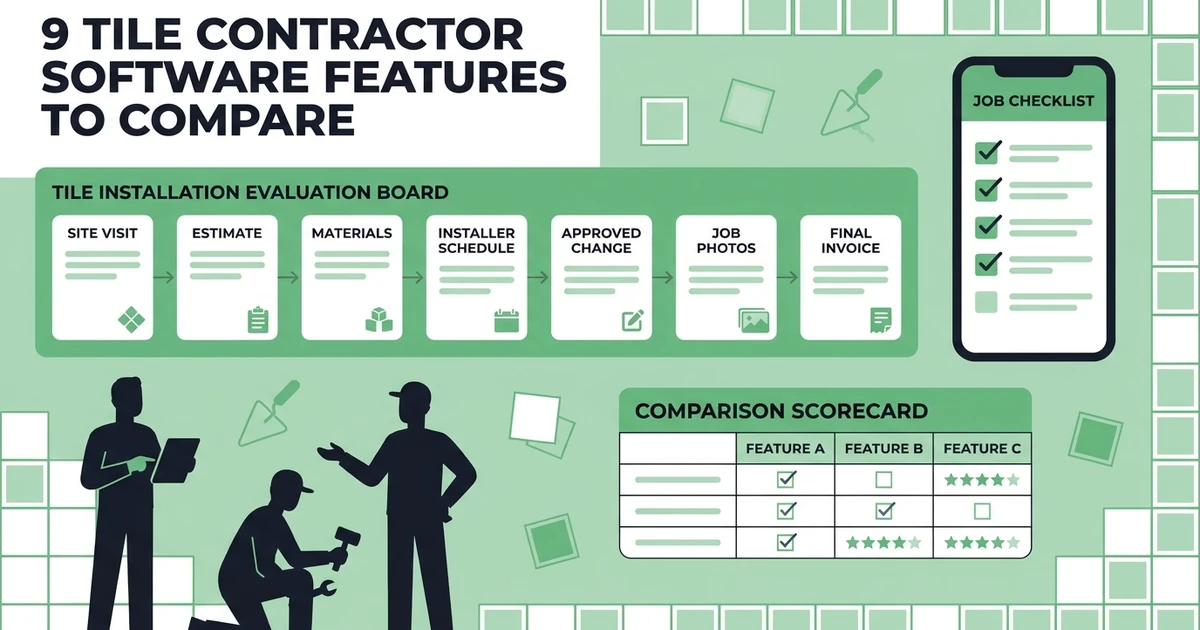


Quick Answer: Tile contractor software should connect estimates, measurements, material details, crew schedules, site documentation, customer approvals, invoices, and payments. Before buying, test the complete workflow on a real bathroom or flooring project instead of judging the platform from a feature list alone.
Tile installation businesses carry a lot of detail from the first site visit to the final grout line. A small change in surface condition can affect materials, labor, the schedule, and what the customer expects to pay.
That is why a tile contractor needs more than a calendar and an invoice template. The useful system keeps the scope, customer decisions, installer instructions, photos, costs, and billing record connected. It should help the office answer a simple question at any moment: what is happening on this job, what changed, and what needs to happen next?
The U.S. Bureau of Labor Statistics reports about 97,000 jobs for flooring installers and tile and stone setters in 2025, with specialty trade contractors representing the largest employer group. The BLS tile and stone setter profile also describes measuring, surface preparation, material cutting, and customer-service work. Those tasks are a useful starting point for deciding what tile contractor software should make easier.
Why tile contractors need more than a calendar and invoice template
A tile job can look simple on the schedule and still contain dozens of decisions. The crew may need room measurements, substrate notes, tile selections, grout color, trim details, access instructions, and a customer-approved scope. If those details stay in texts or paper folders, the installer may arrive with an old version of the plan.
The billing risk is just as real. A client might add a backsplash, request a different pattern, or approve additional substrate preparation. If the office cannot connect that decision to the job and the final invoice, the contractor may complete extra work without a clear record of the approval.
The best tile contractor software reduces those handoff gaps. It should not force every company into a large construction-management system. It should give the owner and installers a practical place to manage the information that changes the outcome of a tile project.
The nine tile contractor software features worth testing
Use the following checklist during every product demo. The feature matters only if it works in the actual tile workflow you need to run.
1. Can the software turn a site visit into a precise tile estimate?
An estimate should capture the spaces, surfaces, material choices, labor, preparation work, and assumptions that shape the price. A tile contractor should be able to start with a repeatable template, then adjust it for a bathroom, kitchen, entryway, shower, or commercial area.
Test whether the system keeps the estimate readable for the customer. Clear line items help the client understand what is included, while the contractor can preserve internal notes about measurements, allowances, and expected effort.
Ask these questions:
- Can the estimator create reusable service or material line items?
- Can the customer approve the quote electronically?
- Does the approved scope stay attached when the job is scheduled?
- Can the office follow up on an estimate that has not been answered?
2. Can it keep tile, grout, trim, and labor details attached to the job?
Material information should not disappear after the quote is accepted. The job record should show the selections and the work the crew is expected to complete. If the customer changes a tile or trim profile, the updated decision should be visible to the people who schedule and perform the work.
Do not assume that every platform provides a full inventory or takeoff system. Instead, ask what the software actually records: job expenses, notes, line items, purchase details, and cost categories may be handled differently from stock levels or supplier ordering.
For a useful test, create a bathroom job with tile, grout, waterproofing, trim, demolition, and installation labor. Then add a customer-approved material change and see which parts of the record update.
3. Can installers access the latest job details from the field?
Tile installers need the right information at the moment they begin work. That can include access instructions, room photos, substrate notes, pattern direction, customer requests, safety information, and the expected completion sequence.
A mobile experience should make those details easy to find. The installer should not need to search through a long message thread or call the office to confirm which material was approved.
Ask the vendor to demonstrate:
- Viewing the current job scope on a phone.
- Adding before-and-after photos.
- Recording notes and checklist items.
- Showing customer instructions to the assigned crew.
- Sending a field update back to the office.
4. Can it schedule installers around job duration and site readiness?
Tile work depends on more than an open calendar slot. Surface preparation, curing time, material availability, customer access, and the size of the crew can all affect when the next visit should happen.
The scheduler should make it clear who is assigned, what the job requires, and whether a change will affect other appointments. It should also notify the team when the plan changes, so installers do not travel to a site before it is ready.
Test a multi-day bathroom project. Schedule preparation, installation, and final touch-up as separate steps or visits if the system supports that workflow. Then move the installation date and watch what the office, crew, and customer can see.
5. Can it record changes before they become billing disputes?
Change requests are normal in remodeling. The customer may add a niche, choose a different tile, ask for extra demolition, or request a new room. The software should make the change visible before the crew does the work.
Look for a clear chain from request to approval. The record should show what changed, who approved it, when the approval happened, and how the price or schedule changed. Even if a platform does not use a formal construction change-order module, it should give the office a reliable way to preserve the decision.
Give the vendor a specific test: add a second backsplash section after the original estimate is accepted. Ask the vendor to show the old scope, the new scope, the approval, and the final invoice.
6. Can it connect completed work to progress and final invoices?
Billing should follow the work record. When the installer finishes a phase, the office should know what was completed, what remains, which expenses were recorded, and whether the customer is ready for the next invoice.
The right setup depends on your business model. A small repair may use one invoice after completion. A larger remodel may need a deposit, progress billing, and a final balance. Ask whether the software supports the billing sequence you actually use, and whether the invoice can include the approved materials, labor, and additions.
Fieldified helps service teams connect job completion to invoicing, payment links, reminders, and customer records. Its invoicing workflow is designed to help a tile contractor send a professional invoice after the work is complete instead of waiting for a separate paperwork session.
7. Can customers approve quotes and receive job updates without calling the office?
Customers want confidence that the tile, pattern, schedule, and price are correct. A client-facing workflow can reduce repeated phone calls by giving customers a place to approve quotes, view appointment information, receive updates, and make payments.
The customer experience should still feel personal. The software is useful when it gives the office a clear record of the conversation and helps the installer arrive with the same information the customer approved.
Ask whether customers can:
- Review and approve an estimate.
- See appointment details.
- Receive a change request for approval.
- Pay an invoice online.
- Submit a question or service request.
8. Can the owner see job profitability before the month closes?
Tile contractors need more than revenue totals. The owner should be able to review labor time, expenses, invoice status, and job progress while there is still time to correct a problem.
For example, a bathroom installation may look profitable until extra preparation work, a second site visit, and material changes are recorded. Job-level reporting helps the owner see whether the added work was priced and billed, rather than discovering the gap after the month ends.
During a demo, ask how the platform separates quoted amounts from actual time and expenses. Then ask how quickly an owner can find jobs that are complete but not invoiced.
9. Can the team adopt it without adding office work?
Adoption is a buying criterion. A tile contractor may have a small office team and installers who spend most of the day at customer locations. If entering a photo, note, or time record takes too many steps, the job record will become incomplete.
Check the mobile experience, templates, onboarding, permissions, data import, support, and plan limits. Ask who will configure the system, how long the first workflow takes to set up, and what happens when the business adds another crew.
The BLS projects 4% growth for flooring installers and tile and stone setters from 2025 to 2035, with about 6,400 openings each year on average. The current BLS occupational projections table provides the underlying occupation data. Whether your team grows quickly or stays small, software should support the way installers work instead of creating a second administrative job.
The tile contractor software demo scorecard
Use a simple scorecard so the most attractive presentation does not win by default. Score each item from 0 to 2: 0 if the workflow is missing, 1 if it requires workarounds, and 2 if the platform handles it clearly.
| Test | What a strong result looks like | Score |
|---|---|---|
| Site visit to estimate | The office can build a clear quote from the job details | 0–2 |
| Approved scope to schedule | The accepted scope remains visible to the assigned crew | 0–2 |
| Field documentation | Installers can add photos, notes, and completion details | 0–2 |
| Scope change approval | The customer decision is recorded before extra work begins | 0–2 |
| Completion to payment | The final invoice and payment status follow the job record | 0–2 |
Run the scorecard with one real bathroom or flooring project. Ask each vendor to complete the same steps. A consistent test makes it easier to compare usability, not just marketing language.
See the workflow in action: Book a Fieldified demo to see how estimates, schedules, mobile job records, invoices, and payments can connect for a growing tile installation team.
How Fieldified gives tile contractors one all-in-one operating system
Fieldified gives tile contractors one connected system for the core job lifecycle. Use quote management to create professional estimates, capture approvals, and follow up on pending decisions. Once work is accepted, scheduling and dispatch keep the office and installers aligned.
The field team has mobile access to job information, while the office can manage field-service jobs from one record, review job progress, time, expenses, invoices, and payment status. Reporting and analytics give the owner a clear view of work and financial performance without rebuilding the picture in separate systems.
For tile contractors, Fieldified replaces the handoffs between estimates, scheduling, field updates, invoices, and payments with one connected operating workflow.
Why tile contractors choose Fieldified
Fieldified gives installation businesses an all-in-one operating system that removes duplicate entry between estimates, schedules, field updates, invoices, and payments. It keeps the office and installers working from the same job record while the business stays easy to run.
Explore Fieldified pricing, then bring a real project with a material change, an installer update, and a final invoice to a demo. You will see the connected workflow in action from quote to payment.
Frequently Asked Questions
What is tile contractor software?
Tile contractor software connects the work behind an installation business, including estimates, customer approvals, schedules, job details, field documentation, costs, invoices, and payments. The useful test is whether one job record stays accurate from the site visit through final closeout.
Which tile contractor software features matter most?
Start with estimate-to-job handoff, mobile access, material and labor records, installer scheduling, change approvals, customer communication, invoicing, payment collection, and reporting. The right priority depends on whether your work is mostly short installations or multi-day remodels.
Can tile contractor software track materials and change requests?
Some platforms can record material details, expenses, notes, and approved changes, but the workflow depth varies. Demonstrate a real tile change, such as a different trim or added room, and confirm how the updated scope reaches the schedule and invoice.
Does tile contractor software support mobile photos and job notes?
Many field-service platforms provide mobile access for job details, photos, notes, forms, and customer updates. Ask the vendor to show how a field update appears to the office and how the team finds the latest instruction at the job site.
Is Fieldified a good fit for tile contractors?
Fieldified gives tile contractors one all-in-one workflow for estimates, schedules, mobile job information, time and expense tracking, invoices, payments, and customer communication. It keeps the installation process connected from the first site visit through final payment.
Conclusion: score the workflow, not the feature count
The best tile contractor software is the system that protects the details between the site visit and the final payment. It should make customer decisions, installer instructions, material changes, job costs, and billing easier to follow.
Use the nine-feature scorecard with a real installation, then see how Fieldified keeps the office and crew connected without chasing details across messages, spreadsheets, and separate invoice tools.
Ready to test the workflow with your own jobs? Book a Fieldified demo and see how your team can connect estimates, schedules, field updates, invoices, and payments in one place.