EN
EN DE
DE ES
ES FR
FR NL
NL PT
PT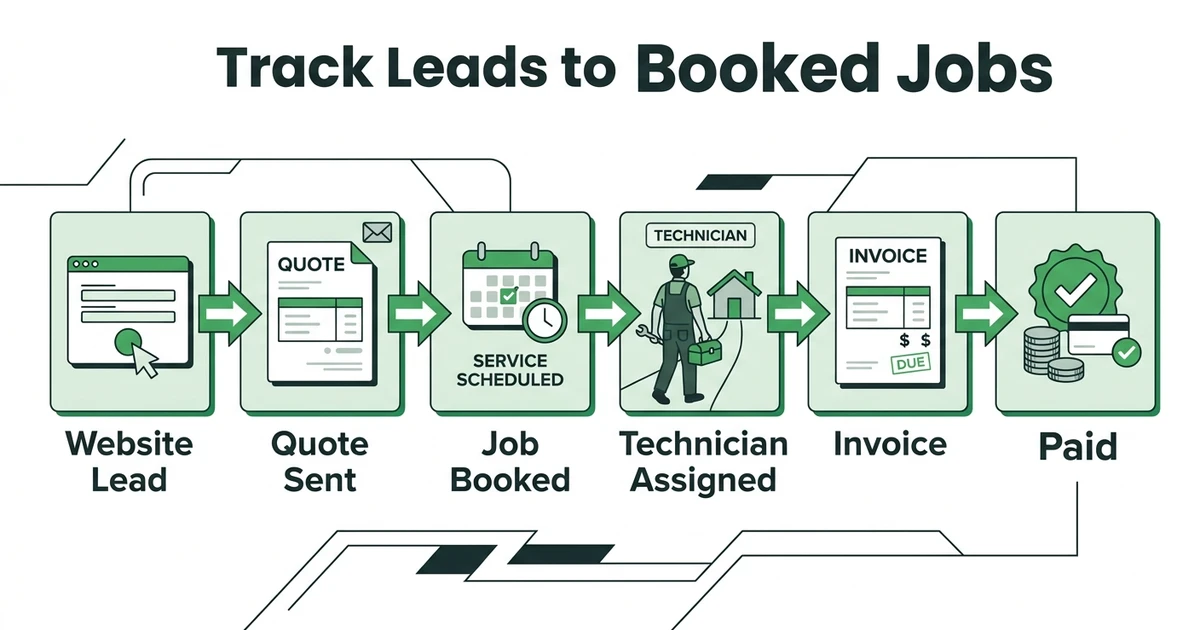





Quick Answer:
To track website leads to booked jobs, capture the source of each request, attach it to the customer record, follow the quote status, and keep the booked job, invoice, and payment tied to the same workflow. Google Analytics can show which channels drove the request, but field service software shows whether that request became paid work.
Website leads are easy to count and hard to trust. You may know that a form was submitted, a call came from search, or someone clicked a quote button, but that does not always tell you whether the lead became a booked job.
For a home service business, that gap matters. A plumbing lead is not valuable because it filled out a form. It becomes valuable when the office responds, sends the quote, books the job, completes the work, sends the invoice, and collects payment.
That is the path you need to track.
How Do You Track Website Leads to Booked Jobs?
To track website leads to booked jobs, every request needs a source and a next step. The source tells you where the lead came from. The next step tells you whether the business actually moved it forward.
That means a lead should not end in an inbox. It should become a customer record, quote, scheduled job, or follow-up task.
At minimum, track:
- Lead source
- Customer name and contact details
- Service type
- Property address
- Quote status
- Follow-up status
- Booked job date
- Assigned technician or crew
- Invoice status
- Payment status
When those details stay connected, you can answer the question that actually matters: which website leads became revenue?
Why Website Leads Get Lost After the Form Submission
Most lead tracking breaks because the marketing system and the field service workflow are separate. The website captures a request, then the office handles the real work somewhere else.
Here is a normal example. A cleaning company gets three website inquiries in one morning. One arrives through a quote form, one comes through a phone call, and one comes from a booking page. The owner can see the website activity, but the quote is sent from email, the job is added to a calendar, and the invoice is created later in accounting software.
By Friday, the business knows three leads came in. It may not know which one became a recurring cleaning job, which one needed follow-up, and which one never answered.
That is why lead tracking has to continue after the form submission. The source is only useful if it follows the job through the office and field workflow.
What Lead Details Should Follow Every Quote and Job?
Every website lead should carry enough context to help the office respond quickly and report accurately later. A form submission that only says “new inquiry” forces the team to rebuild the story by hand.
For a field service company, the lead record should follow the work. If a garage door lead becomes an estimate, the estimate should still show where the lead came from. If that estimate becomes a scheduled install, the job should still connect back to the same customer and source.
The most useful fields are practical:
- Source or campaign
- Requested service
- Urgency
- Preferred time window
- Customer notes
- Quote amount
- Quote status
- Scheduled date
- Job completion status
- Invoice and payment status
This gives the owner a cleaner view of what is actually working. It also helps the office spot leads that are stuck before they go cold.
Where Google Analytics Helps and Where It Stops
Google Analytics is useful for measuring important website actions. Google explains that GA4 key events help site and app owners measure important behavior, while linked Google Ads reporting can connect those actions to campaign performance in its Marketing Platform update.
That matters for form submissions, quote requests, calls, booking clicks, and other website signals. It helps you understand which pages or campaigns are creating demand.
But website analytics usually stops before the field service work is finished. It may tell you a quote form was submitted. It does not automatically know whether your dispatcher followed up, whether the customer approved the quote, whether the job was booked, or whether the invoice was paid.
That is where operational tracking matters. The marketing source should flow into the system your office uses to manage requests, quotes, schedules, invoices, and payments.
If website leads disappear after the form submission, walk through Fieldified’s request-to-job workflow and see how the lead becomes a quote, scheduled job, invoice, and payment. Book a demo to follow one real lead from first request to paid work.
How Fieldified Connects Website Requests, Quotes, and Jobs
Fieldified helps service businesses manage the work after a lead arrives. A website request can become a customer record, a quote, a scheduled job, a technician assignment, an invoice, and a payment follow-up inside one field service workflow.
That is important because speed matters. Zendesk reports that 74% of consumers expect customer service to be available 24/7, and 88% expect faster response times than they did a year earlier in its CX Trends report.
For a home service company, fast response is not only a support issue. The first contractor to answer, quote, and book often has the advantage.
Fieldified’s online request and booking forms help collect the job details upfront. From there, the office can use quote management workflow to send the quote, track approval, and follow up when the customer has not responded.
Once the customer says yes, the quote can become scheduled work. That is the handoff many businesses lose when they move between forms, inboxes, calendars, and invoice templates.
Lead Tracking Checklist for Home Service Teams
Use this checklist to see where your current tracking breaks. If one stage lives in a different tool with no shared record, reporting will be harder later.
| Stage | What to track | Common failure |
|---|---|---|
| Website request | Source, service type, customer details | Lead stays in email only |
| Quote | Price, scope, status, follow-up date | No one follows up |
| Booking | Scheduled date, assigned technician, job notes | Calendar has time but not context |
| Completion | Job status, photos, notes, changes | Office has to ask what happened |
| Invoice | Amount, sent date, payment status | Billing waits until the week ends |
| Payment | Paid, unpaid, reminder status | Revenue source is unclear |
For teams comparing quote workflows, this guide to quote management software for contractors explains how approval and follow-up should connect to the job.
How to Know Which Website Leads Became Revenue
You know which website leads became revenue when the original request stays tied to the final job outcome. That outcome might be booked, completed, invoiced, paid, lost, or still waiting for follow-up.
This does not require perfect attribution. It requires a consistent workflow. Every request should be logged, every quote should have a status, every booked job should connect to the customer, and every invoice should show whether payment came in.
For a plumbing company, that means the owner can look back and see which web leads became emergency repairs, which turned into estimates, which became scheduled replacements, and which never moved past quote.
That is a much better business signal than total form submissions.
Is Fieldified Right If You Already Use Forms, GA4, or Spreadsheets?
Fieldified does not replace every marketing tool. You may still use Google Analytics, call tracking, ad platforms, or website forms to understand where demand starts.
Fieldified becomes useful after that first signal. It gives the office one place to manage the lead as real field service work: customer record, quote, schedule, dispatch, invoice, payment, and follow-up.
If a spreadsheet still works, keep it simple. But if the office is checking a form inbox, a calendar, a quote document, a technician text thread, and an invoice list just to understand one lead, the process is already too scattered.
That is the point where lead management tied to field operations starts to matter.
Frequently Asked Questions
How can I track website leads to booked jobs?
Track website leads to booked jobs by keeping the lead source attached to the customer, quote, scheduled job, invoice, and payment. The goal is to follow the lead beyond the website and into the actual service workflow.
Can Google Analytics show which service leads became paying customers?
Google Analytics can show important website actions such as forms, booking clicks, and quote requests. To know whether those leads became paying customers, you also need operational records for quotes, jobs, invoices, and payments.
What should I track after someone requests a quote online?
Track the source, service type, customer details, quote status, follow-up date, scheduled job date, assigned technician, invoice status, and payment status. These fields help show whether the request turned into booked work.
How does Fieldified help with lead tracking?
Fieldified helps capture requests, manage customer records, send quotes, schedule jobs, dispatch technicians, invoice completed work, and track payment status. That gives the office one workflow from lead to paid job.
Do I need CRM software to track home service leads?
You need CRM software when leads are too active to manage from memory or a basic spreadsheet. For home service teams, the CRM should connect to quotes, jobs, schedules, invoices, payments, and follow-ups.
What is the difference between a website lead and a booked job?
A website lead is a request or inquiry from a potential customer. A booked job is scheduled work with a customer, date, service scope, and technician or crew assigned.
Conclusion
Website lead tracking should not stop at the form submission. For a service business, the real question is whether the request became a quote, booked job, completed job, invoice, and payment.
Fieldified helps connect that path so the office can see more than marketing activity. It can see what happened to the work.
Book a demo to see how Fieldified helps home service teams track leads past the website and into real booked jobs.