EN
EN DE
DE ES
ES FR
FR NL
NL PT
PT





Imagine you receive a lead at your service place, and you want to convert it into a paying customer. To do that, you need to send a professional quote to win the job. But what if you don’t know how to write one?
You may end up using manual methods that require a significant amount of time and ultimately lead to reduced customer satisfaction. That’s why a CRM-based job quote feature is beneficial for your field service business.
Since writing clear and professional quotes is a crucial part of your business, make sure your quote clearly displays your services, pricing, terms, and total cost. Manual spreadsheets and paperwork may lead to calculation errors and miscommunication with customers.
However, a CRM system helps you suggest additional services to customers, allowing you to increase your sales. Here, we provide a step-by-step guide to writing a job quote, enabling you to create a professional quote for your customer.
How to Actually Write a Job Quote?
1. First, choosing a template:
Even if you are using manual spreadsheets, choosing a job quote template is a smart decision. A template helps you stay organized and ensures that you do not miss any important details.
When selecting a template, you may see different options based on your business needs and budget. You can create your own template using MS Word or Google Docs. You can also use Fieldified’s free quotation template to save time.
Choosing the right template might feel confusing at first, but make sure your selected template includes all the necessary information:
- Your business name and contact details
- A unique quote number
- The client’s name, address, and contact details
- The date when the quote is issued
- A clear list of products and services with their prices
- Any relevant estimate disclaimer
- An expiry date, if applicable
- A section showing the total amount due
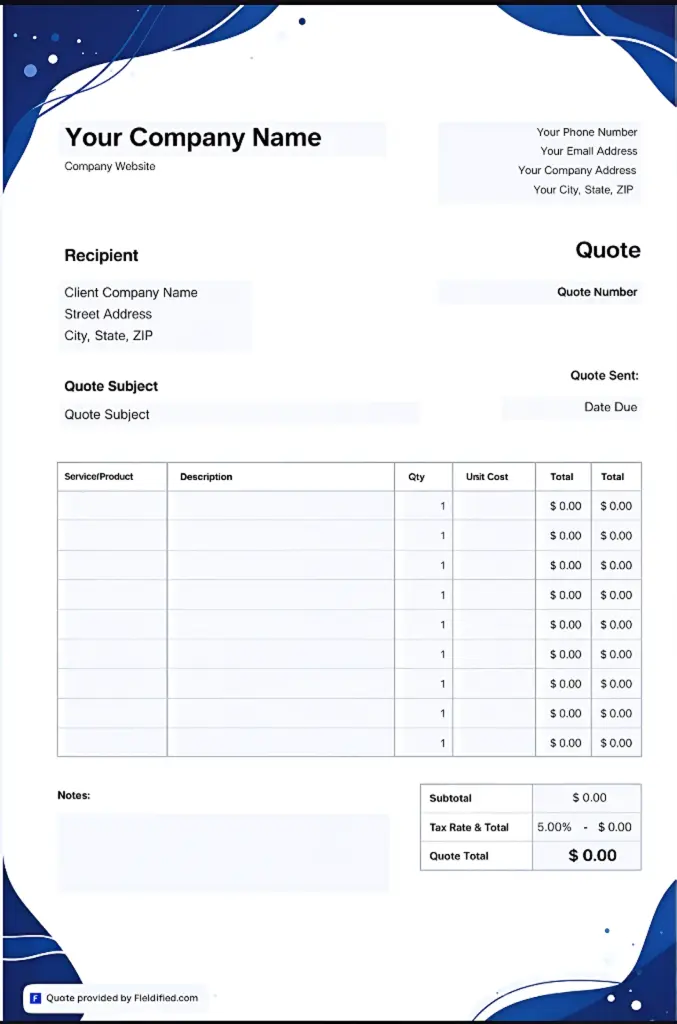
Make sure your template clearly includes the words “quote” or “estimate” on it. This helps customers quickly understand what the document is about.
2. Add your Business Details
Write clear and easy-to-find information about your business so your customers can reach out to you with questions or changes.
Business details you have to include:
- Your business name
- Business address
- Phone number
For better results and a more professional look, consider customizing your quotes with your logo and brand colors. Use Fieldified to make your business stand out.
3. Enter Customer Information
Now, enter your potential client’s information, and do the same as you did for your business in the quote sheet.
Good to include their:
- Name
- Address
- Phone number
This software is not only useful for creating job quotes, but it can also help you manage stronger relationships with your customers and build your business reputation.
4. Quote Number
Each job you create should have a quote number, just like a reference number you see on receipts or invoices. Quote numbers help you track jobs and keep everything organized properly.
If you use manual methods, then follow these practices:
- Only include letters and numbers.
- Keep it about 3–5 characters long.
- For finding later, you can add the client’s name or initials to the quote number.
A CRM can automatically create a quote number for you, so you don’t have to do it manually. Switching from WhatsApp to a CRM would be a smart and professional decision.
5. Add the Issue Date
An issue date is essentially the day when you send your quote to your customer. It’s essential to mention the issue date.
Here’s why:
- Establishes Pricing Validity Period
The issue date shows how long your quoted price will remain valid. It helps customers understand that prices may change after a certain time.
This protects your business from loss if material or labour costs increase later.
- Creates an Official Documentation Record
The issue date acts as proof of when the quote was created and sent. It keeps your business records clear and organized.
If you need to check details later, you can easily refer back to the correct timeline.
- Prevents Future Disputes and Misunderstandings
The issue date reduces confusion between you and the customer. It clearly shows when the pricing was shared. This helps avoid arguments about delays or price changes in the future.
However, using a CRM can help you automatically add the issue date to your quote. This saves you time and reduces the chances of mistakes, allowing you to close more jobs.
6. Enter the Service on the List that you’re providing
The next step is to enter the services that you’re providing to your customers, along with their pricing. This is called an itemized job quote.
An itemized quote clearly tells customers what services you are offering, what they are paying for, and how much each line item costs. This list makes the total cost easy to understand and gives clients the option to add or remove items according to their budget.
To make the list section clear and easy to understand, you should include:
- A brief description of each service item
- Service quantity
- Unit price
- otal of all service items
Ensure your quote list covers all the details your client needs to pay for, including labor, services, materials, and any additional costs such as taxes and delivery fees.
Write everything in proper order, but don’t write too much. You want to make the list easy to read for clients, not a maze. 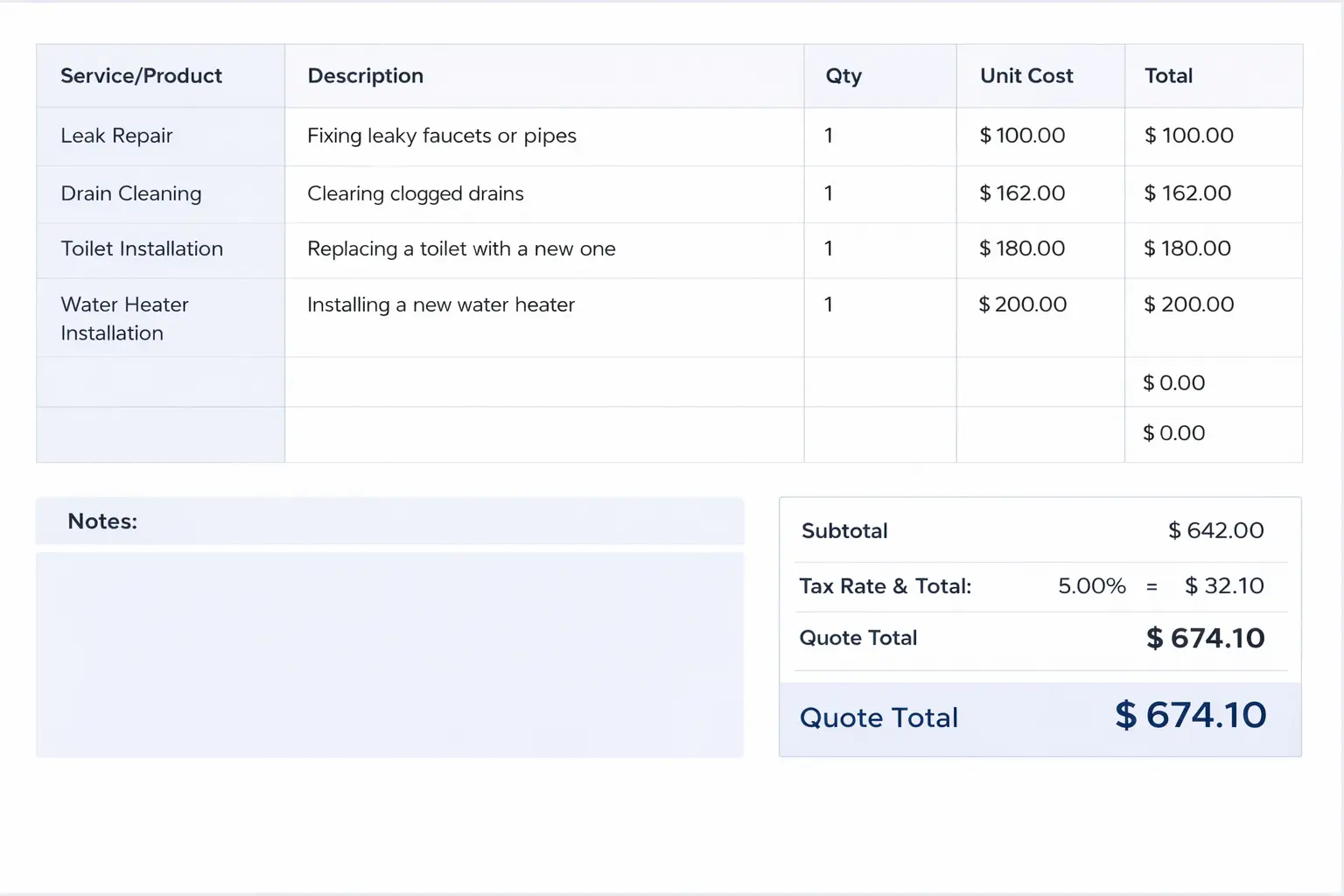
Here, you can also add extra services yourself, such as add-ons and upselling options, based on your business strategy.
For example, if a customer books a leak repair and you notice pipe corrosion or low water pressure in their plumbing system, you can suggest an additional service. This can benefit both your client and your business.
They are not required to add it to their current service, but it is a great way to inform them about what else you offer, in case they want to get more work done.
7. Specify your terms and conditions
In your quote, terms and conditions can outline the relationship between you and the customer before it officially begins. This is what keeps you on the same page about payments, job scope, and timelines.
Quote terms and conditions may specify:
- If a client needs to deposit some amount in advance
- Which payment methods do you accept?
- The deadline by which the client must complete the payment.
- What will happen if the cost increases beyond the original quote?
- What services do you guarantee, and what is not under warranty?
- Client responsibilities, like clearing the work area before the work starts
- How long the quote is valid and when it will expire.
You can either enter them in the notes section of your quote or write in a separate terms and conditions column, depending on the template you chose. 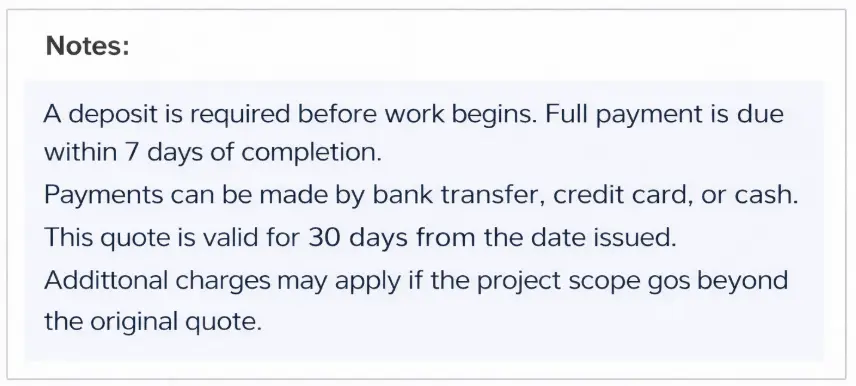
8. Finishing touch
Last thing, you need to do before sending the quote to your customer is to add any additional details, such as:
- The total due with taxes and additional fees
- Any relevant promotions or discounts
- A column for the client’s signature to approve your quote
- Thank you note
- Next steps, like to approve the quote or to schedule the service
How to Send a Job Quote to a Customer
When it comes to sending a job quote to customers. There are several different methods, such as:
- Formal mail letter
- In-person
- Via email
- Text message or WhatsApp
Let’s look at each one of them.
1. Formal Mail Letter
Write a formal letter to send your job quote to your customer. It is best for those clients who don’t use email or have a smartphone. Because mailed quotes take more time than other options and can easily get lost or sent to the wrong address, it is better to use this method only when necessary.
If you don’t respond quickly, you may lose the client to another company that responds quickly.
2. In-person
Giving face-to-face quotes to your client is also good, while you can create a job quote on the job site. For example, if you’re working on the job site, repairing pipes and drains at your customer’s place, and you are confident about the labor and material costs, you can prepare the quote on the spot.
If you use CRM software, you can enter job details while you are there, such as square footage, job photos, and the profit margin. A CRM will automatically give you a quick and professional quote.
But if you don’t have all the details and need to confirm material and labour costs. Then it’s better to send a quote by email or text message first, within 24-48 hours before you visit the job site. This is a good way to provide an accurate price to the customer.
3. Via Email
Most clients are comfortable receiving quotes by email. Email is professional, quick, and easy to approve. It is also a safer option than a paper quote because it doesn’t get lost easily.
Email works best when you need to send a detailed job estimate or attach documents such as images or service breakdowns. It is a good option if you want to keep a proper record of your quotes, or if your client prefers email communication.
4. Text Message or WhatsApp
Text messages or WhatsApp quotes are ideal for simple jobs or when a client needs a quick response. They are fast, convenient, and easy for clients to reply to.
This method works well when you want instant communication. It is also helpful if your client prefers chatting on WhatsApp or texting instead of email.
Best Practices of Writing a Good Job Quote
Job quotes are a crucial part of your service business. Make sure they look professional because they reflect your business’s professionalism, impress your customers, and help you win more jobs.  Follow these best practices below to improve and revamp your quote:
1. Keep it simple
Naturally, quotes need a lot of information, so make sure to keep them simple and easy to understand. This helps clients review and approve them without confusion.
If your quotes are too scattered and complicated, your customer may feel overwhelmed and choose to cancel the work or move on to the next provider.
2. Provide next steps
Always provide the next steps after sending the quote to the customer, and keep them clear so the client knows what to do. For example:
- How should they approve the work through a digital or physical signature?
- Is any advance payment required before the work begins?
- Should they call the office to book the appointment?
When you send quotes with Fieldified, it can automatically include the next steps by using AI, so you can spend more time on your work.
3. Send Follow-ups
If a client doesn’t approve the quote immediately, it doesn’t mean that they are not interested in hiring you. They must have forgotten to respond, or be busy. Or maybe they need a few extra days to confirm the budget.
Sending a polite follow-up message is a good way to remind your client. This increases your chances of winning more jobs. You can also use quoting software to automatically send a reminder to the client within 3-4 business days.
4. Use a CRM
It can be a great option to use CRM software because using manual methods or paperwork can be a daunting task. It can get damaged or lost easily by a customer.
That’s why it’s essential to choose a reliable CRM for your service business. It can help you manage jobs, estimates, and clients more easily, and save around 5–10 hours per week.
FAQs
1. How to write up a quote for a job?
Start with a template, add your business and customer details, list services with prices, include terms, and mention the total cost clearly.
2. How to quote a job properly?
Calculate labor, materials, taxes, and extra costs carefully, then present everything in a clear and itemized format.
3. How to start writing a job quote?
Begin by choosing a professional template and adding your business name, contact details, and quote number.
4. What should be included in a job quote?
Include services, pricing, total amount, issue date, expiry date, terms and conditions, and approval section.
5. How to send a job quote to a client?
You can send it by email, text message, WhatsApp, in-person, or formal mail, depending on your client’s preference.
6. What are the best practices for writing a job quote?
Keep it simple, provide next steps, send follow-ups, and use CRM software to save time and stay professional.
Blog Summary
- A job quote helps you convert leads into paying customers by sending a clear and professional estimate.
- Using a template keeps your quote organized and ensures you don’t miss important details.
- Always include complete business and customer information to keep the quote clear and professional.
- Add a quote number and issue date to track jobs properly and avoid pricing confusion.
- List your services clearly with descriptions, quantity, unit price, and total cost so clients understand what they are paying for.
- Mention terms, payment details, quote validity, and next steps to avoid misunderstandings.
- Using a CRM helps you send quotes faster, follow up automatically, manage clients easily, and save 5–10 hours per week.