EN
EN DE
DE ES
ES FR
FR NL
NL PT
PT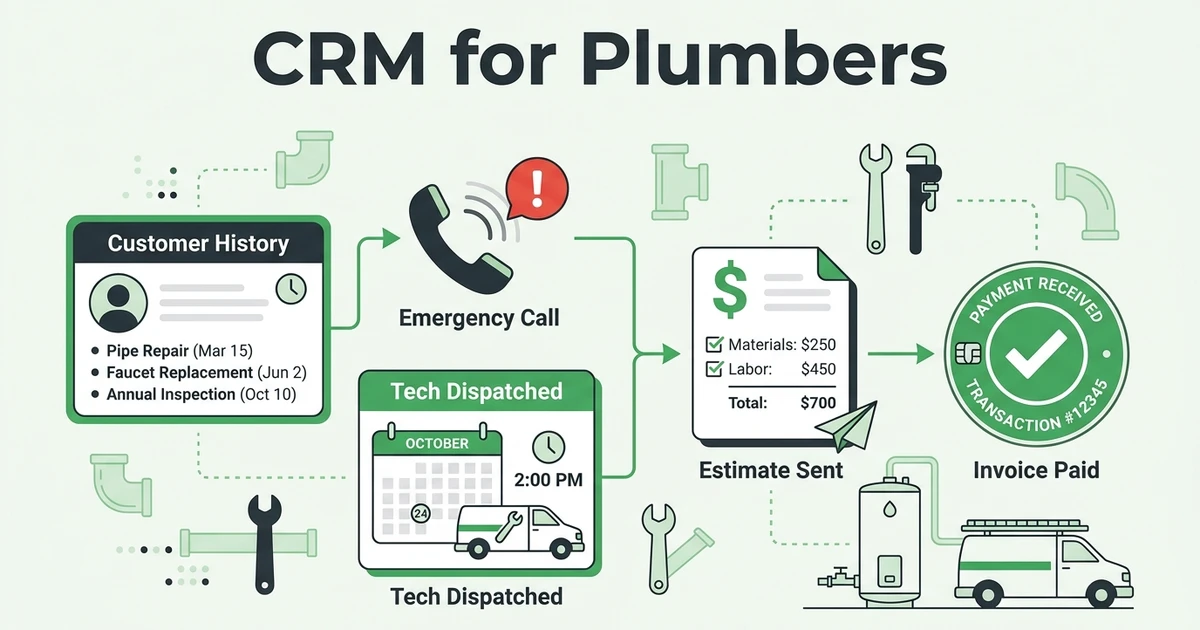





Quick Answer:
A CRM for plumbers stores customer records, service history, estimates, job notes, dispatch details, invoices, payments, and follow-ups in one place. For a growing plumbing business, the best CRM is connected to scheduling and invoicing so the office can see what happened before, during, and after every service call.
Fieldified helps plumbing companies manage customers, jobs, estimates, schedules, invoices, and payments from one place. The CRM should feel like the office’s memory, not another database nobody updates.
When a customer calls about the same water heater for the third time, your team should know the service history before the truck rolls. The dispatcher should see past notes. The technician should see photos, warranty details, and open invoice status.
That is the difference between contact storage and a plumbing workflow that actually supports the day.
Why plumbing jobs slip when customer history is scattered
Plumbing jobs slip when customer information lives in too many places. One detail is in a text thread, another is in the estimator’s notes, and the invoice sits in accounting software that the dispatcher does not check before booking the next call.
That works until the business gets busy. Emergency calls come in while technicians are already on route. A repeat customer expects your office to remember the last repair. A quote needs follow-up, but nobody owns it.
BLS projects employment of plumbers, pipefitters, and steamfitters to grow 4 percent from 2024 to 2034, with about 44,000 openings projected each year on average in its Occupational Outlook Handbook profile. When skilled labor is tight, your office cannot afford to waste technician time on missing notes.
PHCC says labor shortages are likely to remain a key concern for plumbing, heating, and cooling contractors in 2025 in its industry trends outlook. A plumber CRM will not hire technicians for you, but it can help the team you already have work with better information.
What is plumbing CRM software?
Plumbing CRM software is a shared customer and job record for plumbing work. It should show who the customer is, what property they own or manage, what work your team has done, what was quoted, what is scheduled, and what still needs follow-up.
The word CRM can sound like sales software. For a plumbing company, think of it as the place your office checks before answering, dispatching, quoting, or billing.
A useful plumber CRM should connect these details:
- Customer name, phone, email, and service address
- Property notes, access instructions, and equipment details
- Service history and past technician notes
- Photos, forms, and job documentation
- Estimates and approval status
- Dispatch schedule and assigned technician
- Invoice status and payment history
- Follow-up reminders for quotes and repeat work
That is why CRM and contact management for service businesses should connect to the rest of the job. Customer information is only useful when the office and field can act on it.
What should plumbing CRM software track?
Plumbing CRM software should track the details that affect the next service call. If a technician needs it on site or the office needs it before booking, it belongs in the customer record.
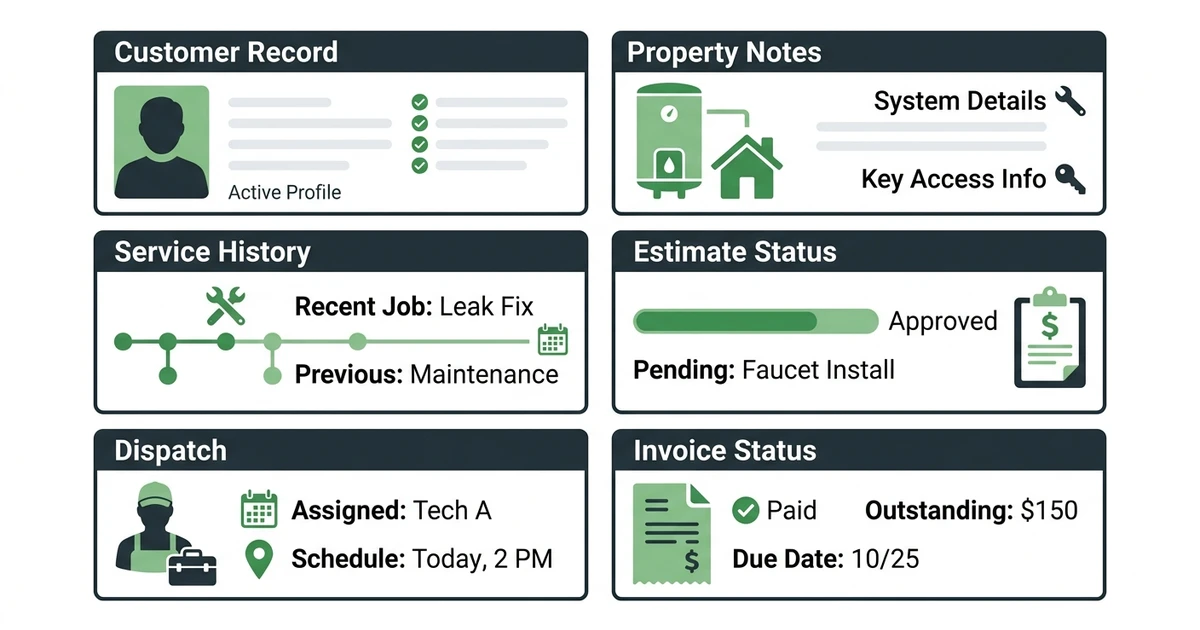
For plumbers, the most important records are:
| Record type | What to track | Why it matters |
|---|---|---|
| Customer history | Past jobs, notes, photos, and complaints | Helps repeat calls start with context |
| Property details | Shutoff location, access, equipment, and warranty notes | Reduces technician callbacks to the office |
| Estimates | Scope, pricing, approval status, and follow-up dates | Keeps quoted work from going cold |
| Dispatch | Assigned technician, arrival window, and job status | Helps the office answer customer questions |
| Billing | Invoice status, deposits, payments, and reminders | Keeps completed work from becoming delayed cash |
Think about a six-technician plumbing company. A customer calls about a water heater issue. The dispatcher checks the CRM and sees that your team replaced a valve last month, sent a quote for a tank replacement, and still has one unpaid invoice.
That context changes the call. The office can book the right technician, bring the right history into the visit, and avoid an awkward billing surprise after the job is complete.
How a plumber CRM helps with emergency calls, repeat jobs, and estimates
Emergency plumbing calls are where scattered information hurts fastest. If a customer has a burst pipe, the office needs the service address, access notes, past work, and technician availability immediately.
With connected scheduling and dispatch tools, the CRM is not just a contact list. It becomes the starting point for assigning the right plumber and keeping the customer updated.
Repeat jobs benefit the same way. If a property manager calls every few months, your office should not ask the same questions from scratch. The CRM should show unit notes, gate codes, preferred billing contact, open estimates, and any patterns from past repairs.
Estimates need the same discipline. If a customer does not approve a water heater replacement right away, the CRM should keep the quote visible until someone follows up. Otherwise, that revenue waits inside an inbox until a competitor calls first.
Keep plumbing customer history, dispatch, invoices, and follow-ups connected.
Fieldified gives plumbing teams one place to manage service calls from first contact to payment. Book a demo to walk through your plumbing workflow.
CRM for plumbers vs. generic CRM: what matters in the field?
A generic CRM can store leads and contacts. That may help a sales team, but plumbing companies do not run on sales pipelines alone.
Your team runs on calls, jobs, technicians, estimates, parts, invoices, and repeat customers. The CRM has to understand that work.
| Need | Generic CRM | Plumbing CRM |
|---|---|---|
| Contact storage | Yes | Yes |
| Service history | Limited | Built around past jobs |
| Dispatch scheduling | Usually separate | Connected to customer and job |
| Estimates and invoices | Often separate | Part of the workflow |
| Technician access | Limited | Mobile-friendly for field work |
This does not mean every plumbing company needs the biggest tool on the market. It means the CRM should match plumbing operations before it adds more screens.
If you want a deeper comparison of options, the best plumbing CRM software guide can help. For a more focused data setup, read the client database for plumbers guide.
Checklist: how to choose plumbing CRM software
Choose plumbing CRM software by walking through a real service call. If the system cannot support that call from intake to invoice, it will create more work for your office.
Use this checklist:
- Can the office create a customer record in seconds?
- Can dispatchers see customer history before assigning the job?
- Can technicians view notes from a phone?
- Can estimates stay tied to the customer and job?
- Can quote follow-ups be tracked?
- Can invoices and payments connect to completed work?
- Can recurring customers and property managers be organized cleanly?
- Can the pricing model handle a growing crew?
NAHB says labor shortages are high among electricians, plumbers, and HVAC technicians, with over half of surveyed builders reporting shortages of those crafts in its construction labor analysis. That makes office efficiency more than a nice extra.
If every missing note creates a technician callback, the CRM is failing the field. The right tool should reduce the number of times your team has to ask, “What happened last time?”
How Fieldified helps plumbers manage clients, jobs, invoices, and follow-ups
Fieldified connects plumbing customer records with the rest of the job lifecycle. Your office can manage contacts, create estimates, schedule technicians, track jobs, send invoices, and follow up on payment from one place.
That matters for plumbing teams because the customer record is only half the story. You also need to know what was sold, who is assigned, what was completed, and whether the invoice has been paid.
Fieldified is built for field service work, not generic sales pipelines. It also uses flat plan pricing for core plans, which helps growing plumbing teams avoid a bill that jumps every time they add a technician or office user.
If your team is still moving between spreadsheets, texts, calendars, and invoice tools, Fieldified gives those details a shared home.
Frequently Asked Questions
What is plumbing CRM software?
It is a customer and job management system built around plumbing calls, estimates, service history, dispatch, invoices, and follow-ups. It keeps the details your office and technicians need before, during, and after each service call.
What should plumbing CRM software track?
Plumbing CRM software should track customer details, property notes, service history, estimates, job photos, technician notes, invoice status, payment history, and follow-up reminders. For growing teams, it should also connect to scheduling and dispatch.
Is a generic CRM enough for a plumbing business?
A generic CRM can store contacts, but it usually does not handle plumbing dispatch, job notes, estimates, invoices, or emergency call workflows well. A plumbing CRM should match how service calls move from intake to payment.
How does a plumber CRM help repeat customers?
A plumber CRM keeps service history, equipment notes, past estimates, and communication in one record. That helps your office answer repeat calls faster and gives technicians better context before they arrive.
When should a plumbing company switch from spreadsheets to CRM?
Switch when customer history is hard to find, follow-ups depend on memory, or the office has to rebuild job details across texts, calendars, and invoices. Those are signs the plumbing workflow needs one shared record.
Conclusion
Plumbing CRM software should do more than store names and phone numbers. It should help your office answer calls, understand service history, assign technicians, follow up on estimates, and bill completed work.
When those details stay connected, your plumbing company spends less time hunting for context and more time getting paid for the work already done.
See how Fieldified keeps plumbing customer history, dispatch, estimates, invoices, and payments in one workflow. Book a demo and walk through how your team handles calls from intake to payment.