EN
EN DE
DE ES
ES FR
FR NL
NL PT
PT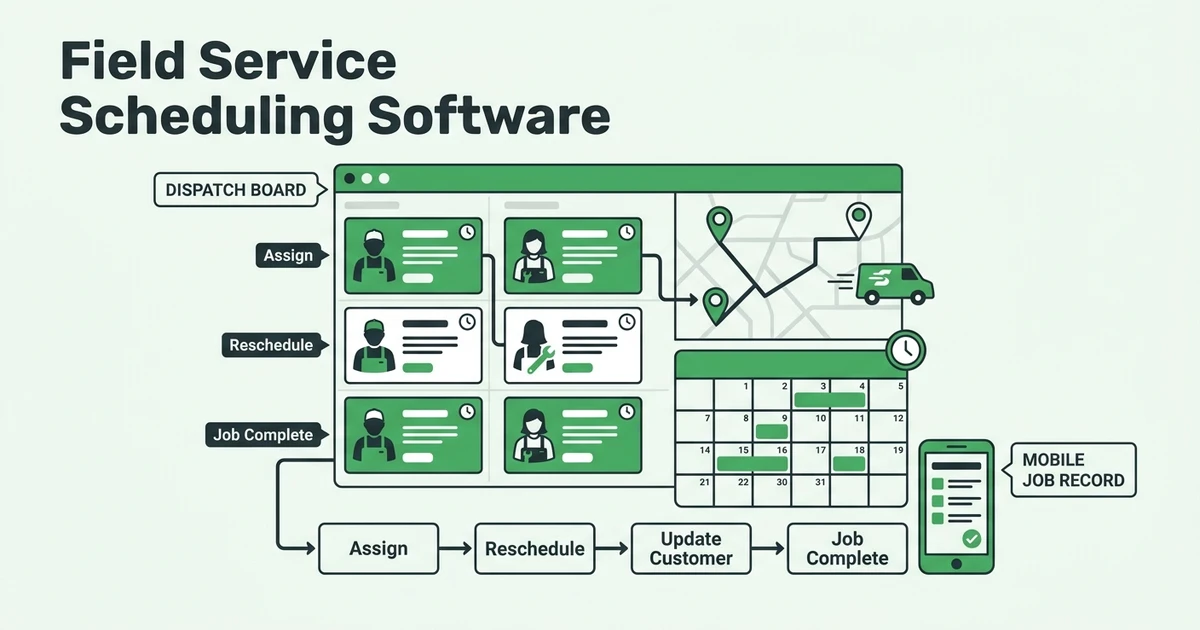





Quick Answer: Choose field service scheduling software by testing a complete schedule change, from the customer request through technician reassignment, completed work, and payment follow-up. Compare these seven options against the same acceptance checklist; the order below is an evaluation shortlist, not a verified performance ranking.
- Fieldified
- Jobber
- Housecall Pro
- ServiceTitan
- Service Fusion
- Workiz
- FieldEdge
If you manage a growing HVAC, plumbing, or electrical team, start with the handoff you most want to fix. Perhaps the dispatcher changes an appointment, but the technician still has yesterday’s instructions. Perhaps the visit closes while the invoice stays on someone’s task list.
Use this guide to build a buying test. Vendor-specific features, prices, plan inclusions, and implementation promises are deliberately left for demonstration and written confirmation. The comparison notes recommend questions to ask; they do not certify that a named product passes them.
Why does a shared calendar break down once a field team has multiple technicians?
Consider a hypothetical plumbing office moving a technician from a delayed installation to an urgent repair. Changing the calendar entry is only the beginning. The office still needs to decide who finishes the installation, what to tell both customers, and which notes the reassigned plumber needs.
For national occupational context, the BLS estimated employment of 2,319,860 in the material recording, scheduling, dispatching, and distributing worker group in May 2024. BLS May 2024 occupational employment estimates This is a broad occupational group, not a count of field-service dispatch staff.
The same release estimated national dispatcher employment at 312,140, including public safety telecommunicators. BLS national dispatcher employment table Neither figure measures scheduling software adoption or predicts what your company could save.
Which scheduling workflows should a field-service business test before comparing vendors?
Bring a sanitized version of an actual service day to each demonstration. Include an existing customer, a new request, an unavailable technician, and an unfinished visit. Give every vendor identical inputs so the comparison stays fair.
Can the office move an urgent repair without losing context?
Start with an HVAC technician whose first diagnosis runs over. Introduce an urgent same-day repair at another property. Ask the dispatcher to identify an eligible replacement, move the appointment, and preserve the customer’s original description and access instructions.
Then inspect both visits. The delayed job should still have an owner and a next action. The urgent job should show the revised assignment and the information the replacement technician needs. Reject a demonstration that quietly deletes the original problem to make the schedule look tidy.
Use these acceptance checks:
- Preserve the customer, property, job description, and appointment history.
- Show who changed the assignment and which visit remains unfinished.
- Demonstrate the revised customer message and its delivery status.
- Open the updated job from the technician’s actual device.
- Carry completed work into the next commercial step without retyping it.
Use the scheduling and dispatch evaluation page as a discussion reference when preparing the exercise. Keep the acceptance checklist independent of any vendor’s terminology.
What belongs in your comparison scorecard?
Separate requirements into must-haves, preferences, and later improvements. For a plumbing emergency team, preserving access notes may be mandatory. For a landscaping crew, keeping a recurring route together may deserve more attention. Choose priorities before watching a polished demonstration.
For every requirement, record the proposed plan, who completes the task, and any extra purchase or setup work. Ask for a written cost breakdown covering technician and office access, onboarding, messaging, payment processing, integrations, support, and renewal terms where applicable. Do not assume a quoted subscription includes every item.
7 best field service scheduling software options: what should you compare?
Apply the same buying criteria to all seven names: assignment control, technician context, customer communication, completed-job handoff, total cost, and implementation effort. The table assigns a different starting exercise to each candidate to keep your research practical. It does not describe verified differences between their capabilities.
Treat each workflow lens as a question about your company. You can run any row’s exercise with any vendor. The strongest choice is the one that demonstrates your must-haves under acceptable commercial terms, regardless of its position here.
| Option | Starting workflow to demonstrate | Evidence to request | Buying checkpoint |
|---|---|---|---|
| Fieldified | Urgent request through payment follow-up | Linked records and technician view | Confirm scope and full cost |
| Jobber | Existing customer gets a revised appointment | Retained history and changed visit | Confirm migration and plan scope |
| Housecall Pro | Residential visit changes during the day | Customer message and job status | Confirm communication costs |
| ServiceTitan | Dispatcher and manager review an exception | Permissions and change history | Confirm setup responsibilities |
| Service Fusion | Technician hands completed work to billing | Completed record and invoice draft | Confirm accounting ownership |
| Workiz | Office revises details after customer contact | Updated request and assigned visit | Confirm contact-record continuity |
| FieldEdge | Technician returns to an unfinished repair | Prior findings and linked follow-up | Confirm return-visit handling |
1. Fieldified: can the same job survive every handoff?
For Fieldified, begin with the complete plumbing scenario. Ask for a new customer request, an initial assignment, an urgent reassignment, technician completion notes, and the next quote or invoice step. Keep the customer and property consistent throughout the demonstration.
Buying criterion: require the presenter to show where the dispatcher, technician, and billing person find the same job information. Ask which actions require manual approval. Evaluate the proposed configuration rather than treating an attractive calendar as proof of the whole workflow.
Tradeoff to resolve: decide how much process change your office can absorb. Request a written explanation of setup work, account access, charges, and any external system needed. Advance Fieldified only when the demonstrated handoffs match your requirements and the commercial scope is clear.
2. Jobber: what happens to an existing customer’s appointment history?
For Jobber, start with an established HVAC customer whose repair needs rescheduling. Ask the presenter to retain the original problem, access instructions, and prior visit references while assigning someone else. Then have the replacement technician explain what they can see.
Buying criterion: test continuity rather than asking whether a customer database exists. Have your office user locate the correct property, distinguish old notes from current instructions, and identify the next promised arrival window without coaching.
Tradeoff to resolve: if you are moving from another system, request a sample migration using sanitized records. Confirm what history would move, what would remain elsewhere, and who checks it. Obtain written pricing for the exact roles and workflows tested before drawing a cost conclusion.
3. Housecall Pro: can the customer understand a changed visit?
For Housecall Pro, use a residential electrical repair with a revised arrival window. Ask the presenter to show the customer-facing message, the office record, and the technician’s appointment. Check whether those views tell the same story in the proposed setup.
Buying criterion: test an exception as well as a successful message. Use a hypothetical incorrect phone number or a customer who requests a different time. Ask how the dispatcher recognizes the problem, records the response, and assigns the follow-up.
Tradeoff to resolve: request written confirmation of communication charges and any configuration needed for your message templates. Have the office approve the wording. Do not assume notification delivery means the customer accepted the revised appointment.
At this checkpoint, request a Fieldified demo using your delayed-job scenario. Ask to trace the customer request through reassignment, completed work, and payment follow-up, with your dispatcher checking each handoff.
4. ServiceTitan: who controls an exception when several people dispatch?
For ServiceTitan, give the same urgent repair to a dispatcher and an operations manager. Ask each person to work through their proposed access level. Introduce an assignment that conflicts with your internal skills policy and ask how they would resolve it.
Buying criterion: inspect responsibilities and permissions. Determine who may override an assignment, change customer commitments, or reopen completed work. Have the presenter show how a manager would understand a change after the dispatcher has left for the day.
Tradeoff to resolve: ask for a setup plan with named owners on both sides. Decide whether your team can maintain the proposed rules and permissions. Require the full commercial proposal before judging affordability; this exercise makes no assumption about price or implementation complexity.
5. Service Fusion: can billing use the technician’s completed record?
For Service Fusion, follow a plumbing repair into office review. Ask the technician to record findings, materials, approved work, and any unresolved issue. Then ask a billing user to prepare the next commercial document from that record.
Buying criterion: inspect the actual destination of each field. Check that the customer, property, work description, and approved charges remain correct. Deliberately correct an entry and ask which record becomes authoritative after the correction.
Tradeoff to resolve: decide whether billing belongs in the proposed system or your existing accounting process. Request a demonstrated handoff and written confirmation of any integration requirements. Do not accept a promise to export data later as equivalent to a tested workflow.
6. Workiz: can a changed customer request reach the assigned technician?
For Workiz, start with a customer contacting the office about an electrical fault, then changing the instructions before arrival. Ask the dispatcher to attach the clarification to the correct customer, property, and visit. Have the technician find it without office guidance.
Buying criterion: check the distinction between a new inquiry and an update to existing work. Introduce similar customer names or multiple properties in your test data. Ask how the proposed process avoids creating a second appointment for the same request.
Tradeoff to resolve: confirm which contact records your staff must maintain and where replies will be reviewed. Request the costs and scope of the exact communication workflow demonstrated. Keep the decision tied to your intake process rather than assuming a particular communication feature exists.
7. FieldEdge: can an unfinished repair become a clear return visit?
For FieldEdge, use an HVAC diagnosis that requires a return appointment after a part arrives. Ask the presenter to preserve the original findings, create the next visit, and show what the returning technician would read before departure.
Buying criterion: distinguish the status of the visit from the status of the underlying job. Have your office identify what is complete, what is waiting, and who owns the next action. Check whether the proposed workflow matches your billing policy for diagnostic and return work.
Tradeoff to resolve: request a demonstration using your actual definition of a callback. Confirm setup requirements, technician access, and commercial terms in writing. Apply the same rule used for the other candidates: an unresolved must-have should prevent purchase, even when the rest of the demonstration looks convincing.
How do skills, location, and availability change a scheduling decision?
Use a decision order your dispatcher can explain. First establish eligibility under your company’s policies. Then check availability, required equipment, realistic travel, and existing customer commitments. Ask vendors to demonstrate your order rather than accepting an unexplained recommended assignment.
In a hypothetical electrical repair, the closest technician might be assigned to a long installation. Another might lack the experience your manager requires for that job. Build both constraints into the demonstration and ask what information the dispatcher must maintain.
Will the proposed assignment protect the rest of the day?
Test beyond the urgent appointment. Ask what happens to the reassigned technician’s next visit and whether the displaced customer needs a new commitment. Include time for the work itself, travel, parts collection, and breaks according to your operating plan.
For the travel portion, use the route-planning evaluation page to organize questions about job order and location. Ask the presenter to distinguish an estimated journey from a customer-facing arrival promise. Do not treat either as a guaranteed completion time.
For a deeper comparison of assignment decisions, consult the field service dispatch software guide. Use it to refine your acceptance questions before the final vendor meeting, rather than adding requirements after you sign.
What should happen after a technician finishes the scheduled visit?
Define completion before you evaluate the handoff. For a plumbing repair, your checklist might require findings, work performed, materials, customer authorization, and a clear next action. For a landscaping visit, specify the completed scope and any work deferred by agreement.
Ask the technician to complete that checklist on the device they intend to use. Then have the office review the result. Use the job-detail tracking page to prepare questions about notes, evidence, status, and who can correct a record.
Does completed work lead to the right quote, invoice, or follow-up?
Run separate endings for completed work and additional work awaiting approval. In the first, inspect the invoice draft and customer details. In the second, ask how the office prepares the next quote without presenting unapproved work as a completed charge.
Continue through payment follow-up. Identify who confirms the amount due, who owns a failed payment or disputed charge, and where the next action is recorded. Ask for the applicable processing terms in writing rather than assuming payment handling is included in the subscription.
Finally, test a correction after office review. Change a material quantity or reopen the visit in your sample workflow. Ask what happens to the invoice, job status, and customer communication. A demonstration should make the correction path as clear as the successful path.
Is Fieldified right for a growing field-service team?
You do not need to replace every process simultaneously. Identify what must move at launch, what can remain in your current accounting setup, and what would require a later decision. Review the mobile workforce management guide when defining technician responsibilities away from the office.
What if your technicians resist changing their workflow?
Include them before purchase. Have a technician open a revised appointment, find access notes, record work, and submit it for review. Repeat with a weak connection and inspect what actually saves. Ask for help only after observing where they get stuck.
Choose a limited pilot with a dispatcher, technician, and billing reviewer. Define acceptance before starting: required information retained, exception ownership clear, and commercial handoff completed. Reject Fieldified or any alternative if a critical requirement remains unresolved. A promised future improvement should not count as a passed test.
Frequently Asked Questions
How should I choose field service scheduling software for a growing team?
Compare vendors using the same delayed-job scenario, your actual roles, and your required customer information. Choose only after your dispatcher and technician can complete the workflow on the proposed plan.
What should field service scheduling and dispatch software show in a demo?
Ask for intake, assignment, reassignment, customer updates, mobile job context, and the completed-work handoff. Include a failed notification and a visit that needs a return appointment.
Should I choose the cheapest technician scheduling software?
Compare written total costs against the workflow you need, including office access, technician access, onboarding, messaging, and integrations. A low subscription quote should not override a failed must-have test.
How do I test a field service scheduling app with technicians?
Have a technician open a reassigned visit, find access instructions, record work, and hand the job back to the office. Repeat with a weak connection and inspect which updates actually save.
Can I keep my existing accounting process when changing scheduling tools?
Make that a purchase condition and demonstrate the exact handoff before signing. Check customer matching, invoice ownership, payment status, and how corrections move between systems.
When should I rule out Fieldified?
Rule it out if the proposed setup cannot demonstrate a required workflow or the written commercial terms do not fit your budget. Apply the same standard to every option on your shortlist.
Conclusion: choose the schedule your team can carry through to payment
Evaluate these seven candidates against the same working day. Keep your must-haves visible, separate demonstrations from promises, and compare complete written costs. Let your dispatcher, technician, and billing reviewer assess the parts they would actually use.
Book a Fieldified demo around your next real schedule change. Bring a sanitized customer request and ask to follow it through technician assignment, completed work, and payment follow-up. Use the demonstrated workflow and written proposal to decide whether Fieldified fits your team.