EN
EN DE
DE ES
ES FR
FR NL
NL PT
PT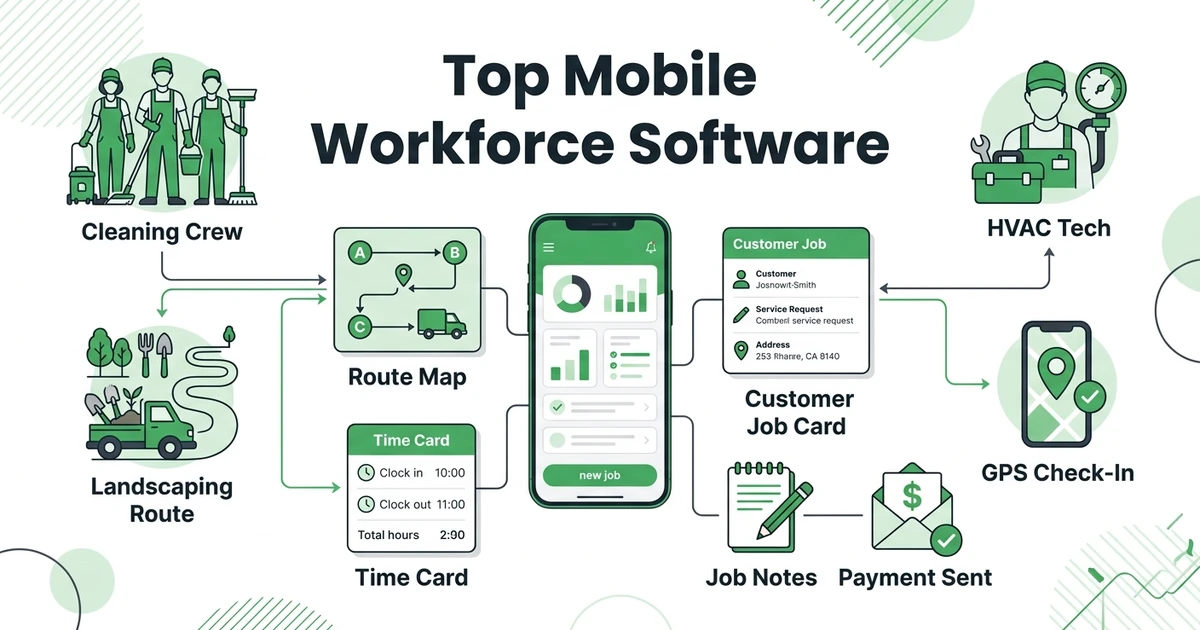





Quick Answer:
Mobile workforce management software helps owners coordinate employees who work away from the office with schedules, mobile job details, GPS or time tracking, communication, and field status updates. Fieldified is the best choice for field service teams that need mobile workforce visibility connected to customer jobs, quotes, invoices, and payments.
TL;DR: Quick Summary
- Fieldified - Best for field service teams that need workforce visibility plus job lifecycle management
- Connecteam - Best for deskless employee management
- Jobber - Best for small residential service teams
- Housecall Pro - Best for mobile home service workflows
- ServiceTitan - Best for larger trade companies
- Skedulo - Best for enterprise mobile workforce scheduling
- Deputy - Best for shift scheduling and labor planning
- Homebase - Best for hourly teams
- When I Work - Best for simple staff scheduling
- Workyard - Best for GPS time tracking
- Arrivy - Best for customer-facing mobile operations
- Zuper - Best for flexible field service teams
- Service Fusion - Best for flat-price FSM basics
- FieldPulse - Best for small contractor job management
- Workiz - Best for call-heavy mobile teams
- Salesforce Field Service - Best for enterprise CRM-led teams
- ServiceTrade - Best for commercial service teams
- Simpro - Best for commercial work order workflows
- Synchroteam - Best for map-based field operations
- Hubstaff - Best for remote workforce time tracking
The main choice is category fit. A cleaning company that needs shift scheduling, chat, and clock-ins may shortlist Connecteam or Homebase. An HVAC, plumbing, electrical, landscaping, or maintenance team usually needs field service depth, because the employee update has to connect to a customer job.
What is mobile workforce management software?
Mobile workforce management software helps businesses coordinate people who work away from the main office. It usually covers scheduling, mobile job access, time tracking, GPS location, forms, messaging, status updates, proof of completion, and workforce reporting.
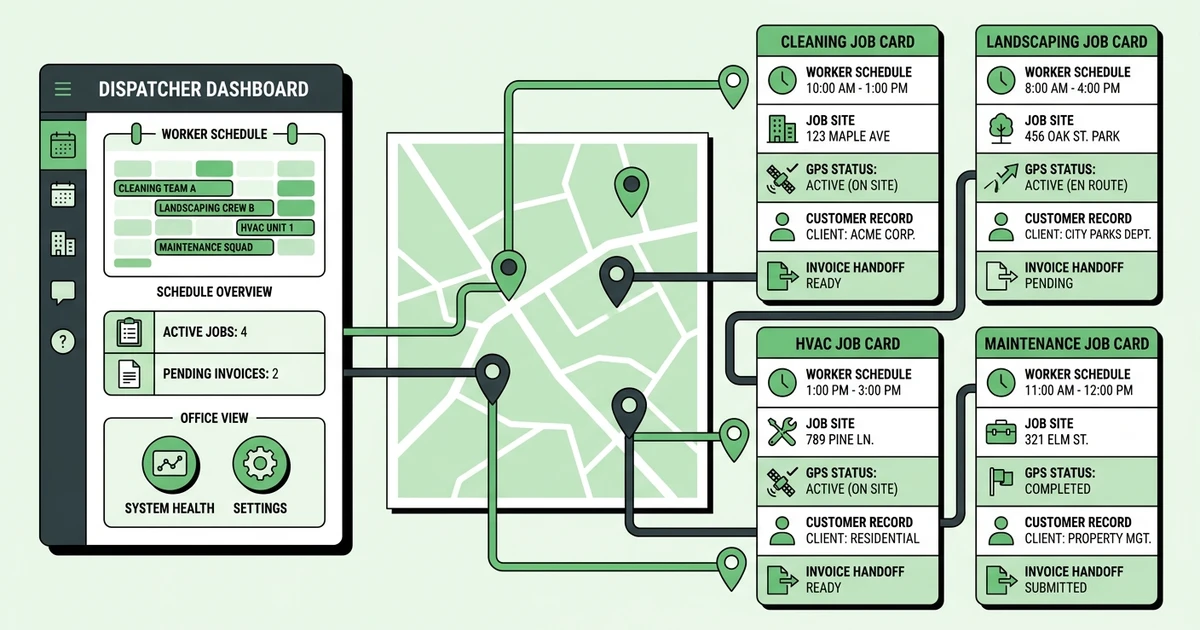
For field service teams, the definition needs one more layer. A technician is not just an employee on a shift. They are going to a customer site, carrying job notes, collecting photos, updating work status, and often triggering an invoice or payment.
That is why a pure workforce app can feel good for managers but incomplete for dispatchers. A lawn care owner may know who clocked in, but still need to know which property was serviced, what photos were attached, whether the customer approved the quote, and whether the visit should be billed.
Fieldified is built around that field-service-first view, with scheduling, dispatch, customer records, job tracking, and payments connected to the mobile team.
Why field service teams compare mobile workforce management tools
Field service owners compare these tools because mobile work creates gaps the office cannot see. A dispatcher may know a plumber left the shop, but not whether the technician arrived, found the issue, created a quote, or needs another visit.
Workforce demand adds pressure. The Bureau of Labor Statistics projects installation, maintenance, and repair occupations to grow faster than the average from 2024 to 2034, with about 608,100 openings each year in its occupational outlook.
The software market is growing for the same reason. MarketsandMarkets projects the workforce management market to grow from USD 9.57 billion in 2025 to USD 15.67 billion by 2030 at a 10.4% CAGR in its workforce management forecast.
The practical question is simple: do you need to manage workers, field jobs, or both? Cleaning, landscaping, HVAC, plumbing, electrical, installation, and maintenance businesses usually need both because labor visibility affects customer experience and cash flow.
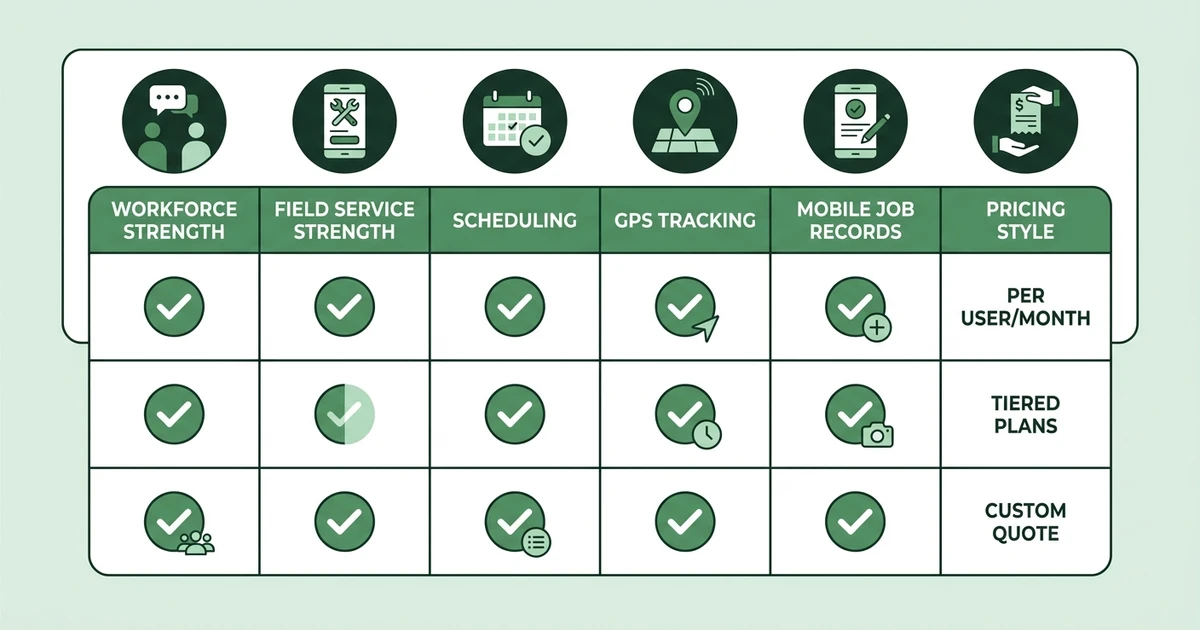
Quick comparison: top 20 mobile workforce management software platforms
| Rank | Tool | Best for | Workforce strength | Field service strength | Pricing style |
|---|---|---|---|---|---|
| 1 | Fieldified | Field service mobile teams | Scheduling, dispatch, technician updates | Quotes, jobs, invoices, payments | Published flat plans |
| 2 | Connecteam | Deskless employee management | Scheduling, chat, forms, training | Limited job lifecycle depth | Tiered plans |
| 3 | Jobber | Residential service teams | Mobile schedules and job updates | Quotes, invoices, client hub | Tiered plans |
| 4 | Housecall Pro | Home service workflows | Technician mobile app | Estimates, payments, customer messages | Tiered plans |
| 5 | ServiceTitan | Larger trade companies | Technician workflows and reporting | Deep trade operations | Custom pricing |
| 6 | Skedulo | Enterprise mobile workforces | Advanced scheduling | Depends on configuration | Custom pricing |
| 7 | Deputy | Shift planning | Rosters, time, labor rules | Light field service fit | Tiered plans |
| 8 | Homebase | Hourly teams | Scheduling and payroll-friendly time | Light job context | Tiered plans |
| 9 | When I Work | Simple staff scheduling | Shifts and time tracking | Light job context | Tiered plans |
| 10 | Workyard | GPS-heavy crews | GPS time tracking | Job costing support | Per-user plans |
| 11 | Arrivy | Customer-facing field teams | Arrival visibility | Service and delivery updates | Tiered plans |
| 12 | Zuper | Flexible field teams | Technician app and automation | FSM workflows | Tiered or custom plans |
| 13 | Service Fusion | Price-conscious FSM teams | Mobile work orders | Quotes, jobs, invoices | Flat monthly plans |
| 14 | FieldPulse | Small contractors | Mobile job management | Estimates and invoices | Tiered plans |
| 15 | Workiz | Call-heavy teams | Mobile job updates | Calls, quotes, payments | Tiered plans |
| 16 | Salesforce Field Service | Enterprise CRM teams | Workforce optimization | CRM-led service | Enterprise pricing |
| 17 | ServiceTrade | Commercial service teams | Technician field updates | Assets and service history | Custom pricing |
| 18 | Simpro | Commercial workflows | Mobile work orders | Projects and job costing | Custom pricing |
| 19 | Synchroteam | Map-based operations | Scheduling and maps | Work orders | Tiered plans |
| 20 | Hubstaff | Remote workforce tracking | Time, GPS, productivity | Limited service job depth | Per-user plans |
Detailed reviews: 20 best mobile workforce management software tools
1. Fieldified
Fieldified is the best fit for contractors who need workforce visibility tied to real customer work. The office can schedule jobs, dispatch technicians, track field status, manage quotes, send invoices, collect payments, and capture calls through AI Receptionist.
That combination matters when your mobile team is not simply clocking into a shift. An electrician needs job notes, site contacts, quote details, photos, and the next action. A landscaping crew needs recurring visit history, route changes, and proof that the work was completed.
Key features:
- Scheduling and dispatch
- Mobile app for technicians
- Time and GPS visibility
- Job tracking with notes, photos, and statuses
- Client portal
- Quote management
- Invoices and payments
- AI Receptionist for missed calls
- Flat published pricing
Pricing style: Fieldified publishes Basic at $49/mo up to 5 users, Standard at $119/mo up to 10 users, and Premium at $199/mo up to 15 users on its pricing page.
Pros:
- Strong fit for HVAC, plumbing, cleaning, landscaping, installation, and maintenance teams
- Mobile updates connect to customer records and job history
- Dispatch, quotes, invoices, and payments stay in one workflow
- Flat plans help owners budget as the team grows
Cons:
- Not focused on HR training libraries or internal employee engagement
- Enterprise workforce planning teams may need more custom workforce analytics
Expert verdict: Fieldified is best when you need to manage both the worker and the work. It is the strongest fit for contractors that want fewer disconnected apps between the office, the field, and the customer.
2. Connecteam
Connecteam is a strong deskless employee management platform. It covers scheduling, time tracking, forms, task management, chat, updates, and training, which makes it attractive for cleaning, facilities, hospitality, retail, and field teams.
For contractors, the question is whether workforce management is enough. Connecteam can help you manage staff, but it is not built around quote approvals, dispatch boards, customer job history, invoices, and payments.
Pricing style: tiered plans with workforce modules.
Pros: strong employee communication, useful forms and checklists, good fit for deskless teams.
Cons: weaker fit if the mobile worker needs full field service job context.
Expert verdict: Connecteam is best if your primary pain is managing employees, not converting customer jobs from quote to payment.
3. Jobber
Jobber gives small residential service teams a simple mobile workflow for schedules, job details, quotes, invoices, and customer communication. It is often evaluated by lawn care, cleaning, plumbing, and home maintenance teams.
The mobile experience is approachable, and technicians can see the jobs they need to complete. Owners should review how pricing, automation, and reporting change as more staff join.
Pricing style: tiered plans.
Pros: easy mobile workflow, good residential fit, useful customer tools.
Cons: growth-stage teams should compare included users and feature access.
Expert verdict: Jobber is a solid option for smaller residential field teams that value simplicity.
4. Housecall Pro
Housecall Pro is a mobile-first platform for home service teams. It supports scheduling, estimates, invoices, payments, notifications, and technician workflows.
It can work well for HVAC, plumbing, electrical, and cleaning teams that want the tech app to be simple. Compare higher-tier needs if you care about reporting, automation, or call workflows.
Pricing style: tiered plans.
Pros: strong technician app, good customer communication, useful home service workflows.
Cons: package differences can matter as the team grows.
Expert verdict: Housecall Pro is best for mobile home service operations that want a polished technician experience.
5. ServiceTitan
ServiceTitan is built for larger trade companies with deeper operational needs. It supports technician workflows, dispatch, estimates, sales presentation, reporting, marketing, and call center operations.
For larger HVAC, plumbing, and electrical teams, it can give managers strong visibility into field activity. Smaller teams should weigh the setup, cost, and internal process change.
Pricing style: custom pricing.
Pros: deep trade workflows, strong reporting, advanced technician tools.
Cons: heavy for small teams that need fast adoption.
Expert verdict: ServiceTitan is best for mature trade companies with the resources to use a larger platform properly.
6. Skedulo
Skedulo focuses on mobile workforce scheduling for large distributed teams. It is useful for organizations managing availability, skills, locations, and complex staffing rules.
It can work across industries where workers travel to sites. Contractors should check how quote management, invoicing, customer records, and payment handoff are handled.
Pricing style: custom pricing.
Pros: strong scheduling logic, enterprise workforce planning, mobile assignments.
Cons: less field-service-specific out of the box than contractor platforms.
Expert verdict: Skedulo is best for enterprise workforce scheduling when staff allocation is more complex than job billing.
7. Deputy
Deputy is a workforce management app for shift scheduling, labor planning, time tracking, compliance workflows, and manager communication. It is commonly considered by hourly teams.
For field service teams, Deputy can help with rosters and time, but it does not replace job management. A cleaning company may still need separate tools for quotes, customer records, invoices, and proof of completion.
Pricing style: tiered plans.
Pros: strong shift scheduling, labor planning, time tracking.
Cons: not built for contractor quote-to-payment workflows.
Expert verdict: Deputy is best when shift planning is the core problem.
8. Homebase
Homebase helps hourly teams manage schedules, time clocks, payroll handoff, hiring, and team communication. It is popular with small businesses that need staff scheduling without complex field operations.
For mobile crews, Homebase can be useful if the work is mostly shift-based. HVAC, plumbing, and maintenance teams will likely need stronger job, customer, and invoice workflows.
Pricing style: tiered plans.
Pros: approachable scheduling, payroll-friendly time tracking, good for hourly teams.
Cons: limited job lifecycle support for field service contractors.
Expert verdict: Homebase is best for hourly workforce coordination, not full field service operations.
9. When I Work
When I Work focuses on employee scheduling, team availability, time clocks, and shift communication. It is a straightforward option for managers that need simple roster control.
For contractors, it can help if the crew is scheduled by shift rather than by customer job. It is less useful when dispatch, quote details, parts, photos, and invoicing need to live in the same workflow.
Pricing style: tiered plans.
Pros: simple scheduling, easy staff communication, useful for hourly teams.
Cons: limited field service context.
Expert verdict: When I Work is best for simple staff scheduling.
10. Workyard
Workyard is strong for GPS time tracking, job costing, construction workforce visibility, and field crew accountability. It can help owners understand where crews are and how labor time maps to jobs.
For construction and field crews, that visibility can be valuable. But if your team also needs quote approvals, customer communication, invoices, and payments, you may need a field service platform alongside it.
Pricing style: per-user plans.
Pros: GPS tracking, time cards, job costing support.
Cons: limited end-to-end customer job management.
Expert verdict: Workyard is best when location-based time and labor visibility are the pain.
11. Arrivy
Arrivy helps field, delivery, and service teams provide customer-facing arrival updates and mobile status tracking. It is useful when the customer experience depends on knowing when the crew will arrive.
Installers, movers, delivery teams, and service crews may benefit from the visibility. Contractors should compare how much back-office field service depth they need after the appointment is completed.
Pricing style: tiered plans.
Pros: arrival visibility, customer status updates, mobile coordination.
Cons: less complete for quote, invoice, and payment workflows.
Expert verdict: Arrivy is best for customer-facing mobile operations.
12. Zuper
Zuper offers field service scheduling, dispatch, technician mobile workflows, automation, and integrations. It can support teams that need configurable field operations.
The fit depends on setup requirements and whether your office wants a flexible system. Contractors should test a full job path from booking to mobile update to invoice.
Pricing style: tiered or custom plans.
Pros: flexible workflows, mobile app, automation options.
Cons: configuration can require more planning than a simpler platform.
Expert verdict: Zuper is best for flexible field service teams with defined process needs.
13. Service Fusion
Service Fusion covers dispatch, customer management, estimates, invoices, payments, and reporting. It is useful for contractors that want core field service workflows with a flat pricing angle.
Pricing style: flat monthly plans. Pros include broad FSM coverage and user-friendly budgeting. Cons include interface and workflow fit depending on team preference. Verdict: good for price-conscious FSM basics.
14. FieldPulse
FieldPulse helps small contractors manage jobs, estimates, scheduling, customers, invoices, and mobile updates. It can be a practical first system after spreadsheets.
Pricing style: tiered plans. Pros include approachable job management and mobile access. Cons include less enterprise workforce depth. Verdict: best for small contractor job management.
15. Workiz
Workiz is strong for phone-led field teams that need to turn calls into jobs and send updates to technicians. Urgent service businesses often evaluate it for dispatch and communication.
Pricing style: tiered plans. Pros include call workflows and mobile job visibility. Cons include less fit for shift-only workforce management. Verdict: best for call-heavy mobile teams.
16. Salesforce Field Service
Salesforce Field Service supports enterprise mobile work, scheduling optimization, technician workflows, and CRM-led service operations. It is powerful when customer data already lives in Salesforce.
Pricing style: enterprise pricing. Pros include configurability and CRM depth. Cons include implementation complexity. Verdict: best for enterprise CRM-led teams.
17. ServiceTrade
ServiceTrade fits commercial service contractors that need field updates tied to assets, inspection history, recurring service, and customer communication. It is less focused on basic employee scheduling.
Pricing style: custom pricing. Pros include commercial service depth. Cons include narrower appeal for residential-only teams. Verdict: best for commercial service teams.
18. Simpro
Simpro is a field service and job management platform for commercial contractors, with work orders, projects, inventory, job costing, and mobile field workflows.
Pricing style: custom pricing. Pros include commercial job depth and operational control. Cons include added setup for smaller teams. Verdict: best for commercial work order workflows.
19. Synchroteam
Synchroteam offers scheduling, dispatch, maps, mobile work orders, and job tracking for field teams. It is practical for operations that need location-first planning.
Pricing style: tiered plans. Pros include map-based assignment and mobile job updates. Cons include less breadth than larger FSM platforms. Verdict: best for map-based field operations.
20. Hubstaff
Hubstaff focuses on time tracking, GPS, productivity visibility, and workforce reporting. It can help remote and field teams document where time is going.
Pricing style: per-user plans. Pros include time visibility and productivity tracking. Cons include limited contractor job lifecycle support. Verdict: best for remote workforce time tracking.
Best mobile workforce management software by use case
Fieldified is the best choice when workforce updates need to become business outcomes. For example, a maintenance technician can update job status, attach photos, trigger an invoice, and give the office the context needed to collect payment.
Connecteam is stronger when the problem is internal team management. Deputy, Homebase, and When I Work are stronger when the team is shift-based. Workyard is stronger when GPS time tracking is the main gap.
Best fits by scenario:
- Best for field service quote-to-payment: Fieldified
- Best for employee scheduling and chat: Connecteam
- Best for hourly teams: Homebase
- Best for shift planning: Deputy
- Best for GPS-heavy crews: Workyard
- Best for enterprise distributed workforces: Skedulo
- Best for residential home service: Jobber or Housecall Pro
- Best for commercial service teams: ServiceTrade or Simpro
See how Fieldified connects mobile technicians, dispatch, job records, invoices, and payments in one workflow. It is built for teams where every field update needs to move the job forward.
Best mobile workforce management software by company size
For one to ten employees, keep the system simple. Fieldified, Jobber, Homebase, and When I Work are easier to evaluate because setup speed matters more than advanced workforce rules.
For ten to fifty employees, mobile visibility becomes more operational. Fieldified, Connecteam, Housecall Pro, Deputy, Workyard, and Service Fusion all belong on the shortlist, depending on whether your work is job-based or shift-based.
For fifty to two hundred employees, compare permissions, reporting, route visibility, customer communication, integrations, and implementation support. Fieldified can fit growing field service teams, while ServiceTitan, Skedulo, Zuper, ServiceTrade, and Simpro suit larger or more complex operations.
How to choose mobile workforce management software
The easiest mistake is buying an employee app when your real problem is field job control. If the office still has to copy photos into another system, create invoices by hand, and chase updates over text, the workforce app has not solved the contractor workflow.
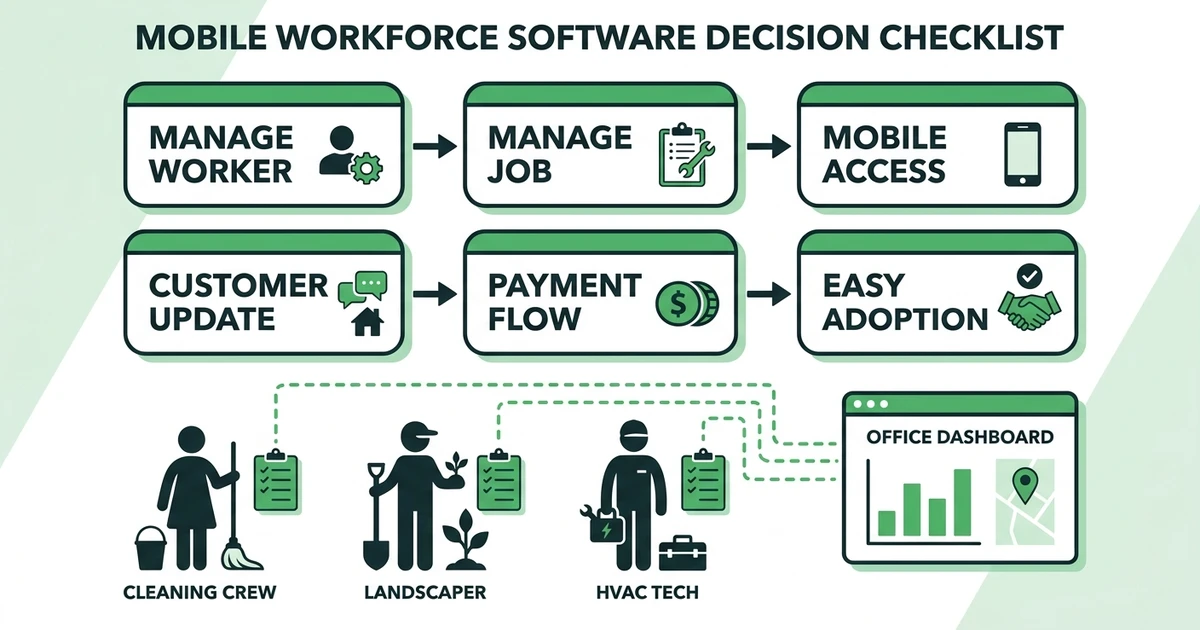
Ask these questions before you choose:
- Does it manage the work or only the worker?
- Can field staff access customer job details from mobile?
- Does it support GPS and time tracking without making the app hard to use?
- Can customers receive updates when the schedule changes?
- Can field data become invoices, payments, reports, and job history?
- Does pricing scale predictably as the team grows?
- Can the team adopt it without heavy training?
Also test the technician view. Field apps fail when the office loves them but the crew avoids them. Fieldified’s mobile app workflow is designed around the job details technicians actually need between appointments.
Is Fieldified right for my mobile service team?
Fieldified is right if your mobile staff perform customer jobs, not just shifts. That includes cleaners servicing recurring sites, landscapers moving through routes, HVAC technicians handling repairs, plumbers responding to urgent calls, and installation crews documenting completion.
It is also a strong fit if the office needs quotes, job notes, photos, invoices, payments, customer history, and schedule changes in one place. You can compare that broader workflow with Fieldified’s guide to a field service mobile app.
Fieldified may not be the best choice if you only need onboarding, employee handbooks, HR forms, or internal announcements. In that case, a workforce-only platform may be enough.
Why trust this mobile workforce guide?
This guide separates field-service-first tools from general workforce tools. That distinction matters because a contractor does not just need to know who is working. The office needs to know what job they are working on, what happened there, and what should happen next.
The evaluation criteria include scheduling, mobile job access, GPS and time visibility, customer updates, quote-to-payment support, pricing style, and fit for cleaning, landscaping, HVAC, plumbing, installation, and maintenance teams.
For a one-vendor alternatives lens, Fieldified’s guide to Connecteam alternatives is a useful follow-up when you are weighing employee apps against field service platforms.
Frequently Asked Questions
What is the best mobile workforce management software for field service teams?
Fieldified is the best option when mobile workforce visibility needs to connect with customer jobs, quotes, invoices, payments, and dispatch. Workforce-only apps can manage shifts well, but contractors usually need job lifecycle tools too.
How is mobile workforce management software different from field service software?
Mobile workforce tools focus on employees, schedules, time tracking, location, chat, and forms. Field service software goes further by connecting those mobile updates to customer records, estimates, work orders, invoices, and payments.
Do cleaning and landscaping teams need GPS tracking?
GPS tracking can help cleaning and landscaping owners confirm site arrivals, support payroll, and answer customer questions about visit timing. It works best when it is tied to jobs, routes, and proof of completion rather than used as a standalone tracker.
Can technicians use mobile workforce software from the field?
Yes, but the mobile app needs to be simple enough for field staff to use between jobs. Look for job notes, photos, status updates, customer details, and offline-friendly workflows where possible.
Is Fieldified a workforce app or a field service platform?
Fieldified covers mobile workforce needs like scheduling, dispatch, technician updates, and time visibility, but it is primarily a field service platform. That means the mobile work connects to quotes, clients, invoices, payments, and AI call handling.
Conclusion
The best workforce tool depends on whether your business manages shifts, jobs, or both. For field service contractors, the stronger choice is usually a platform that connects mobile staff to the customer job lifecycle.
Fieldified is built for that job-based reality. Book a Fieldified demo to see how your office can manage mobile technicians, customer jobs, quotes, invoices, and payments from one place.