 EN
 DE
 ES
 FR
 NL
 PT
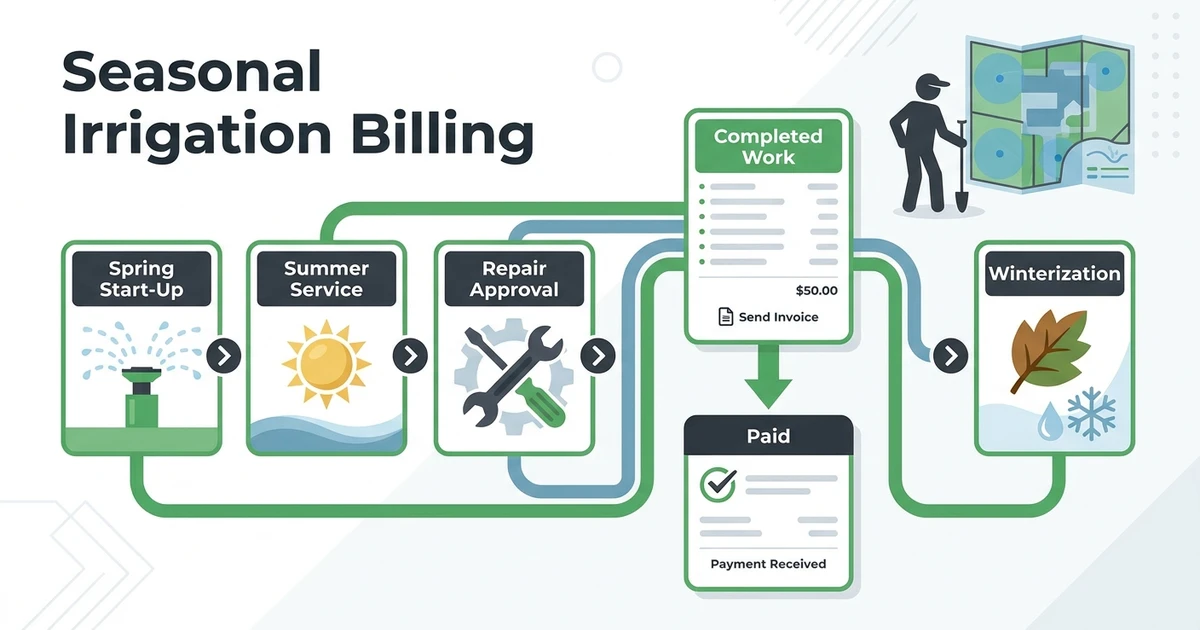


Quick Answer: Irrigation billing is easier when spring startups, recurring service, repairs, and winterization each have a defined billing trigger. Fieldified connects completed-job details to invoices, reminders, and payment records so the office can bill from the work that actually happened.
Irrigation work does not arrive in an even weekly pattern. Spring startups can fill the calendar quickly. Mid-season repair calls can interrupt planned work. Winterization closes the year with another concentrated push. A billing process that treats every job the same usually leaves the office chasing details after the season gets busy.
The better approach is to set the billing rule before the job happens. Decide what triggers an invoice for each service type, record the work and approved changes at the property, then make the invoice match that record. Customers get a clearer explanation, and the office has less reconstruction to do later.
Why seasonal irrigation work needs a billing calendar
A billing calendar is not a second dispatch calendar. It is a simple map of when each kind of completed work becomes ready to bill. It keeps seasonal service from being mixed into repair work or left waiting until the office finds time to build invoices.
For example, a spring startup might be billed after the completed visit or under a pre-agreed seasonal plan. A monthly maintenance customer may be billed on a regular cadence. A repair should move through a documented approval and completed-work process. Winterization can follow its own seasonal agreement.
| Service period | Typical billing event | Record to confirm before invoicing |
|---|---|---|
| Spring startup | Startup work is completed | Property, zones serviced, work notes, approved extras |
| Mid-season maintenance | Agreed recurring date or completed visit | Service date and recurring-plan details |
| Repair | Approved repair is completed | Issue, approval, labor, parts, and final work notes |
| Winterization | Winterization work is completed | Property, completed scope, and any added work |
This calendar does not set legal payment terms or tax treatment. It simply gives the office a repeatable moment to review what was completed before an invoice goes out.
Assign ownership for that review. A technician may complete the field record, while an office manager confirms the approved scope and billing trigger. The handoff should be clear enough that a busy startup week does not leave completed jobs sitting unbilled because everyone assumed someone else would finish the record.
How to bill spring startups, mid-season visits, repairs, and winterization
Start with a separate workflow for each type of work. Spring startups often have a known base scope, but a technician may find a damaged head, controller issue, or valve problem. Record that discovery as a potential repair rather than quietly folding it into the startup charge.
For recurring maintenance, the billing cadence should match the customer agreement. The office can bill per visit or on a regular statement, as long as the invoice makes clear which service period or visits it covers. Keep a pause, skipped visit, or changed frequency in the same customer record before the next bill is created.
Repairs need one more step. Capture the issue, the recommended work, the customer’s approval, and the completed result. For winterization, confirm that the final invoice is tied to the service actually performed at that property, not a copy from last year’s route.
EPA’s 2023 irrigation guidance recommends an audit after installation and repair before an irrigation system is put into operation.EPA WaterSense irrigation guidance That is a service-context point, not a billing rule. It does, however, illustrate why repair work should remain identifiable rather than disappearing into a routine maintenance charge.
What to record before invoicing an irrigation repair
The invoice is only as clear as the job record behind it. Before billing, make sure the team has the property, service date, reported issue, technician findings, approved scope, completed work, labor, parts, and any notes needed for customer follow-up.
This is particularly useful when a technician sees the problem on-site but the office sends the invoice later. Without the notes and approval, the office may know that a repair occurred but not why the customer is being charged more than the usual service visit.
Keep the record practical. A customer generally needs a clear repair description and total. Your team may need more detail, such as zone or controller notes, photos, and parts information. Both can remain connected to the same job without crowding the customer-facing invoice.
How to handle parts, approvals, and changed scope without confusing the customer
Changed scope is normal in irrigation work. The customer may call for a startup, while the technician finds an additional repair that requires labor and a replacement part. The important thing is not to treat that discovery as automatic billable work.
Use a consistent handoff. Document the finding, request or record approval using the method your business uses, and update the job before the work becomes an invoice. Then show the original service and the approved addition in separate, clear entries.
| Change on the job | Billing record to keep | Customer-facing invoice treatment |
|---|---|---|
| Repair found during startup | Technician finding and approved scope | Separate repair line from the startup charge |
| Replacement part needed | Part detail and associated labor | Itemize the part and labor when useful |
| Return visit required | Reason and scheduled follow-up | Identify the return work rather than hiding it in a base service line |
This approach helps the customer review the invoice and helps your office see what happened when the customer calls later. It also prevents a routine seasonal charge from becoming a catch-all category for work that changed on-site.
How to review outstanding irrigation invoices before the season ends
The right time to check outstanding invoices is throughout the season, not when the last winterization job is closed. Review unpaid work by service type and customer so the office can see whether the missing step is an unsent invoice, an unanswered question, or a payment follow-up.
Keep the review focused on the record. Was the job completed? Was an invoice sent? Does the invoice clearly reflect the completed work? Has the customer received the agreed reminder? That sequence is more useful than a generic overdue list with no job context.
The IRS identifies invoices as supporting documents in a small-business recordkeeping system.IRS Publication 583 That does not replace advice from an accountant. It is a practical reminder to keep service, invoice, and payment records organized enough to support the business record.
Use the review to find patterns, not just overdue balances. If spring-startup invoices repeatedly wait for missing job notes, change the closeout checklist. If repair invoices generate questions about parts, make the approval and repair description clearer. Each repeat issue is a process problem your team can solve before the next seasonal rush.
What irrigation billing software should connect
Evaluate the billing workflow with a season-long scenario, not just one demo invoice. Create a spring startup, add an approved repair, schedule a recurring maintenance visit, and complete a winterization job. Then ask whether the team can find the job record, create the correct invoice, see payment status, and answer a customer question without searching through separate tools.
Look for a system that connects the following:
- Customer and property history
- Completed job details and technician notes
- Approved repair changes and parts
- Invoices, payment options, and reminders
- Outstanding payment status and follow-up history
The irrigation service software page covers scheduling, customer records, and field work. For the billing decision, look specifically at how those details become a clear invoice after seasonal service or a repair.
The existing irrigation business software guide focuses on dispatch and job context. Use it when evaluating route and field coordination. Use this billing guide when the question is whether those completed jobs can become accurate, explainable invoices without a second round of data entry.
During a product review, ask the team to find a repair from earlier in the season after the invoice has been sent. They should be able to see the property, work completed, approval, invoice, and payment status together. That test shows whether the system supports the full seasonal record, not just the first invoice screen.
Keep the test grounded in an actual customer agreement. A system may produce an attractive invoice, but the office still needs to understand why it was sent and what changed on the job. The complete record matters most when the calendar is full and the original technician is already on the next route.
If your immediate need is a single client-ready format, the free contractor invoice generator can help. When the volume of seasonal work grows, a connected job-to-payment workflow gives the office much more context.
Keep the seasonal job, invoice, and payment record together. Fieldified helps irrigation teams move from completed work to a clear invoice and consistent payment follow-up without rebuilding the details in a separate tool. Book a demo.
Irrigation billing FAQs
How should irrigation companies bill spring startups?
Use the billing point agreed with the customer, then ensure the service record confirms the work before invoicing. If a technician finds extra repair work, keep that approval and charge separate from the base startup service.
Can irrigation billing software manage seasonal invoices?
It should keep seasonal jobs, repair details, invoices, payment status, and customer history connected. Test the full year pattern, including a repair and winterization, rather than only testing a single invoice screen.
What should be on an irrigation repair invoice?
Show the property, date, repair description, labor, parts, total, and payment terms that apply. Keep the fuller job record and customer approval linked to the invoice so the office can answer follow-up questions.
How do I bill for irrigation parts?
Document the approved part and the labor separately when that makes the charge clearer. The invoice should describe what was completed, while the job record can keep the technical details needed by the office and technician.
When should I send a winterization invoice?
Follow the timing in the customer agreement and issue the invoice from the completed winterization record. Before sending it, make sure any changed scope or added work is documented rather than assumed.
Conclusion: connect seasonal service records to payment
Irrigation billing becomes easier when every season has a clear trigger and every invoice starts with the completed job. Keep routine service predictable, make repairs visible, and review payment follow-up while the job context is still easy to find.
Fieldified gives irrigation teams one connected place for job details, invoices, reminders, and payment status. Book a demo to see the job-to-payment workflow with your seasonal service process.