EN
EN DE
DE ES
ES FR
FR NL
NL PT
PT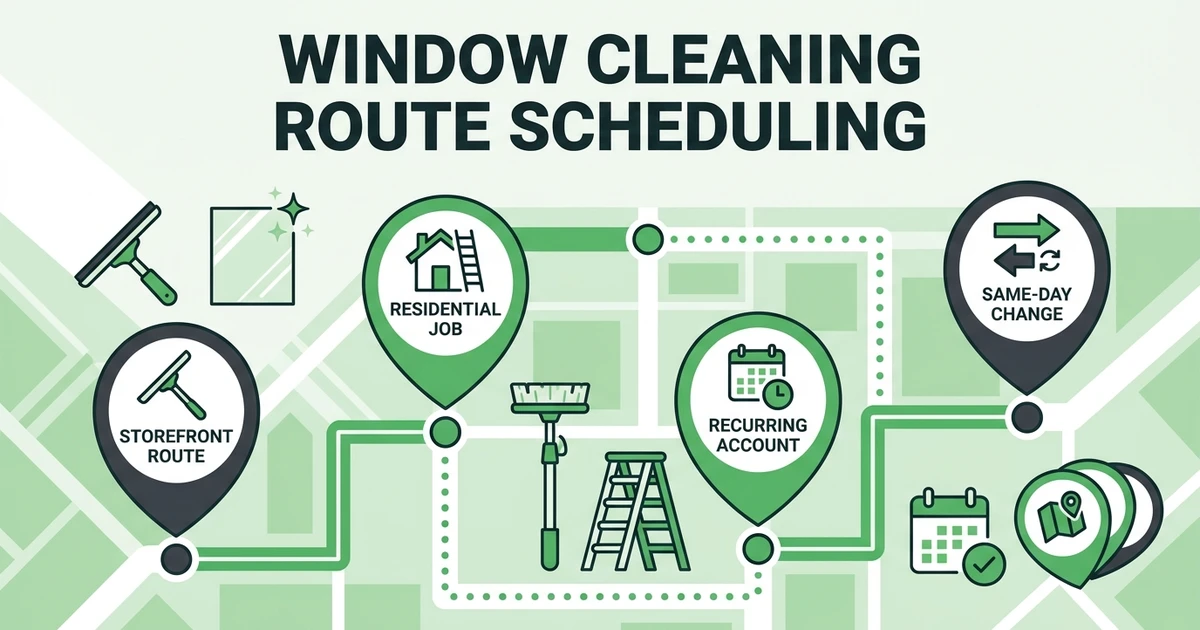





Quick Answer: Window Cleaning Route Scheduling
Window cleaning route scheduling is the process of planning daily and recurring window cleaning jobs by location, crew availability, access needs, equipment, and customer timing. A good route workflow helps window cleaners reduce windshield time, prevent missed stops, and keep clients updated when schedules change.
Route planning gets harder once you add recurring storefronts, residential jobs, ladder work, access notes, weather delays, and payment follow-up. A basic calendar can show where a crew should be. It cannot always explain what they need when they arrive.
Fieldified helps window cleaning teams manage scheduling, dispatch, job notes, proof of work, invoices, and payments from one place. That matters when the route changes after the crew is already on the road.
BLS includes washing windows, walls, and glass among janitor and building cleaner duties in its occupational profile. The same profile says janitors and building cleaners held about 2.4 million jobs in 2024 according to BLS data, so clean scheduling matters across a large labor market.
Why Window Cleaning Routes Get Messy Fast
Window cleaning routes look simple until details start moving. One storefront wants service before opening. One residential client forgot to unlock the side gate. One commercial account needs a water-fed pole crew, not the tech who was closest.
Then weather changes the plan. Rain may not cancel every job, but it can change which stops make sense first. Parking, ladder access, interior panes, and customer timing all affect the route.
The hidden problem is that route details often live in too many places. The schedule is in a calendar. Access notes are in a text thread. Pricing is in a spreadsheet. The invoice waits until someone remembers what was completed.
That is how small misses become expensive. A technician drives across town only to find locked access. The office calls three customers to reshuffle the afternoon. A finished job does not get billed until days later.
What Window Cleaning Route Scheduling Needs to Include
A window cleaning route needs more than start times and addresses. It should give the office and crew enough context to complete each stop without a chain of phone calls.
A strong route workflow should include:
- Job location and route order
- Crew assignment and availability
- Equipment notes for ladders, poles, screens, or high glass
- Access instructions, parking notes, and contact preferences
- Recurring service frequency
- Client reminders and same-day updates
- Photo proof and completion status
- Invoice and payment follow-up
The details matter because window cleaning is not one uniform task. Storefront glass, residential second-story panes, post-construction cleanup, and recurring commercial work all create different route needs.
This is why the parent window cleaning software workflow should connect scheduling with job tracking and payment. If the route stops at dispatch, the office still has to chase the rest.
How to Schedule Recurring Window Cleaning Jobs
Recurring window cleaning jobs are valuable because they make demand predictable. They also punish sloppy scheduling because one missed visit can affect a long-term account.
Start by grouping recurring jobs by frequency. Weekly storefronts, monthly commercial accounts, and quarterly residential clients should each have their own rhythm. Then group by route density, access limits, and crew size.
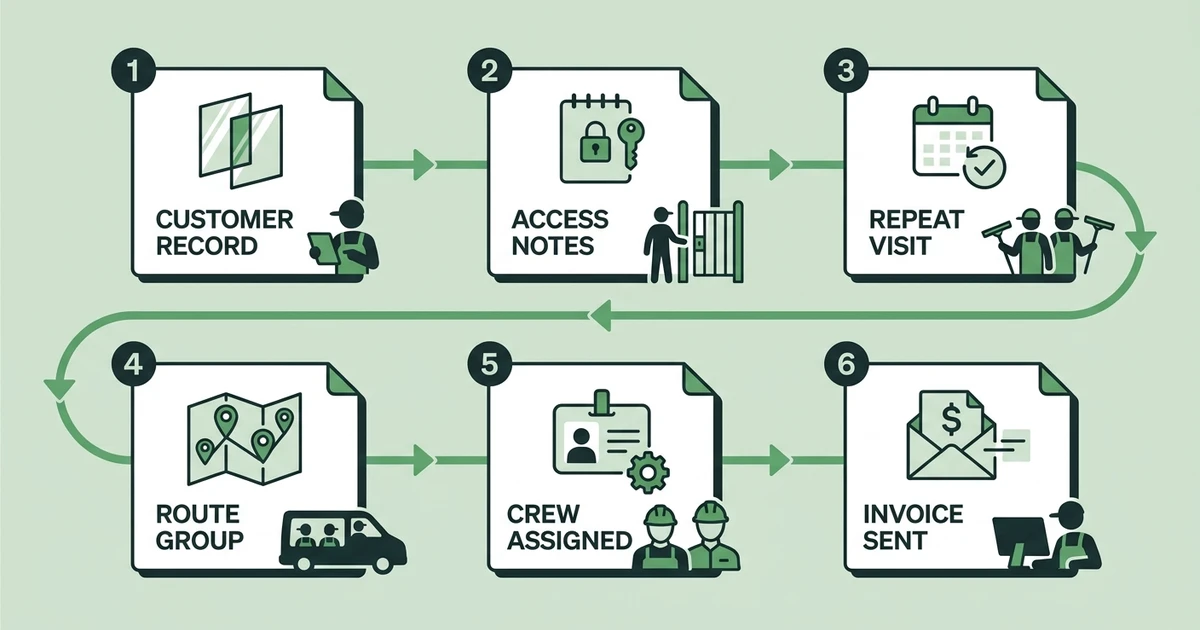
A simple recurring route process looks like this:
- Create the customer and property record.
- Add access notes, preferred time windows, and service scope.
- Set the recurring frequency.
- Group stops by neighborhood or commercial corridor.
- Assign the right crew and equipment.
- Send reminders before the visit.
- Capture completion notes and photos.
- Send the invoice or payment link.
If you are still dialing in pricing before building routes, use the job estimate calculator alongside this window cleaning pricing guide. Clean routing works best when each stop is priced with enough margin for travel and setup time.
How to Handle Same-Day Route Changes Without Losing Clients
Same-day changes are part of window cleaning. A customer cancels. Rain hits one part of town. A storefront manager asks for an earlier arrival. A technician discovers that the job needs a second person.
The goal is not to prevent every change. The goal is to make changes visible fast enough that the route still works.
For a three-technician window cleaning business, the morning might start with storefront routes, move into residential jobs after school drop-off hours, then finish with a monthly commercial account. If one storefront is blocked by construction, the office needs to move that stop without breaking the rest of the day.
With a live route, the dispatcher can update the job order, notify the technician, and send the customer a timing update. With a static calendar, everyone starts calling and texting until the day is patched together.
Book a demo and see how Fieldified helps window cleaning teams plan routes, keep access notes attached, and update clients when schedules change.
What to Look for in Window Cleaning Scheduling Software
Window cleaning scheduling software should help you evaluate the whole route, not just the appointment. The right tool should fit how crews actually move through a day.
Use this checklist before choosing a system:
| Route Need | Why It Matters for Window Cleaning | What to Look For |
|---|---|---|
| Recurring jobs | Storefront and commercial routes repeat | Repeat visits with easy rescheduling |
| Access notes | Locked gates and entry rules cause delays | Notes attached to customer and job records |
| Equipment planning | Ladders, poles, and screens affect assignment | Crew and job notes visible before dispatch |
| Mobile updates | Crews need current route instructions | Phone access for schedule and status changes |
| Proof of work | Clients may want confirmation before paying | Photos, notes, and completion reports |
BLS Occupational Requirements Survey data says 50.4% of building and grounds cleaning and maintenance workers had varying work schedules in 2025 according to its ORS profile. The same profile says these workers spent 88.9% of the workday standing in the physical demands section, which is a reminder that field time is too valuable to waste on avoidable route confusion.
Look for tools that help you schedule and dispatch window cleaning crews and track every window cleaning job detail. Route planning and job proof should work together.
How Fieldified Helps Window Cleaning Teams Plan Better Routes
Fieldified gives window cleaning teams one place to manage route scheduling, job details, customer communication, invoices, and payments. That helps the office keep the day moving without relying on scattered notes.
Crews can use the mobile app to see the current route, check property notes, add photos, and update job status. When the office changes the schedule, the crew is not working from yesterday’s plan.
Fieldified also helps with client communication. Reminders and updates reduce the chance that a technician arrives at a locked property or a client forgets the appointment.
After the work is complete, the same job record can support invoicing and follow-up. That keeps route scheduling connected to cash flow, not just dispatch.
Frequently Asked Questions
What is route scheduling for window cleaners?
Route scheduling for window cleaners means planning jobs by location, crew availability, equipment, access needs, and customer timing. It helps crews complete stops in a logical order and gives the office a live view of the day.
How do I make recurring window cleaning routes easier to manage?
Group accounts by frequency, neighborhood, property type, and time window. Then use repeat schedules with property notes so crews do not rebuild the same plan every week or month.
What is the best way to handle rain delays?
Keep the route flexible and communicate quickly. Move affected jobs, protect priority accounts, and send updated timing to clients before they have to ask.
What should technicians see on a window cleaning route?
Technicians should see the job order, address, access notes, scope, equipment needs, contact details, photos or proof requirements, and completion steps. That keeps the field crew from calling the office for basic instructions.
Does Fieldified support route scheduling for window cleaners?
Yes. Fieldified supports scheduling, dispatch, mobile job updates, job tracking, client communication, invoices, and payments for window cleaning teams. It is built for contractors who need the route, job details, and follow-up in one workflow.
Conclusion: Build Routes Your Crew Can Actually Follow
Window cleaning routes fail when they do not include the real details of the job. Timing, access, equipment, weather, proof of work, and payment follow-up all matter.
A better route workflow gives the office control without slowing the crew down. It keeps recurring jobs predictable, same-day changes visible, and clients informed.
That is the difference between a route your crew can follow and a route the office has to rescue all day.
Book a Fieldified demo to manage route scheduling, recurring jobs, proof of work, invoices, and payment follow-up from one place.