EN
EN DE
DE ES
ES FR
FR NL
NL PT
PT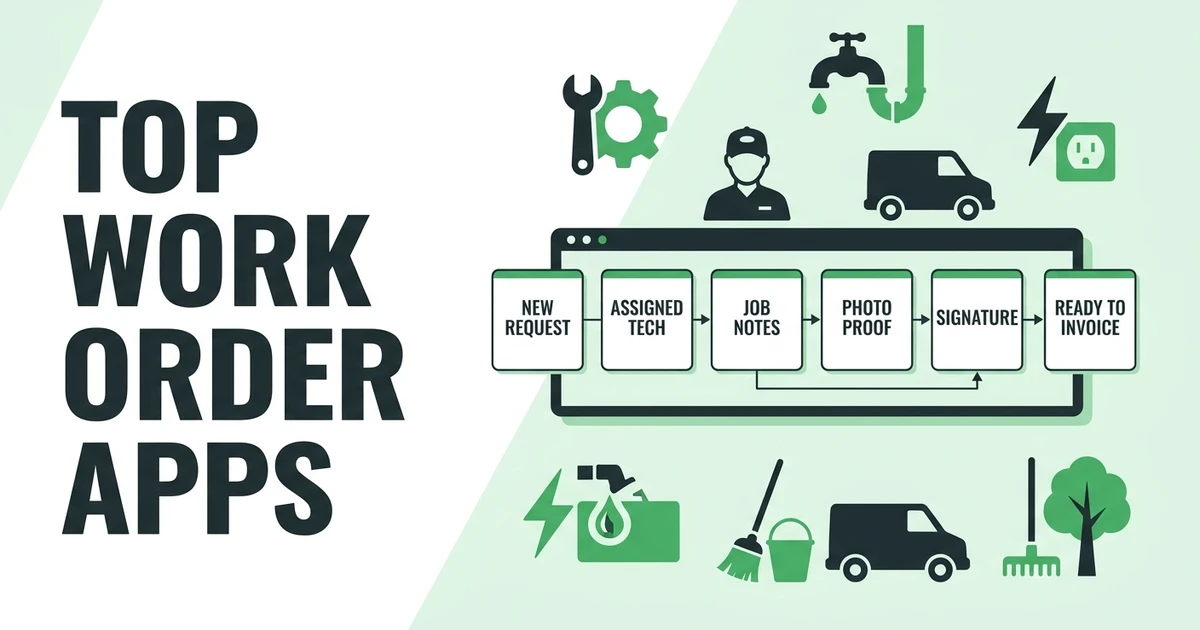





Quick Answer:
The best work order apps help contractors create jobs, assign technicians, collect field updates, document completed work, and prepare invoices without chasing texts or paper forms. Fieldified is the best fit for small and growing field service teams that want work orders connected to scheduling, customer history, invoices, payments, and mobile technician updates.
TL;DR:
- Fieldified - Best for quote-to-work-order-to-invoice workflows
- Jobber - Best for simple home service work orders
- Housecall Pro - Best for mobile-first residential teams
- FieldPulse - Best for small contractors getting organized
- Workiz - Best for call-heavy service teams
- Service Fusion - Best for unlimited-user FSM basics
- Zuper - Best for flexible field service operations
- ServiceM8 - Best for small mobile trade businesses
- Simpro - Best for commercial service work orders
- ServiceTitan - Best for larger trade companies
- ServiceTrade - Best for commercial service contractors
- MaintainX - Best for maintenance teams
- UpKeep - Best for asset-heavy work orders
- Limble - Best for preventive maintenance operations
- Fiix - Best for CMMS-led maintenance programs
- Fieldwire - Best for construction field tasks
- Procore - Best for large construction project teams
- Contractor Foreman - Best for construction contractors on a budget
- JobNimbus - Best for exterior contractors
- mHelpDesk - Best for basic service management
These tools look similar on a pricing page, but they are not built for the same day in the field. A plumber needs job notes, customer history, photos, and a fast invoice handoff. A facilities team may care more about assets, inspections, and preventive maintenance.
This guide separates field service work order tools from CMMS and construction project apps so you can compare the right category, not just the longest feature list.
What are work order apps?
These apps help contractors create, assign, track, document, and complete jobs from a phone or office dashboard. For an HVAC company, that may mean sending a furnace repair to the right technician with the customer’s address, notes, equipment history, and arrival window.
For a cleaning company, it may mean assigning a recurring job, adding checklist items, collecting photos, and confirming the job is ready to bill. The best tools keep the office, field crew, and customer record connected.
A simple task app can remind someone to visit a job. A real field service work order app stores what was requested, who did it, what changed, what photos were captured, whether the customer approved the work, and what the office should invoice.
If this is the exact workflow you are fixing, Fieldified’s work order software page shows how work orders connect to scheduling, job details, and follow-up steps.
If the field documentation piece is the bigger issue, the track every job detail feature shows how notes, photos, forms, and job status updates stay connected after a technician leaves the site.
Why paper work orders break once your crew grows
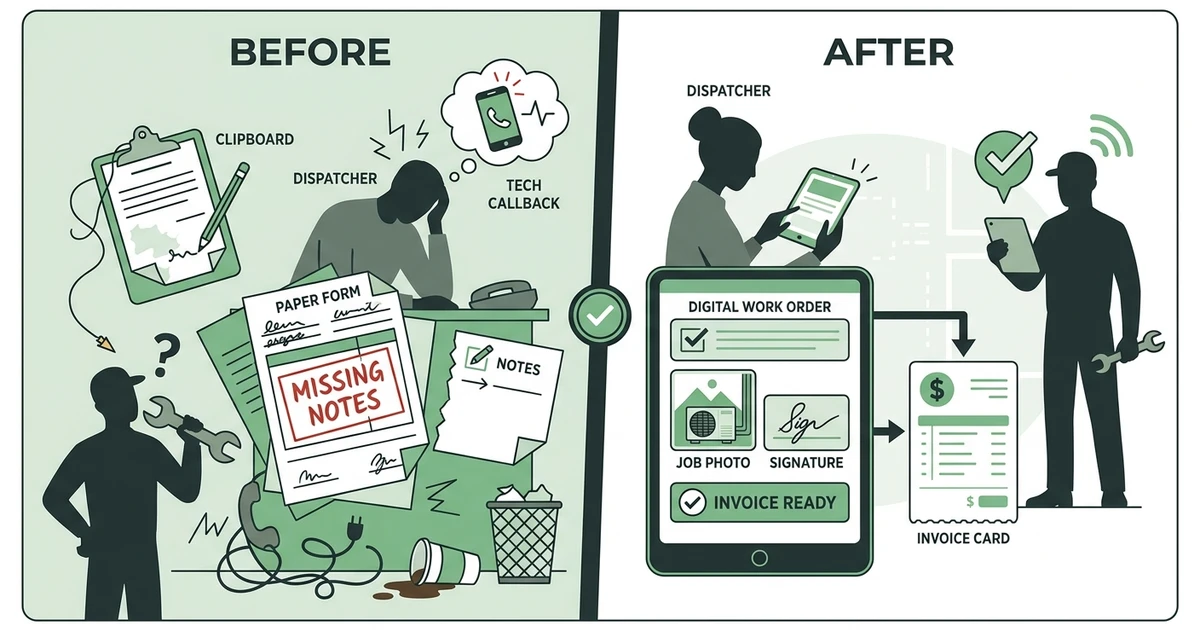
Paper works when the owner knows every customer, every technician, and every job by memory. It breaks when the HVAC dispatcher gets an emergency call, one technician is delayed, another needs a part, and the office still has to know which jobs can be billed by the end of the day.
That pressure is not going away. The Bureau of Labor Statistics projects about 608,100 openings each year in installation, maintenance, and repair occupations from 2024 to 2034 in its occupational outlook.
Deloitte’s 2026 engineering and construction outlook says the industry may need about 499,000 new workers in 2026, and that labor gaps can contribute to delays, cost overruns, and margin pressure in its industry outlook.
When skilled labor is hard to find, wasting technician time on missing notes and callbacks hurts twice. You lose the job time, then you lose office time reconstructing what happened from texts, photos, and memory.
A good work order app gives every job a single source of truth. The office can see the status, the technician can update the work from mobile, and the invoice can move without waiting for a paper form to return to the shop.
For a deeper look at field access, the field service mobile app guide explains what technicians should be able to do from the jobsite.
Quick comparison: top 20 field service work order tools
Use this table to narrow the list before reading every review. Focus first on the workflow type, because a CMMS tool and a contractor field service app can both use the phrase “work order” while solving very different problems.
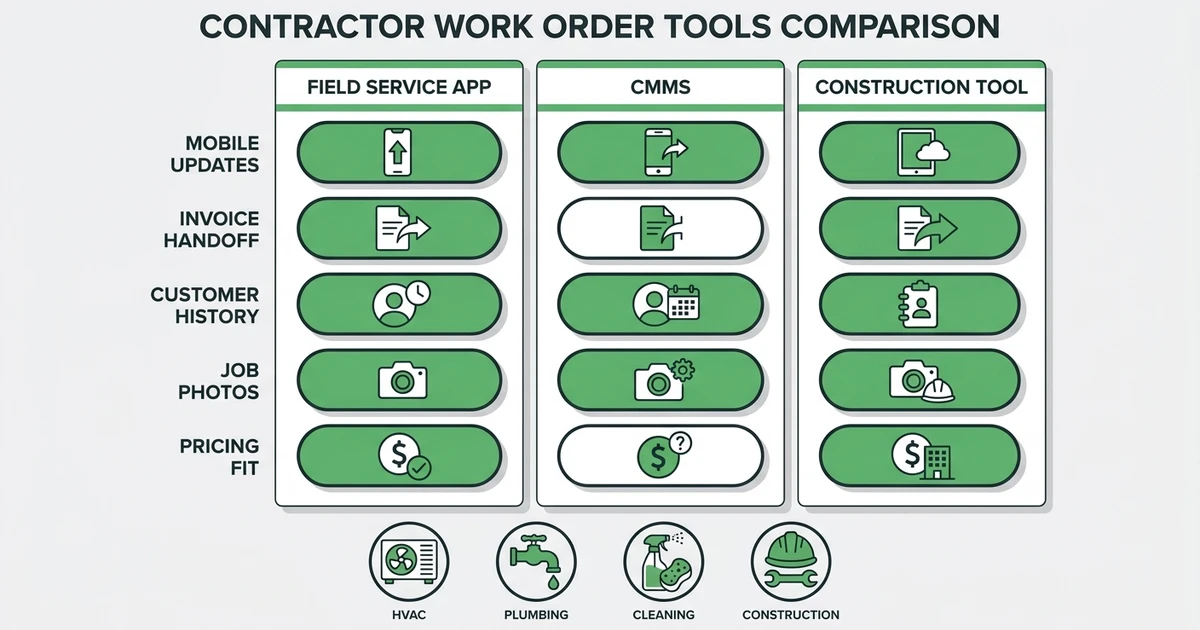
For most small contractors, the most important columns are mobile field updates, invoicing handoff, and pricing style. Those three usually decide whether the app saves time or just creates another place to enter job notes.
| Rank | App | Best for | Work order strength | Mobile field updates | Pricing style |
|---|---|---|---|---|---|
| 1 | Fieldified | Field service contractors | Job lifecycle work orders | Strong | Published flat plans |
| 2 | Jobber | Simple home services | Easy job records | Strong | Tiered plans |
| 3 | Housecall Pro | Residential teams | Mobile job management | Strong | Tiered plans |
| 4 | FieldPulse | Small contractors | Jobs, estimates, invoices | Good | Tiered plans |
| 5 | Workiz | Phone-led teams | Dispatch and job tracking | Good | Tiered plans |
| 6 | Service Fusion | Price-conscious teams | FSM work orders | Good | Flat monthly plans |
| 7 | Zuper | Flexible operations | Configurable jobs | Strong | Tiered or custom |
| 8 | ServiceM8 | Small mobile trades | Field job cards | Strong | Tiered plans |
| 9 | Simpro | Commercial service | Work order depth | Good | Custom pricing |
| 10 | ServiceTitan | Larger trades | Advanced job records | Strong | Custom pricing |
| 11 | ServiceTrade | Commercial contractors | Asset service records | Good | Custom pricing |
| 12 | MaintainX | Maintenance teams | CMMS work orders | Strong | Tiered plans |
| 13 | UpKeep | Asset-heavy teams | Preventive maintenance | Strong | Tiered plans |
| 14 | Limble | Maintenance programs | PM and assets | Strong | Custom or tiered |
| 15 | Fiix | CMMS operations | Maintenance workflows | Good | Tiered plans |
| 16 | Fieldwire | Construction tasks | Field task tracking | Good | Tiered plans |
| 17 | Procore | Large construction | Project work tracking | Good | Custom pricing |
| 18 | Contractor Foreman | Contractors on a budget | Project and work tracking | Good | Tiered plans |
| 19 | JobNimbus | Exterior contractors | Production workflows | Good | Custom pricing |
| 20 | mHelpDesk | Basic field service | Work order basics | Good | Custom or legacy plans |
Detailed reviews: 20 field service work order tools
The reviews below focus on fit, not just feature count. A landscaping company that needs recurring jobs and fast customer updates should not buy the same system as a plant maintenance team managing hundreds of assets.
Use the notes as a shortlist, then check current plans, implementation needs, integrations, and mobile workflows before you commit.
1. Fieldified
Fieldified is built for contractors who need work orders tied to the full job lifecycle. The office can manage customer requests, quotes, schedules, dispatch, job tracking, invoices, payments, and customer communication in one place.
That matters when a plumber finishes a repair and the office needs notes, photos, parts, and approval before sending the invoice. Fieldified keeps that work connected instead of forcing the team to piece it together from texts.
Key features:
- Work orders connected to scheduling and dispatch
- Mobile updates for technicians
- Customer history and job notes
- Quote-to-job workflows
- Invoicing and payment collection
- Client communication and portal
Pros:
- Strong fit for small and growing field service teams
- Flat plan pricing is easier to plan around than per-user surprises
- Covers work orders, CRM, quotes, invoices, and payments together
Cons:
- Not a pure construction project management system
- Large enterprise teams may need deeper custom implementation layers
Expert verdict: Fieldified is the best overall work order app for contractors that want clean job handoffs from request to payment.
2. Jobber
Jobber is a popular option for home service teams that want simple scheduling, job records, quoting, invoicing, and client communication. It works well for smaller residential teams that want an approachable tool without heavy setup.
The main check is growth fit. If you plan to add technicians, compare total team cost, included features, and whether the workflow still fits once dispatch, follow-ups, and reporting become more important.
Expert verdict: Good for simple residential work orders, especially for teams that value ease of use over deeper operational control.
3. Housecall Pro
Housecall Pro is strong for residential service teams that rely on mobile technicians, customer notifications, and fast job updates. HVAC, plumbing, electrical, and cleaning companies often consider it when they want work orders plus scheduling and payments.
It can be a good fit for owner-led teams, but compare tier limits, automation, reporting, and add-ons carefully. The right plan matters as the office becomes more structured.
Expert verdict: Strong mobile experience for residential contractors that want work orders tied to customer communication.
4. FieldPulse
FieldPulse gives small contractors job management, estimates, invoices, scheduling, and customer records. It is a practical option for teams leaving spreadsheets and paper forms.
It fits best when the owner wants an organized field service workflow without enterprise depth. Larger teams should compare reporting, automation, and admin controls before choosing it as the main operating system.
Expert verdict: A good small-business option for getting work orders and customer details under control.
5. Workiz
Workiz is built around call-heavy service operations, which makes it useful for locksmiths, garage door companies, appliance repair teams, and urgent service trades. Work orders can sit close to calls, scheduling, dispatch, and customer updates.
It is worth considering when inbound calls drive the day. Compare how well its work order records, invoice workflow, and field documentation match your technicians’ actual job flow.
Expert verdict: Best for contractors where the phone, dispatch board, and work order need to stay close together.
6. Service Fusion
Service Fusion appeals to contractors that want core FSM features with a flat monthly pricing angle. It covers work orders, dispatch, estimates, invoices, customer management, and reporting.
It can be useful for teams that want predictable pricing, but buyers should test the interface and mobile workflow. A good price only helps if technicians actually keep the work order updated.
Expert verdict: Strong option for budget-aware field service teams comparing unlimited-user style pricing.
7. Zuper
Zuper is a flexible field service platform with work orders, scheduling, dispatch, mobile forms, automation, and integrations. It is often a fit for companies that need more configuration than a simple home service app provides.
That flexibility is useful, but it can also mean more setup. Contractors should map their work order stages before choosing a configurable tool.
Expert verdict: Best for teams that need adaptable workflows and are willing to spend time setting them up.
8. ServiceM8
ServiceM8 is designed for small trade businesses that want mobile job cards, quoting, scheduling, invoicing, and field updates. It is especially practical for teams where technicians work primarily from phones.
It is less suited to companies that need heavy commercial job costing or deep enterprise reporting. For a small plumbing or electrical crew, though, it can cover the daily basics well.
Expert verdict: Best for small mobile trade teams that need clear job cards and simple field updates.
9. Simpro
Simpro is a deeper platform for commercial contractors, with work orders, service jobs, maintenance, project workflows, inventory, and reporting. It fits teams with more complex job structures.
For smaller contractors, the learning curve may be more than they need. For commercial service teams, the extra depth can be valuable.
Expert verdict: Best for commercial contractors with work orders tied to assets, inventory, projects, and reporting.
10. ServiceTitan
ServiceTitan is built for larger trade businesses, especially HVAC, plumbing, and electrical companies that need advanced operations, reporting, call booking, dispatch, marketing, and payments.
It is powerful, but the fit depends on team size and budget. Smaller contractors should make sure they need the enterprise depth before taking on a heavier system.
Expert verdict: Best for larger trade companies that need extensive operational control.
11. ServiceTrade
ServiceTrade is well suited to commercial service contractors that manage recurring service, assets, service history, and customer communication. Fire protection, mechanical, and commercial maintenance teams often need this kind of record depth.
It is not the simplest option for small residential teams. It shines when the work order must connect to asset history and commercial account expectations.
Expert verdict: Best for commercial service teams managing recurring work and customer-facing documentation.
12. MaintainX
MaintainX is a work order and maintenance management platform with strong mobile work orders, procedures, inspections, and asset-focused workflows. It is often used by internal maintenance teams, facilities, and operations groups.
Field service contractors can use it in some cases, but it is not primarily built around customer quotes, dispatch, invoicing, and payments. Compare it carefully if your revenue depends on external service calls.
Expert verdict: Best for maintenance teams that care more about assets and procedures than contractor billing workflows.
13. UpKeep
UpKeep is a CMMS platform for maintenance work orders, assets, preventive maintenance, and inspections. It is strong for teams managing equipment and facilities.
Expert verdict: Best for asset-heavy teams, not contractors whose main problem is quote-to-invoice field service work.
14. Limble
Limble focuses on maintenance management, preventive maintenance, work requests, parts, and assets. It is a strong fit for reliability and facilities teams.
Expert verdict: Best for organized maintenance programs that need asset history and preventive work orders.
15. Fiix
Fiix is a CMMS tool for maintenance teams that need work orders, asset records, inspections, and maintenance analytics. It fits industrial and facility operations better than small field contractors.
Expert verdict: Best for CMMS-led maintenance, not day-to-day residential service dispatch.
16. Fieldwire
Fieldwire helps construction teams manage tasks, plans, punch lists, and field coordination. It is useful when work is organized around jobsite tasks instead of service appointments.
Expert verdict: Best for construction field task management and punch list coordination.
17. Procore
Procore is a large construction management platform covering projects, documents, financials, RFIs, field productivity, and collaboration. It is more project-heavy than service-call-heavy.
Expert verdict: Best for larger construction companies, not small home service teams looking for simple work orders.
18. Contractor Foreman
Contractor Foreman gives contractors project management, scheduling, estimates, invoices, daily logs, and forms at a comparatively accessible price point. It is broad and construction-friendly.
Expert verdict: Best for contractors who need budget-conscious project controls plus field records.
19. JobNimbus
JobNimbus is popular with roofing and exterior contractors that need CRM, production tracking, job workflows, documents, and communication. It fits sales-to-production handoffs well.
Expert verdict: Best for roofing, siding, and exterior teams where the work order connects to production stages.
20. mHelpDesk
mHelpDesk covers basic field service workflows such as scheduling, jobs, estimates, invoices, and customer records. Some contractors still compare it when looking for straightforward service management.
Expert verdict: Best for teams that want familiar field service basics and do not need the newest automation depth.
Best field service work order tools by use case
Fieldified is the best fit when a contractor wants work orders tied to customer requests, quotes, schedules, invoices, payments, and mobile updates. A plumbing dispatcher can assign a repair, the technician can add notes and photos, and the office can bill from the completed job record.
For residential simplicity, Jobber and Housecall Pro are strong options. For call-heavy shops, Workiz deserves a close look. For asset-heavy maintenance, MaintainX, UpKeep, Limble, and Fiix make more sense than contractor-first FSM tools.
If construction projects are the center of your work, Fieldwire, Procore, Contractor Foreman, and JobNimbus may fit better. The real question is whether your work order starts from a service request or from a construction project plan.
See how Fieldified connects work orders, scheduling, job tracking, and invoices so your office can stop rebuilding completed jobs from texts, photos, and paper forms.
Best work order tools by company size
Solo contractors and two-person teams can often start with a lightweight app that handles simple jobs, estimates, and invoices. The risk is choosing a tool that feels easy today but gets messy once someone else starts scheduling and assigning work.
Teams with 6 to 15 technicians need clearer permissions, mobile updates, schedule changes, customer history, and invoice handoff. At that point, a work order app should act less like a form and more like the job record everyone trusts.
For 16 to 50 technicians, reporting, pricing model, dispatch visibility, and admin controls matter more. Enterprise and multi-location teams may need deeper implementation support, commercial asset workflows, and custom reporting.
How to choose the right work order app
Start by writing down the exact failure you want to fix. If your HVAC techs forget job photos, prioritize mobile documentation. If invoices sit for a week, prioritize completion-to-invoice handoff. If customers keep calling for updates, prioritize communication.
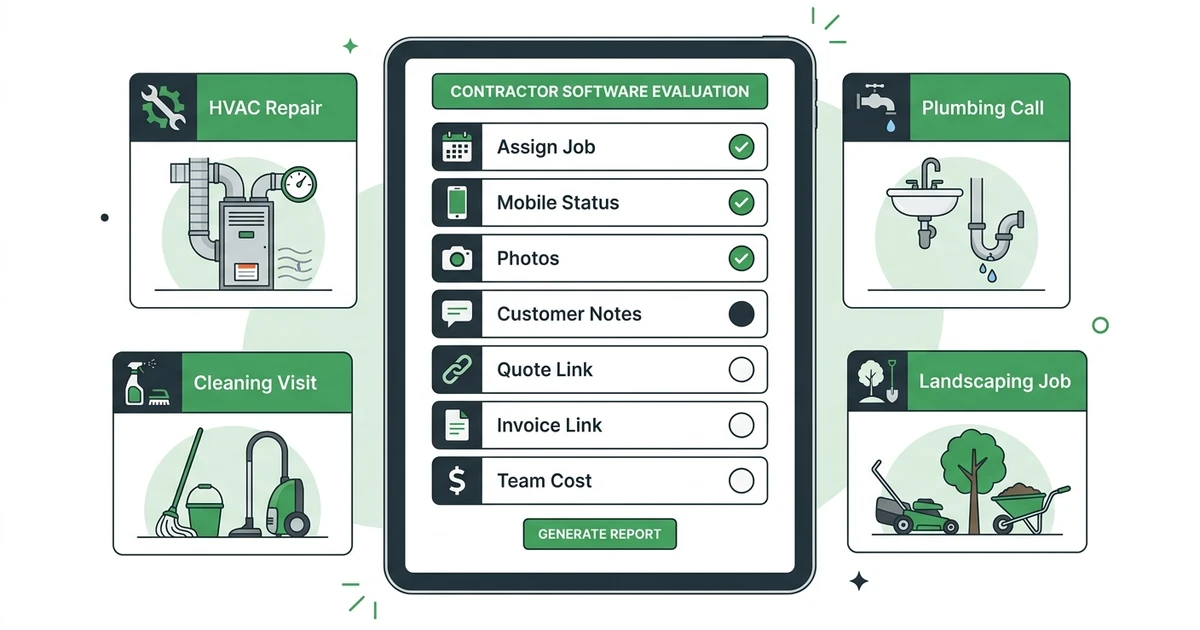
Use this checklist:
- Can the office create and assign jobs quickly?
- Can technicians update status from mobile?
- Can the app capture photos, notes, forms, and signatures?
- Does it connect work orders to quotes and invoices?
- Does it support recurring jobs?
- Does pricing stay reasonable as technicians are added?
- Does it fit your trade instead of generic task management?
Also compare the full team cost. A cheap entry plan can become expensive if mobile users, automation, customer communication, or reporting require higher tiers.
Where Fieldified fits for growing contractors
Fieldified fits contractors who want work orders to live inside the full job lifecycle. The job can start as a request, become a quote, get scheduled, turn into a work order, move through field completion, and become an invoice with payment follow-up.
That is especially useful for HVAC, plumbing, electrical, cleaning, landscaping, and handyman teams where one missed note can delay a bill or create a customer callback. Fieldified is not trying to be a heavy construction project system. It is built for field service work that needs to move cleanly from office to technician to customer.
Frequently Asked Questions
What are the best work order apps for field service contractors?
The best tools for field service contractors include Fieldified, Jobber, Housecall Pro, FieldPulse, Workiz, Service Fusion, Zuper, and ServiceM8. Fieldified is the best fit when work orders need to connect with scheduling, customer records, invoices, payments, and technician mobile updates.
What should a work order app include?
A work order app should include job details, technician assignment, schedule information, customer notes, status updates, photos, forms, signatures, and invoice handoff. For field service teams, mobile access is essential because the work happens away from the office.
Is a work order app different from field service software?
Yes. A work order app focuses on creating, assigning, and completing the job record. Field service software usually includes the work order plus quoting, scheduling, dispatch, CRM, invoicing, payments, and reporting.
What is the best work order app for a small contractor?
For small contractors that want one connected system, Fieldified is the strongest fit. Jobber, Housecall Pro, FieldPulse, and ServiceM8 can also work well depending on the trade, budget, and how much workflow depth the team needs.
Can work order software help with invoices?
Yes, if the app connects completed work to billing. When labor, materials, notes, photos, and approvals are already captured on the work order, the office can send a cleaner invoice with less back-and-forth.
Conclusion
The best work order app is not the one with the longest feature list. It is the one your office and technicians will actually use on a busy day.
For a growing contractor, the work order should answer five questions fast: what was requested, who is assigned, what happened in the field, what proof was captured, and what is ready to bill.
Book a Fieldified demo to see how work orders connect with quotes, scheduling, job tracking, invoices, payments, and customer communication in one contractor-first system.