EN
EN DE
DE ES
ES FR
FR NL
NL PT
PT





Quick Answer:
The best garage door invoicing software helps repair teams turn completed jobs, parts, labor, deposits, and service notes into clear invoices before details get lost. Fieldified is the best fit for garage door teams that want invoicing connected to scheduling, job history, quotes, mobile updates, payment reminders, and customer records.
Garage door invoicing gets messy when the repair moves faster than the office. A technician replaces springs, adds rollers, adjusts a track, collects a deposit, and heads to the next call. If the details come back as a text message, the invoice is already at risk.
This guide compares 8 garage door invoicing software tools:
- Fieldified
- Jobber
- Housecall Pro
- ServiceTitan
- Service Fusion
- Workiz
- FieldEdge
- QuickBooks
The focus is narrow on purpose. This is not another broad garage door business software list. It is about invoices, payment collection, job history, and repair paperwork.
Why Garage Door Invoicing Breaks When Repairs Move Faster Than the Office
Garage door repair invoices need detail. A customer may approve a spring replacement, then the technician finds worn rollers, a frayed cable, or an opener issue. The final bill needs to explain the work clearly without making the customer feel surprised.
That is hard when the invoice is built hours later.
The office may know the customer. The technician knows what happened on site. The quote may live in another tool. The payment status may be tracked somewhere else. When those pieces are split, invoices get delayed or written with incomplete line items.
For a garage door repair team, that can mean:
- Missing parts on the invoice
- Unclear labor descriptions
- Deposits not applied cleanly
- Payment links sent late
- Customers asking what the charge means
- Office staff chasing technicians for details
Cash flow pressure makes this worse. The Federal Reserve reported that 75% of employer firms cited rising costs of goods, services, and/or wages as a financial challenge, and 51% cited uneven cash flow in its 2025 employer firms report. Garage door companies do not need completed repair revenue sitting in paperwork.
Quick Comparison: 8 Garage Door Invoicing Software Tools
Use this table to shortlist the tools. Then test each one with a real repair scenario: spring replacement, added parts, deposit, payment link, and follow-up.
| Rank | Tool | Best for | Invoicing strength | Watch-out |
|---|---|---|---|---|
| 1 | Fieldified | Repair teams that want job-to-payment control | Invoices tied to quotes, jobs, payments, and history | Not accounting-only software |
| 2 | Jobber | Home service teams wanting a known brand | Polished quote and invoice workflow | Per-user pricing may grow with the team |
| 3 | Housecall Pro | Simple residential service invoicing | Mobile-friendly invoices and payments | Compare reporting and workflow depth |
| 4 | ServiceTitan | Large garage door operations | Advanced operations and reporting | Often too heavy for smaller repair crews |
| 5 | Service Fusion | Teams wanting field service invoicing | Dispatch and invoicing in one platform | Test mobile fit with technicians |
| 6 | Workiz | Phone-heavy service teams | Calls, jobs, and payments | Can feel broad if invoicing is the only need |
| 7 | FieldEdge | HVAC and service contractors | Trade workflows and accounting connection | Garage door fit should be tested carefully |
| 8 | QuickBooks | Accounting and bookkeeping | Core invoices and financial records | Not garage-door-first field service software |
1. Fieldified: Best Garage Door Invoicing Software for Field-to-Payment Workflows
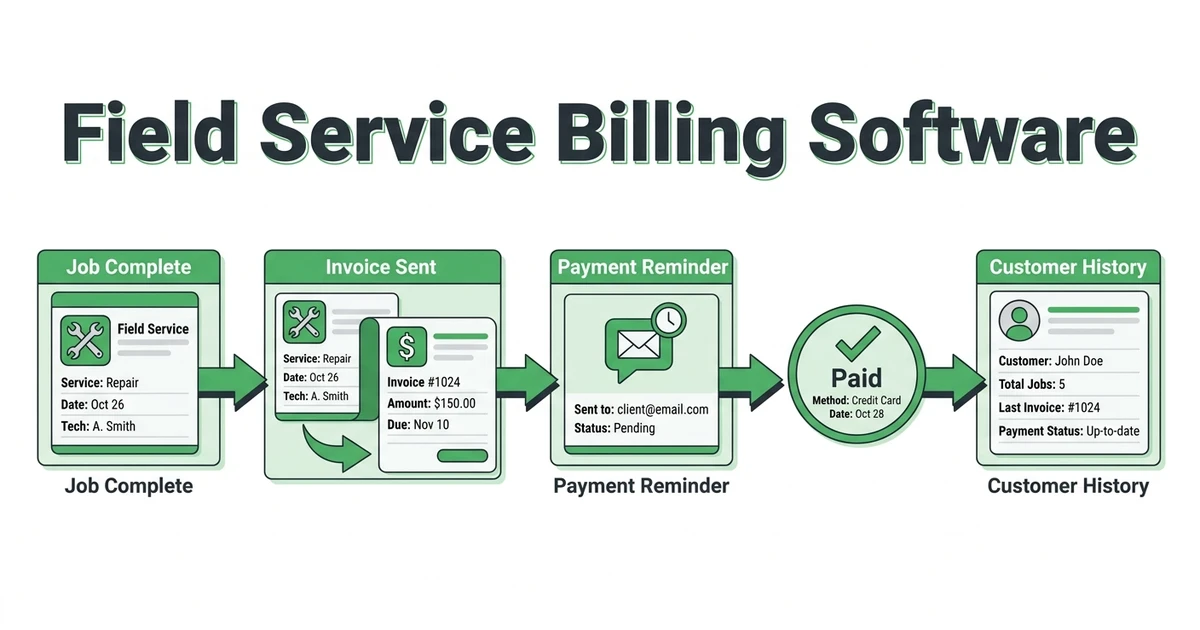
Fieldified is the best garage door invoicing software when invoices need to start from the job, not from a blank accounting form. It connects scheduling, quotes, job details, customer history, invoices, online payments, reminders, and follow-up.
That makes a difference on repair days.
If a technician replaces torsion springs, adds rollers, and notes that the opener may need replacement soon, those details should not disappear into a text thread. The invoice should reflect the work performed, and the customer record should keep the repair history for the next call.
Fieldified helps garage door teams manage:
- Quotes and approvals
- Job notes and mobile updates
- Parts and labor detail
- Invoice creation after completed work
- Online payments
- Payment follow-up
- Customer history
For teams already comparing garage door business software, the invoicing question is simple: can the job move from repair to payment without retyping everything?
Fieldified is strongest when your office wants invoices connected to the same workflow that handles scheduling, dispatch, and customer communication.
If your garage door team wants repair details, invoices, payments, and customer history in one workflow, book a Fieldified demo and walk through how a completed repair turns into a paid invoice.
2. Jobber: Best-Known Invoicing Option for Home Service Businesses
Jobber is a popular option for home service companies that want quotes, scheduling, invoices, and customer communication in one platform. Garage door teams often consider it because it is familiar and built for service businesses.
It can work well for straightforward residential invoicing.
When comparing it for garage door work, test repair-specific details. Can your technician or office clearly itemize springs, cables, rollers, hinges, opener parts, labor, trip fees, and deposits? Can the invoice connect back to the quote and job notes?
Also compare pricing as the team grows. If software costs rise with every added user, the long-term bill may look different from the first demo. Fieldified’s side-by-side comparison page is useful when you want to compare workflow and pricing fit.
3. Housecall Pro: Best for Simple Mobile Invoices and Customer Payments
Housecall Pro is often considered by small residential service teams that want a simple mobile workflow. It can be a good fit when technicians need to send invoices and collect payment without a complex setup.
That simplicity can be valuable.
For garage door repair teams, the question is whether the invoice stays connected to enough job context. A clean invoice is helpful, but the office also needs customer history, quote status, dispatch notes, and payment follow-up.
If your main problem is basic invoice delivery, Housecall Pro may be enough. If your problem is the full repair-to-payment handoff, compare it closely with Fieldified.
4. ServiceTitan: Best for Larger Garage Door Teams With Complex Operations
ServiceTitan is built for larger trade operations that need advanced dispatch, sales workflows, reporting, and office control. Some garage door companies with bigger call volume may shortlist it.
It can handle deep operations.
The tradeoff is complexity and cost. A small garage door repair crew that mainly needs field invoicing, payment links, and job history may not need a heavy enterprise platform.
If your team has managers, office admins, call center needs, and formal reporting requirements, ServiceTitan may fit. If you are trying to get invoices sent faster after service calls, Fieldified is the more practical place to start.
5-8. Other Garage Door Invoicing Tools Worth Comparing
These options may fit depending on whether your invoicing problem sits inside field service, phone intake, accounting, or a broader trade workflow.
Service Fusion: Best for Field Service Invoicing With Dispatch
Service Fusion gives field service teams a way to manage jobs, dispatch, customers, and invoices. It can be worth comparing if you want invoicing inside a broader field service platform.
Test the mobile experience with your technicians. Garage door repair details need to be easy to enter, or the office will still end up chasing notes after the job.
Workiz: Best for Phone-Heavy Garage Door Service Teams
Workiz is often considered by service teams that care about calls, booking, dispatch, and customer communication. That can matter when garage door customers call with urgent repair needs.
For invoicing, test the path from phone call to completed job to payment. If the invoice still needs cleanup after the technician leaves, the workflow may not solve the real problem.
FieldEdge: Best for Trade Teams That Want Accounting Connection
FieldEdge is more common in HVAC and plumbing conversations, but some service contractors may consider it for field operations and accounting connection.
Garage door teams should test fit carefully. The right invoicing tool should match repair tickets, parts, deposits, field notes, and payment follow-up without forcing a workflow built for another trade.
QuickBooks: Best for Accounting, Not Field Workflow
QuickBooks can create invoices, track payments, and support accounting. Many garage door companies already use it or send information to it.
That does not make it garage door invoicing software by itself.
QuickBooks is strongest after the financial transaction reaches the accounting layer. The field layer still needs quotes, scheduling, technician notes, photos, customer history, and repair context. If those details live outside QuickBooks, your office may still be rebuilding invoices by hand.
What to Look for in Garage Door Invoicing Software Before You Book a Demo
Before booking demos, write down the last three invoices that caused problems. Maybe the technician forgot to list a part. Maybe a deposit was missed. Maybe the customer wanted an explanation of labor. Use those examples in the demo.
The best garage door invoicing software should pass a practical test.
Ask each vendor:
| Demo question | Why it matters for garage door teams |
|---|---|
| Can techs invoice from mobile? | Repair details are freshest at the job |
| Can parts and labor be itemized clearly? | Springs, rollers, cables, and openers need clean line items |
| Can invoices connect to quotes? | Customers should see what changed from approval to final bill |
| Can deposits and balances be tracked? | Installation and larger repair jobs often need partial payment |
| Can customers pay online? | Payment should not depend on office follow-up |
| Can unpaid invoices trigger reminders? | Delayed follow-up hurts cash flow |
| Can job history show what was repaired? | Repeat calls need repair context |
The Cleveland Fed reported that rising costs were the top financial challenge for small firms, and reaching customers and growing sales was the top operational challenge in its 2026 survey release. For garage door repair teams, clear invoices and fast payment collection help protect the revenue you already earned.
What if You Already Use QuickBooks for Garage Door Invoices?
QuickBooks can still be part of your process. The question is whether it should be the place where the repair job is built.
For many garage door companies, QuickBooks works well for bookkeeping. It is less helpful when the office needs to know what happened on the job, which parts were installed, what the customer approved, what the technician recommended, and whether a follow-up visit is needed.
That information belongs closer to the field workflow.
Fieldified can help manage the job layer before the accounting layer. Your team can keep scheduling, job notes, quotes, invoices, payments, and customer records connected, then handle accounting needs separately as required.
If your office already has a strong accounting process, do not throw it away. Fix the gap between completed repair and clean invoice.
Is Fieldified Right for Your Garage Door Repair Business?
Fieldified is right for garage door teams that want invoices connected to the rest of the job. It is built for service businesses that need scheduling, dispatch, quotes, mobile notes, invoices, payments, and follow-up together.
It is especially useful when your team handles both repairs and installations.
A spring replacement may need a simple invoice. An installation may need a quote, deposit, scheduled job, balance payment, and follow-up. A callback may need the original repair history. Fieldified keeps those pieces easier to find.
It may not be the best fit if you only need bare accounting invoices and no field workflow. In that case, an accounting tool may be enough.
But if your invoices are delayed because repair information is scattered, Fieldified’s send invoices faster and get paid sooner workflows are built for that handoff.
You can also use the invoice generator for contractors for one-off documents, but the stronger long-term fix is keeping invoicing tied to the garage door job record.
Frequently Asked Questions
What is garage door invoicing software?
Garage door invoicing software helps repair and installation teams create invoices from completed jobs, add parts and labor, send payment links, and track unpaid balances. The best tools keep the invoice connected to the job record and customer history.
What is the best garage door invoicing software for small repair teams?
Fieldified is the top choice for small and growing repair teams that want invoices connected to scheduling, job notes, quotes, payments, and customer records. It helps technicians and the office work from the same repair details.
Can technicians send invoices from the field?
Yes. A good garage door invoice app should let technicians or the office create an invoice from the completed job while the repair details are still fresh. That helps reduce missing parts, vague line items, and delayed billing.
Should garage door invoicing software track parts and labor?
Yes. Garage door repair invoices often include springs, rollers, cables, openers, tracks, labor, trip fees, and deposits. Clear line items help customers understand the bill and help the office protect margin.
How does Fieldified help garage door teams get paid faster?
Fieldified helps garage door teams keep quotes, jobs, invoices, payments, reminders, and customer history connected. That makes it easier to invoice after the repair and follow up when a balance remains unpaid.
Conclusion: Pick Invoicing Software That Starts at the Job
Garage door invoicing should not start from memory. It should start from the repair record, the quote, the parts used, the labor performed, and the payment status.
That is why the best tool depends on your workflow. QuickBooks may handle accounting. A general service app may handle basic invoices. Fieldified is the better fit when invoices need to stay connected to scheduling, mobile job notes, customer history, payment links, and reminders.
Book a Fieldified demo and see how your garage door team can move from completed repair to invoice and payment without rebuilding the job by hand.