EN
EN DE
DE ES
ES FR
FR NL
NL PT
PT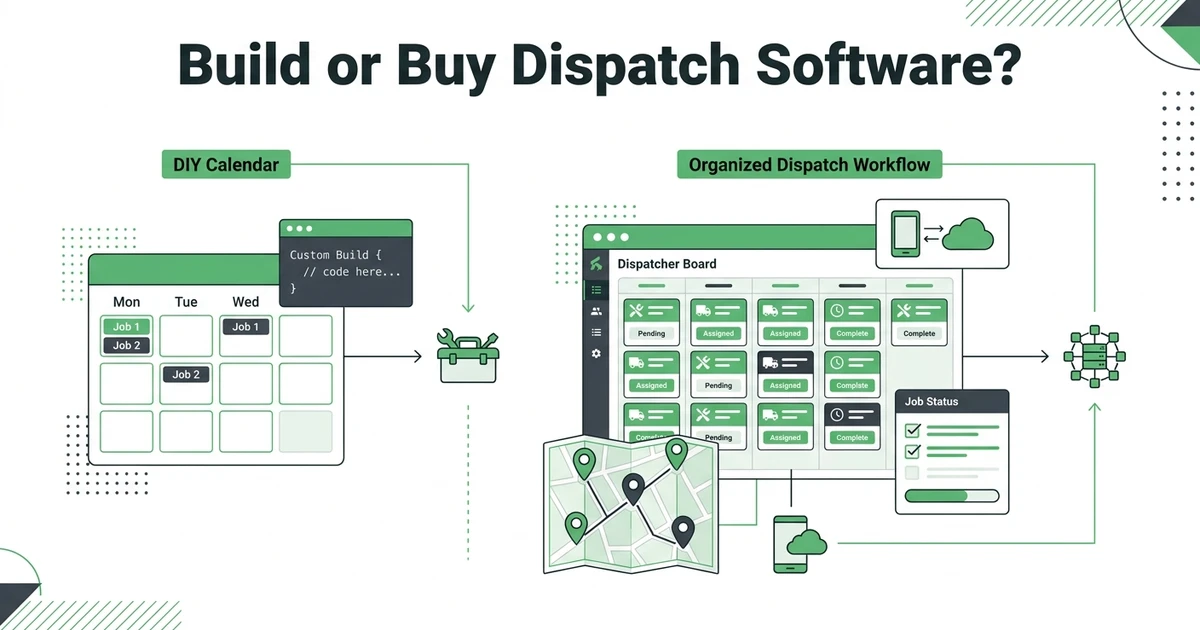





Quick Answer:
You can build your own dispatch and scheduling system if the workflow is simple, but most field service teams outgrow DIY tools once they need live technician updates, customer history, work orders, invoices, payments, and reminders in the same place. For a growing team, buying field service software is usually faster and less risky than maintaining a custom system.
If you are asking whether you can build your own dispatch and scheduling system, the honest answer is yes. A spreadsheet, shared calendar, Airtable base, or no-code app can organize early jobs better than a notebook.
The harder question is whether you should own that system once your team is handling real dispatch pressure. A plumbing office with two urgent leaks, three maintenance calls, and a technician calling in sick needs more than a neat calendar view.
The system has to protect the work while the day changes.
Can You Build Your Own Dispatch and Scheduling System?
You can build your own dispatch and scheduling system in several ways. A solo contractor might use Google Calendar and a spreadsheet. A growing cleaning company might use Airtable forms and filtered views. A larger HVAC team might hire a developer to build a custom dispatch board.
Each option can work at the right stage. The mistake is assuming a dispatch board is only a list of jobs and technicians.
Real dispatch has to answer sharper questions:
- Who is available right now?
- Which technician has the right skill?
- What did the customer ask for?
- What was quoted?
- Has the job been confirmed?
- Did the technician complete the work?
- Has the invoice gone out?
- Has the customer paid?
If those answers live in separate places, the system is not really running dispatch. It is only showing part of the day.
What a Dispatch and Scheduling System Actually Has to Manage
A working dispatch and scheduling system has to connect the office, technician, and customer record. The job may start as a call, web request, email, or repeat visit. From there, it needs a service window, technician assignment, job notes, status updates, and billing handoff.
For example, a locksmith may get an emergency lockout while two planned rekeys are already on the board. The dispatcher needs to see technician availability, distance, skill fit, customer notes, and payment status before moving the schedule.
That same system should support slower planned work. A property manager scheduling multiple rekeys needs quote approval, appointment reminders, assigned technicians, job notes, and invoice tracking.
This is where dispatch software for field service teams becomes different from a calendar. A calendar holds time. Dispatch software holds the working context around that time.
When a DIY Dispatch Board Is Good Enough
A DIY dispatch board is often good enough when the business is still simple. If you are a solo operator, a shared calendar can be enough. If one person answers calls, schedules jobs, completes the work, and sends invoices, the risk of handoff failure is lower.
DIY can also work when your jobs are predictable. A window cleaning route with the same weekly stops is easier to manage than an HVAC schedule full of emergency calls, maintenance visits, parts delays, and callback work.
Use a DIY setup when:
- Job volume is low.
- One person owns the whole workflow.
- Schedule changes are rare.
- Invoices are simple.
- Technicians do not need much mobile context.
- Customer history is easy to remember.
At this stage, a spreadsheet is not a problem. It is a reasonable starting point.
Where DIY Scheduling Breaks for Field Teams
DIY scheduling usually breaks when more people touch the same job. The owner takes the call, the office updates the calendar, the technician gets a text, the quote goes out by email, and the invoice is created later in a separate tool.
That can feel manageable until the first busy week. One schedule change can create a chain reaction: the technician misses the update, the customer gets the wrong arrival window, the job note stays in a text thread, and the invoice waits because the office does not know what happened on site.
The common breaking points are predictable:
- Live dispatch changes are hard to push to everyone.
- Mobile technicians cannot see the full job record.
- Customer history gets split across texts, emails, and spreadsheets.
- Quotes do not always become scheduled jobs cleanly.
- Invoices are rebuilt from memory after the job.
- Payment reminders rely on someone checking a list.
- Reporting takes manual cleanup.
The Bureau of Labor Statistics says installation, maintenance, and repair occupations are projected to add about 569,000 openings each year from 2025 to 2035 in its occupational outlook. When skilled field time is tight, dispatch confusion gets expensive fast.
Before you spend months building a dispatch board, walk through your daily job flow in Fieldified and see what already exists. Book a demo to compare your real schedule, technician updates, invoices, and payments against a ready-made workflow.
Build vs Buy: What Should You Compare Before Deciding?
The best build-vs-buy decision is not about software pride. It is about ownership. If you build the system, you own every bug, permission issue, mobile problem, data cleanup task, integration, and future change.
If you buy field service software, you trade some custom control for a working system that already connects dispatch with the rest of the job.
| Option | Best fit | Watch closely |
|---|---|---|
| Spreadsheet and calendar | Solo operators and very small teams | Easy to outgrow when dispatch changes fast |
| Airtable or no-code setup | Teams testing a custom process | Maintenance still belongs to the business |
| Custom-built app | Companies with unusual workflows and technical budget | Build cost is only the beginning |
| Field service software | Growing teams that need connected jobs | Choose a tool that fits daily field work |
The right question is not “Can we make a board?” Most teams can.
The better question is “Can this system keep calls, schedules, technicians, quotes, invoices, payments, and customer history connected without one person babysitting it every day?”
How Much Does a Custom Dispatch System Really Cost?
Custom software cost does not stop after the first build. Someone has to write the code, test it, fix bugs, add mobile views, manage hosting, handle permissions, protect data, and update the system when your workflow changes.
BLS reports that software developers had a median annual wage of $135,980 in May 2025 in its software developer outlook. That does not mean every dispatch app costs that amount, but it shows why custom software ownership is not a small side project.
Even no-code systems have carrying cost. Someone on the team has to understand the logic, fix broken automations, adjust forms, manage fields, and train new staff.
The hidden cost often shows up later. A new technician joins. A second service area opens. The business adds deposits, recurring jobs, job costing, or payment reminders. The DIY system needs another round of work.
When Field Service Software Is the Better Fit
Field service software is the better fit when dispatch is no longer an isolated task. Once the schedule needs customer records, mobile job notes, quotes, invoices, payments, and follow-ups attached, a simple DIY board starts doing too little.
Fieldified is built for that connected workflow. The office can capture the request, create or update the customer record, schedule the job, dispatch the technician, track field status, send the invoice, and follow up on payment from one place.
That does not mean every contractor needs a full platform on day one. A solo handyman with a few jobs a week can keep things simple.
But if you are already asking whether to build a system, your process may be getting too important to keep in a fragile setup. Use a dispatch capacity calculator to pressure-test how many jobs your team can handle before schedule coordination becomes a bottleneck.
Is Fieldified Right If You Were Planning to Build Your Own System?
Fieldified is worth comparing if your DIY plan includes more than a calendar. If you need technician mobile access, customer history, work orders, quote approvals, invoices, payments, and automated reminders, you are already describing a field service platform.
It is especially relevant if your team is growing and you want to avoid rebuilding the same workflow across several tools. Fieldified’s scheduling and dispatch workflow is designed to keep the office and field team working from the same job record.
Fieldified may not be the right fit if you need a fully custom enterprise system with deep warehouse controls, complex procurement, or unusual multi-branch rules. In that case, custom software may be part of the long-term plan.
For most small and growing contractors, the practical path is simpler: use software that already handles the job lifecycle, then customize the process where it matters.
Frequently Asked Questions
Can I build my own dispatch and scheduling system?
Yes, you can build your own dispatch and scheduling system with a spreadsheet, shared calendar, no-code app, or custom software. The important question is whether you can maintain it once dispatch, mobile updates, customer records, invoices, and payments all need to stay connected.
What is the cheapest way to manage field service dispatch?
The cheapest starting point is usually a calendar and spreadsheet. That works when job volume is low, but the true cost rises if missed updates, delayed invoices, and unclear technician notes start costing the business time.
Is Airtable or Google Sheets enough for technician scheduling?
Airtable or Google Sheets can be enough for basic technician scheduling. They are weaker when schedules change during the day, technicians need full mobile job details, or the office wants quote and invoice status tied to each job.
When should a contractor stop using spreadsheets for dispatch?
Move beyond spreadsheets when multiple people touch each job and details are getting lost. Double-bookings, missed follow-ups, late invoices, and technicians asking for information already collected are all warning signs.
What features should field service dispatch software include?
Field service dispatch software should include scheduling, technician assignment, mobile job notes, customer history, work orders, quote tracking, invoice handoff, payments, reminders, and reporting. The value comes from keeping those pieces connected.
Is buying field service software cheaper than building custom software?
For most small and growing teams, buying field service software is cheaper than building once long-term maintenance is included. Custom software can make sense when the workflow is highly unusual and the business has technical ownership.
Conclusion
You can build your own dispatch and scheduling system. The question is whether you want to own every fix, field update, workflow change, and integration after it goes live.
DIY works when the business is simple. Field service software fits better when dispatch has to connect the whole job lifecycle, from request to scheduled technician to invoice and payment.
Book a demo to compare your DIY plan against Fieldified’s scheduling, dispatch, mobile updates, invoicing, and payment workflow.