EN
EN DE
DE ES
ES FR
FR NL
NL PT
PT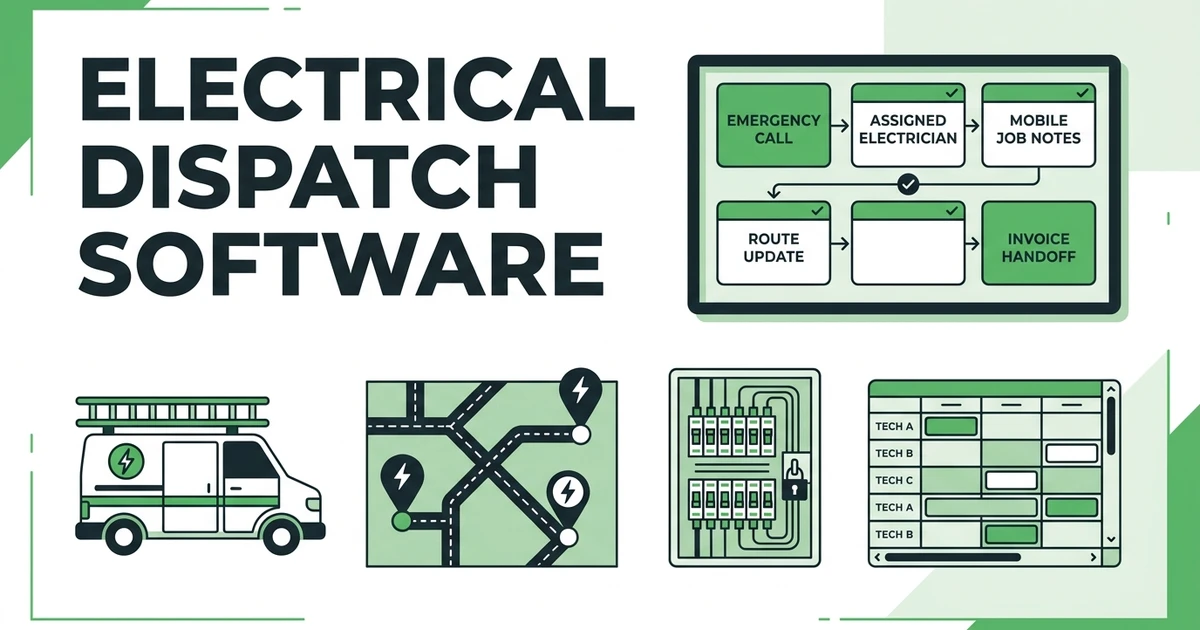





Quick Answer:
Electrical dispatch software helps contractors assign the right electrician to each service call, update schedules when urgent jobs appear, and keep job notes, customer details, and technician status in one place. It gives the office a live view of who is available, what each job needs, and what happens next.
Dispatch software solves a specific problem for electrical contractors: the schedule changes faster than the office can keep everyone updated. A panel issue runs long. A service van gets stuck across town. A customer calls with an urgent outage. One change can throw off the whole day.
That is why dispatch needs more than a calendar.
The job is not just “Tuesday at nine.” It includes the electrician, customer, location, scope, notes, safety context, parts, quote status, and invoice handoff. When those pieces live in separate tools, the office spends the day reacting.
Why Electrical Dispatch Gets Messy Once Calls Start Moving
Electrical dispatch gets messy because service calls do not stay still. A planned troubleshooting visit can turn into a larger repair. An emergency call may need the nearest licensed electrician. A routine inspection may reveal follow-up work that has to be quoted.
The office has to make decisions quickly.
If the dispatcher only sees a calendar, they may not know who has the right skill, who is closest, or which job can be moved without upsetting a customer. If technicians only get text messages, they may miss updated notes or show up without the full story.
That is how wasted drive time starts. The electrician arrives without the right information, the office gets another call, and the next customer waits.
What Electrical Dispatch Software Should Show Before You Assign a Technician
Good dispatch starts before the technician leaves. The office should see enough information to assign the job correctly the first time.
For an electrical contractor, that usually means:
- Customer name and service address
- Job type and service notes
- Technician availability
- Technician skill fit
- Job priority
- Previous customer history
- Quote or approval status
- Photos, access notes, or safety notes
- Current job status
This is why electrical contractor software should connect dispatch to the rest of the job record. The dispatcher should not have to check one tool for the schedule, another for customer history, and a text thread for notes.
When the information is visible before assignment, the office can make cleaner decisions. That matters most when the day is already busy.
How Dispatchers Handle Emergency Calls Without Blowing Up the Schedule
Emergency calls are where dispatch workflows get tested. A customer with a power issue does not want to wait while the office checks three calendars and calls every electrician one by one.
The dispatcher needs to see the day clearly.
Start with these questions:
- Which electrician is available soonest?
- Who is closest to the emergency call?
- Who has the right experience for the issue?
- Which scheduled job can move if needed?
- What customer needs an arrival update?
- What notes does the electrician need before driving over?
The Federal Reserve found that reaching customers and growing sales was the most common operational challenge for small employer firms, followed by hiring or retaining qualified staff in its 2026 Small Business Credit Survey. For electrical contractors, every dispatch miss can affect both: a frustrated customer today and a strained crew tomorrow.
Fieldified’s scheduling and dispatch tools help the office adjust assignments while keeping job details and updates tied to the same record.
What Electricians Need on Mobile Before They Reach the Job Site
Electricians should not need to call the office to ask for information the customer already provided. A mobile dispatch workflow should give them the job context before they arrive.
That includes the address, issue, access notes, previous work, quote details, and any photos or comments attached to the job.
For example, an electrician heading to a breaker issue should know if the customer mentioned a recent appliance install, a recurring trip, a locked utility room, or a past service visit. That context changes how the technician prepares and how the office communicates with the customer.
Fieldified’s mobile app workflow gives field teams access to job information away from the office. That reduces back-and-forth and helps the technician complete the visit with clearer notes for billing or follow-up.
Give your dispatch team a cleaner way to assign electrical jobs, update technicians, and keep job notes tied to the schedule. See how Fieldified handles schedule and dispatch work for field teams.
How Electrical Dispatch Connects to Quotes, Invoices, and Follow-Up Work
Dispatch does not end when the electrician arrives. The visit may create a quote, an invoice, a return trip, or a maintenance recommendation.
That is why dispatch data needs to flow into the next step.
If an electrician completes a small repair, the office should have what it needs to invoice quickly. If the job needs a quote for larger work, the job notes should support that quote. If a part is needed, the follow-up should not depend on memory.
Rising costs make this even more important. The Federal Reserve reported that 75% of employer firms cited rising costs of goods, services, and/or wages as a financial challenge in its 2025 Small Business Credit Survey. Electrical contractors cannot afford avoidable return trips caused by weak notes or poor handoffs.
The stronger workflow is simple: dispatch the right electrician, capture what happened, and move the job cleanly into quote, invoice, or follow-up.
How to Compare Dispatch Tools for a Small Electrical Crew
Small electrical crews should compare dispatch software by how it works on a real service day. A polished calendar is not enough if the office still has to text job details and rebuild invoices later.
Use this checklist:
| Evaluation question | Why it matters for electricians | What to avoid |
|---|---|---|
| Can dispatchers see technician availability? | Urgent calls need fast assignment | Static calendars with no field status |
| Can electricians access job notes on mobile? | Site context affects the visit | Text-only updates |
| Can dispatch connect to quotes and invoices? | Follow-up work should not get lost | Separate tools for each step |
| Can the team update customers quickly? | Arrival changes happen often | Manual phone tag for every change |
Also check pricing. If every extra office user or electrician makes the software bill jump, the tool can become expensive as the crew grows.
Fieldified is built for small and growing teams that need scheduling, dispatch, customer records, quotes, invoices, and payments together. That keeps the system practical without turning it into an enterprise project.
Where Fieldified Fits for Electrical Contractors
Fieldified fits electrical contractors who need one place to manage daily service work. The office can receive the request, schedule the job, dispatch the electrician, track status, capture job details, send invoices, and follow up with the customer.
That is different from only having a calendar.
For an electrical service team, Fieldified can help with:
- Assigning service calls
- Sharing job notes with electricians
- Tracking job status
- Managing customer records
- Turning completed work into invoices
- Following up on quotes and payments
Some firms are also starting to explore AI and automation for repetitive work. Among small employer firms using AI, 71% said it increased productivity according to the Federal Reserve’s 2026 survey. Fieldified’s value is practical: reduce manual handoffs so the dispatcher and electrician can keep the day moving.
Frequently Asked Questions
What are dispatch tools for electricians?
Dispatch tools for electricians help contractors assign service calls, update field teams, and track job status from the office. They keep schedules, customer details, technician notes, and follow-up work connected.
How are electrical dispatch tools different from scheduling software?
Scheduling software places jobs on a calendar. Dispatch software for electricians also helps the office choose the right technician, send job details, react to urgent calls, and track what happens in the field.
Can dispatch software handle emergency electrical calls?
Yes. The right dispatch workflow helps the office see who is available, which jobs can move, and what information the electrician needs before heading to an emergency service call.
What should electricians see on mobile before reaching a job?
Electricians should see the service address, customer notes, job scope, previous work history, photos or attachments, and safety or access notes. They should not have to call the office for basic information that was already collected.
Does Fieldified work for electrical contractors?
Yes. Fieldified helps electrical contractors manage scheduling, dispatch, job tracking, quotes, invoices, payments, and customer history. It is built for small and growing service teams that need one place to run daily work.
Conclusion: Better Dispatch Means Fewer Wasted Truck Rolls
Electrical dispatch is not just filling a calendar. It is deciding which electrician should go where, what they need to know, how the customer stays updated, and what happens after the job.
When those details stay connected, the office spends less time chasing updates and the crew spends more time doing billable work.
Book a demo to see how Fieldified helps electrical contractors manage scheduling, dispatch, mobile job notes, quotes, invoices, and payments in one place.