EN
EN DE
DE ES
ES FR
FR NL
NL PT
PT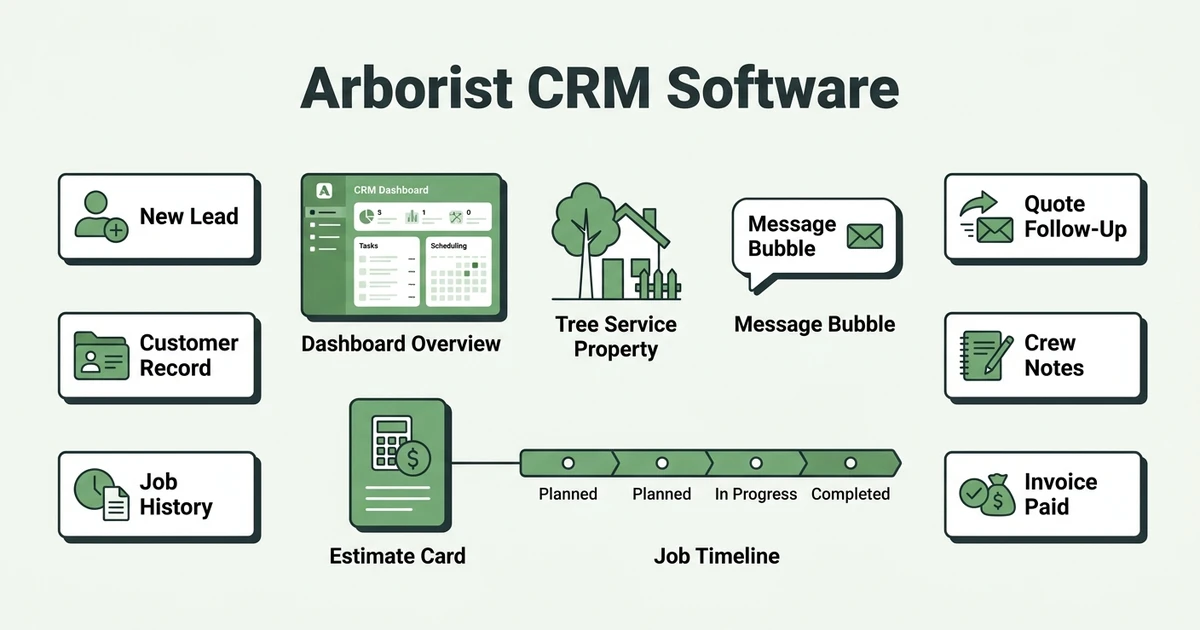





Quick Answer: Arborist CRM Software
Arborist CRM software keeps tree service leads, customer records, estimates, job history, messages, and follow-ups in one shared system. It helps tree care teams know who called, what was quoted, what work was completed, and what needs follow-up next.
Fieldified helps arborists manage clients, jobs, crews, invoices, and payments from one place. CRM is the part of that workflow that keeps customer context from getting lost.
Tree care is relationship-heavy work. A homeowner may call after a storm, then ask about pruning history, plant health concerns, a prior stump job, or an old quote. If that context is scattered across phones and notebooks, the office has to piece the job together under pressure.
The Bureau of Labor Statistics says grounds maintenance workers held about 1.3 million jobs in 2024, including 60,100 tree trimmers and pruners in its occupational profile. For tree service companies, that means plenty of crews, customers, and job history to keep organized.
Why Arborist CRM Software Matters for Tree Care
Arborist CRM software matters because tree service work rarely ends with one visit. A removal may lead to stump grinding. A pruning job may lead to annual maintenance. A storm call may become a larger property safety discussion.
If your customer record only stores a phone number, your team loses the details that help win repeat work. Prior photos, tree notes, quote history, invoices, and conversations all matter when the customer calls back.
CRM also helps with speed. When an emergency request comes in, the office can see the address, past work, access notes, and open quotes before assigning anyone. That is faster than searching inboxes while the customer waits.
Clear records also support safer job planning. OSHA investigated a May 20, 2024 fatal electrocution involving tree trimming near a residential power line according to the Department of Labor release. A CRM is not a substitute for training, but customer and job records should make hazard notes easier to find before the crew rolls out.
What a Tree Service CRM Should Keep in One Place
A tree service CRM should give the office, estimator, and crew the same view of the customer. The goal is not to collect data for its own sake. The goal is to make the next action obvious.
For arborists, the core record should include:
- Customer name, property address, and preferred contact method
- Lead source and first request details
- Photos, job notes, and tree care history
- Estimates, approvals, and quote follow-ups
- Scheduled jobs and completion status
- Messages, calls, and customer updates
- Invoices, payments, and outstanding balances
This is why tree service and arborist software should connect CRM with the rest of the job lifecycle. Customer history is only useful if it follows the work.
If the CRM is separate from scheduling and invoicing, the office still has to copy details between tools. That is where mistakes happen. A gate code gets missed, a quote follow-up slips, or a completed job waits too long for an invoice.
How Arborists Use CRM Data During Real Jobs
Picture a homeowner calling after a storm. A large limb is hanging over a driveway, and the customer says your company pruned the same tree before. The office needs the past notes fast.
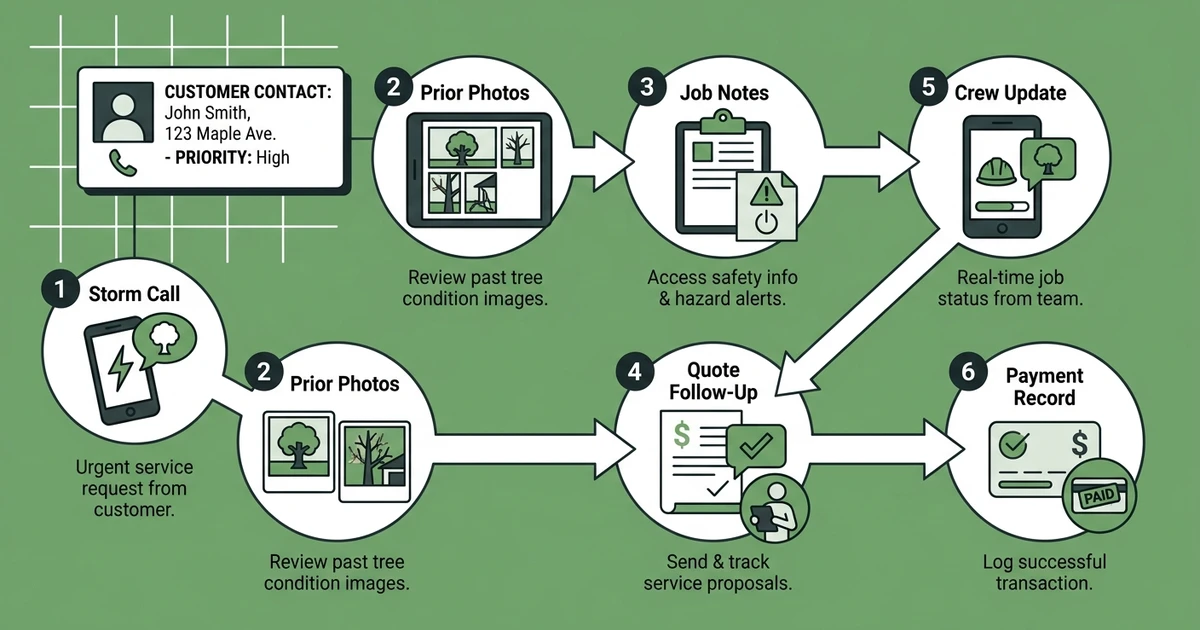
With a scattered setup, someone checks email, another person scrolls texts, and the estimator tries to remember the property. The crew may get sent with incomplete history and no photos from the prior visit.
With a CRM, the office can open the customer record, see prior pruning notes, review photos, check past invoices, and confirm whether a quote is already open. The estimator walks in with context instead of starting over.
That same record helps after the job. If the customer approves additional work, the quote can move forward. If they need a follow-up call, the office can track it. If the crew uploads completion notes, billing has what it needs.
Book a demo to see how Fieldified keeps tree service leads, customer notes, estimates, scheduling, and invoices connected from the first call to payment.
Arborist CRM Software vs Spreadsheets
Spreadsheets feel simple because everyone knows how to open one. They become risky when they are asked to manage conversations, quote status, job history, invoices, and field updates.
A spreadsheet can tell you who the customer is. It usually cannot tell you what they approved, which photos were taken, who followed up, whether the crew saw the access notes, and whether the invoice was paid.
| CRM Need | Spreadsheet Workflow | Arborist CRM Workflow |
|---|---|---|
| Lead tracking | Manual rows and color coding | Lead status tied to the customer |
| Job history | Notes spread across columns | Prior jobs attached to the record |
| Quote follow-up | Calendar reminders or memory | Pending quotes visible in one place |
| Field notes | Texts, photos, and paper notes | Notes and photos tied to the job |
| Payments | Separate invoice records | Invoice and payment status connected |
The biggest difference is accountability. In a CRM, the team can see what happened and what needs to happen next. In a spreadsheet, the process often depends on the person who built it.
How Fieldified Helps Tree Care Teams Manage Clients
Fieldified gives tree care companies client management tools that keep customer records, job history, and communication in one place. That helps the office answer questions without searching through disconnected systems.
The CRM also works with client communication, so messages and updates do not disappear into personal phones. When a customer asks about a quote or appointment, the record is easier to trace.
For day-to-day work, that means fewer missed follow-ups and cleaner handoffs. The estimator can see the customer history. The office can track the quote. The crew can work from the right job notes.
That matters for small teams because the owner is often the salesperson, dispatcher, and billing person. When the CRM carries the context, the business is less dependent on memory.
Is a Tree Service CRM Worth It for a Small Crew?
A tree service CRM is worth it when customer details are already hard to find. You do not need a large office for this to happen. One busy owner with a full phone, a paper notebook, and a shared spreadsheet can lose track of follow-ups quickly.
Common signs include:
- Customers call back and nobody remembers the prior scope
- Quotes sit unanswered because follow-ups are not tracked
- Photos are stored on one employee’s phone
- Crews ask the office for notes that should be on the job
- Invoices are delayed after work is complete
If your company is still getting started, this guide on how to start a tree service business may help with the basics. If you already have leads, jobs, and customer notes scattered everywhere, CRM is the workflow to fix.
You can also compare daily tools in this guide to apps for arborists. Just keep the main question simple: will your team actually use the system during a real workday?
Frequently Asked Questions
What is arborist CRM software?
Arborist CRM software is a customer management system built around tree service work. It keeps leads, customer records, estimates, messages, job history, follow-ups, invoices, and payments organized.
What should a tree service CRM track?
It should track customer details, property notes, photos, estimates, quote status, job history, messages, scheduled work, invoices, and payment status. The best setup keeps those details connected instead of spreading them across separate tools.
How does arborist CRM software help with follow-ups?
It shows which leads and quotes still need action. That helps the office follow up with homeowners before the job goes cold or a competitor wins the work.
Can a CRM help arborists win repeat work?
Yes. A CRM keeps prior pruning notes, plant health recommendations, removal history, and customer preferences available for the next call. That makes it easier to suggest relevant follow-up work without guessing.
Is a spreadsheet enough for tree service customer management?
A spreadsheet may work for a very small list of contacts. Once you manage active leads, estimates, jobs, photos, and invoices, a CRM gives the team a clearer way to track the full customer relationship.
Conclusion: Stop Losing Tree Work in Scattered Notes
Tree service customer management gets messy when every detail lives in a different place. Leads sit in voicemail. Photos stay on phones. Quotes wait for follow-up. Job notes never make it to the crew.
Arborist CRM software fixes that by giving your team one customer record that follows the work from first call to payment.
Book a Fieldified demo to see how your tree care team can manage leads, customer history, quotes, scheduling, invoices, and payment follow-ups in one place.