EN
EN DE
DE ES
ES FR
FR NL
NL PT
PT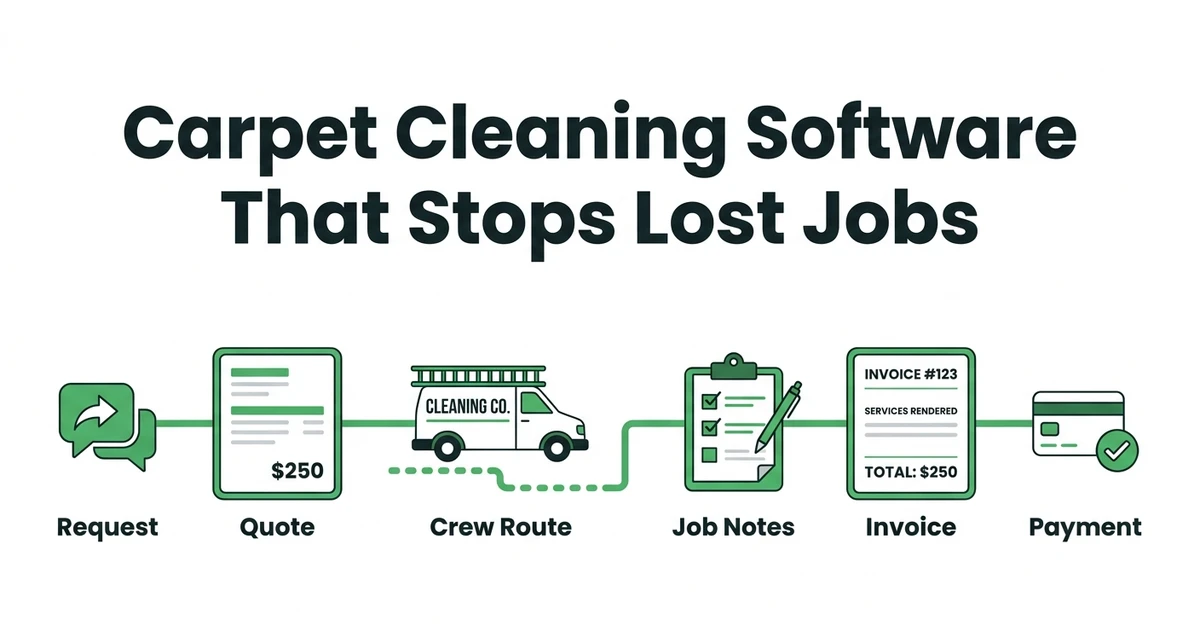





Quick Answer:
The best carpet cleaning business software protects the whole job path: request, quote, schedule, crew notes, invoice, and payment follow-up. Fieldified is a strong fit for carpet cleaning teams that need quotes, routing, customer history, invoices, and reminders connected in one workflow.
Carpet cleaning business software is worth comparing when jobs are not getting lost because of bad work, but because the office cannot keep every call, quote, route change, and invoice straight.
That problem is common in a local, fragmented market. IBISWorld lists the US carpet cleaning industry at $6.9 billion in 2026, with 41,611 businesses in its industry analysis.
For an owner with one or two vans, that means the money is in execution. The customer who gets a fast quote, a clear arrival window, and a same-day invoice is less likely to drift to another cleaner.
Why do carpet cleaning jobs fall through between the first call and the invoice?
Most carpet cleaning jobs do not disappear in one dramatic moment. They leak out through small handoffs: a voicemail not returned, a quote sitting in an inbox, a crew missing the pet-stain note, or an invoice that waits until Friday.
That hurts because carpet cleaning is often a small-team operation. IBISWorld reports 71,250 people employed in US carpet cleaning in 2026, with the average business employing 1.7 people in its employment statistics.
When the owner is also quoting, dispatching, cleaning, and collecting payment, a normal calendar is not enough. It does not tell you which quote needs follow-up, which job needs a portable extractor, or which customer prefers morning access through the side entrance.
The right system should make the next step obvious. A new request should become a quote. An approved quote should become a scheduled job. A finished job should become an invoice with payment follow-up already queued.
What should carpet cleaning business software handle from booking to payment?
Start with the complete path, not a feature list. A carpet cleaning job usually begins with a call, form, or repeat customer request. The office needs the property type, rooms, stairs, stains, upholstery add-ons, parking, and access notes before a price or arrival window is useful.
Then the quote needs a clean approval path. If the customer approves, the job should move into scheduling without retyping the same details. If the customer goes quiet, the follow-up should not depend on someone remembering after a long route day.
Good carpet cleaning software for service teams should cover:
- Customer request intake
- Quote creation and approval tracking
- Scheduling and crew assignment
- Job notes, photos, and service history
- Invoice creation after completion
- Payment reminders
- Repeat service follow-up
That is the difference between a list of appointments and a working carpet cleaning operation.
7 carpet cleaning software features that protect quotes, routes, and invoices
The most useful buying question is not “does it have scheduling?” It is whether the software protects the places where carpet cleaning jobs usually stall.
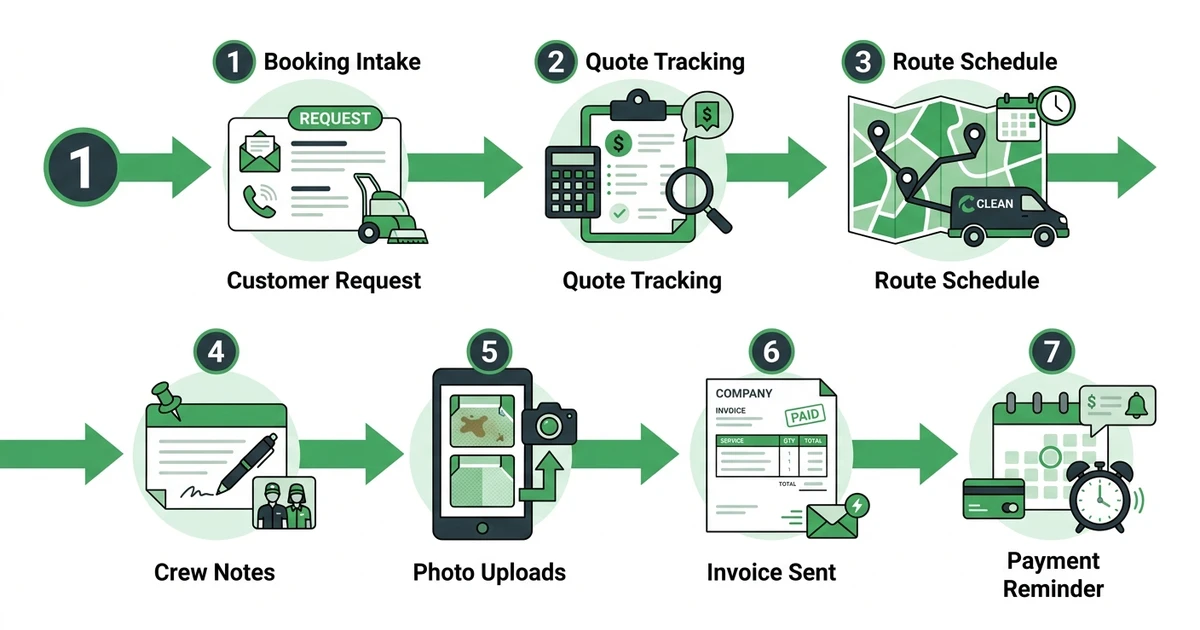
Here are the features to compare first.
- Online booking intake: Customers should be able to request service with enough detail for the office to quote or schedule confidently.
- Quote tracking: The owner should see which quotes are sent, viewed, approved, or waiting for follow-up.
- Route-aware scheduling: Dispatch should group jobs by area, crew availability, and realistic job duration.
- Technician job notes: Crews should see room scope, stain notes, access details, and customer preferences before arrival.
- Photo uploads: Before-and-after photos help document work, protect the business, and answer customer questions.
- Invoice automation: Completed jobs should become invoices quickly, while the job details are still fresh.
- Payment reminders: Customers should get polite reminders without the owner manually chasing every unpaid invoice.
Fieldified connects quote management for carpet cleaning jobs with scheduling and dispatch, which is where many basic calendars fall short.
How can carpet cleaners quote one-time jobs and recurring contracts without spreadsheet cleanup?
One-time residential jobs and recurring commercial work need different quoting habits. A homeowner may need bedrooms, stairs, pet treatment, and upholstery priced clearly. A commercial account may need a monthly, quarterly, or turnover schedule with access notes and service frequency attached.
If all of that lives in a spreadsheet, someone has to clean it up before scheduling, invoicing, and follow-up. That is where mistakes start. A quote tool should carry the approved scope forward instead of forcing the office to rebuild it in the calendar.
For one-time jobs, the quote should show what is included and what costs extra. For recurring work, it should preserve the contract terms, service cadence, and notes that keep the next visit from starting cold.
Fieldified’s quote workflow helps teams send clear quotes, track approvals, and turn accepted work into booked jobs. That matters when one missed follow-up can send the customer to a faster local competitor.
5 route and crew details carpet cleaners should track before dispatch
Carpet cleaning dispatch is not just a name and address. The crew needs the details that decide whether the job starts on time and finishes profitably.
Track these before the van leaves.
- Property access notes: Gate codes, parking, floor level, elevator access, and customer availability.
- Service package: Carpet only, upholstery, stain treatment, deodorizing, or add-on rooms.
- Equipment needed: Truck mount, portable equipment, specialty stain products, or extra drying tools.
- Room or square-foot scope: Enough detail to prevent the crew from walking into a larger job than quoted.
- Repeat-customer preferences: Pets, preferred time windows, billing contact, and prior service notes.
This is where cleaning service scheduling software becomes more useful than a generic calendar. It keeps the dispatch decision tied to the actual job, not just the time slot.
What job notes, photos, and customer history should technicians see before they arrive?
Technicians should not walk into a repeat customer’s home with no context. They should know what was cleaned last time, whether there were pet stains, what the customer approved, and whether there are access instructions that affect arrival.
Photos help too. A photo of a stained hallway, a damaged rug edge, or a completed room can prevent disputes later. It also gives the office a record when the customer calls with a question.
The customer record should show job history, quote history, invoice status, and communication notes. That is especially useful for repeat commercial customers, property managers, and residential clients who book seasonal refreshes.
Fieldified keeps job details and customer history tied together, so the office and crew are not working from different versions of the job.
How do carpet cleaning companies collect payment faster after the job is done?
The best time to invoice is right after the job is complete. The customer remembers the work, the crew has the details, and the office does not have to reconstruct what happened days later.
Delays create friction. The longer an invoice waits, the more likely the owner has to chase payment, answer billing questions, or dig through notes to confirm add-ons.
Software helps by turning completed work into an invoice, sending the customer a clean payment path, and following up when payment is late. Fieldified supports faster invoicing after completed jobs and payment reminders that reduce manual chasing.
That matters because carpet cleaning customers often decide based on speed, clarity, and trust. If the job is finished but the invoice does not arrive until days later, the office creates a collection problem that did not need to exist.
Is Fieldified a good fit for a growing carpet cleaning business?
Fieldified makes sense when your carpet cleaning business has outgrown a spreadsheet, a shared calendar, and a separate invoice tool. It is especially useful when you need the first customer request to stay connected to the final payment.
It is not just about adding software. It is about removing the handoffs that cause missed quotes, unclear routes, lost job notes, and late invoices.
Fieldified also gives owners a predictable way to compare cost. Its plans use published flat tiers, which helps small teams avoid surprise user-by-user cost growth as they add office help or another crew.
If your biggest problems are quote follow-up, crew scheduling, customer history, invoices, and payments, Fieldified fits the work you are already doing.
Frequently Asked Questions
What is carpet cleaning business software?
Carpet cleaning business software helps owners manage requests, quotes, schedules, crews, job notes, invoices, payments, and customer records. The best fit keeps the full job path connected so the office does not lose details between tools.
What carpet cleaning business software is best for small teams?
Small teams should look for software that is easy to run from the office or the field. Fieldified is a strong fit when you need quotes, scheduling, customer history, invoices, and reminders without adding a complicated setup process.
Can carpet cleaning software help with recurring commercial jobs?
Yes. It can store service frequency, access notes, billing contacts, prior job history, and repeat appointment reminders. That helps with offices, rentals, property managers, and seasonal residential work.
Does carpet cleaning business software replace spreadsheets?
It can replace the scheduling, quote tracking, invoice tracking, and customer-history parts that spreadsheets handle poorly. You may still export reports, but daily operations should not depend on someone updating cells after every job.
What should carpet cleaners look for before choosing software?
Look for booking intake, quote follow-up, scheduling, route notes, technician access, invoice automation, payment reminders, and customer history. If a tool only handles appointments, it may not solve the full carpet cleaning workflow.
Conclusion
Carpet cleaning jobs are won or lost in the handoffs. A fast quote does not help if nobody follows up. A full calendar does not help if the crew lacks job details. A finished job does not help cash flow if the invoice waits.
The right software keeps the request, quote, route, job notes, invoice, and payment follow-up connected.