EN
EN DE
DE ES
ES FR
FR NL
NL PT
PT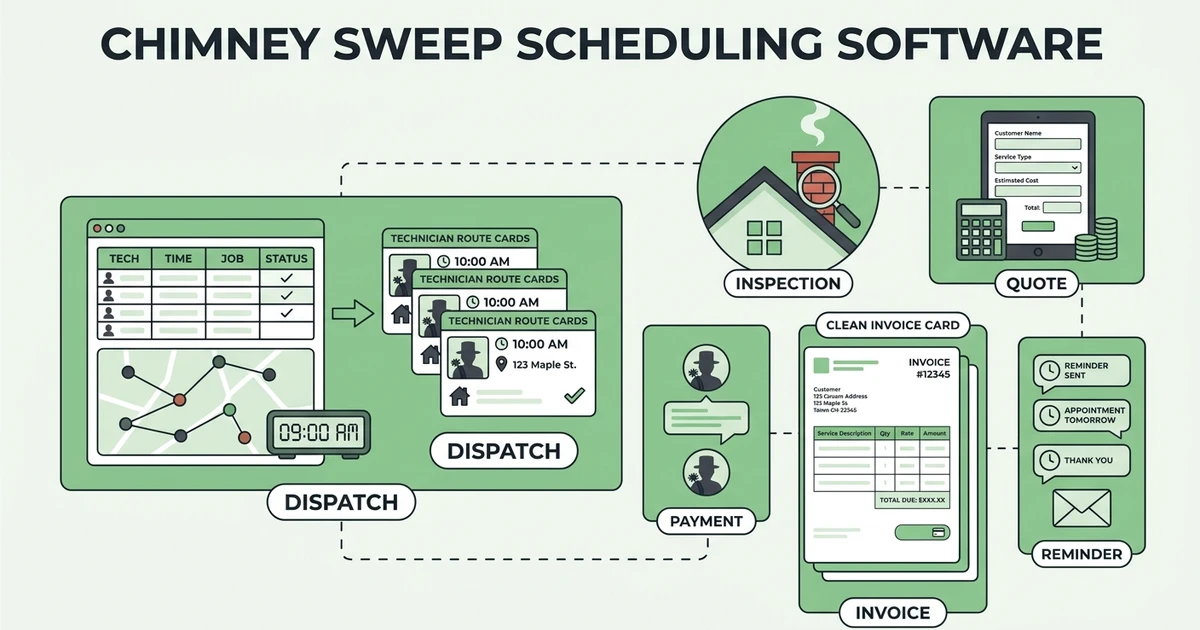





Quick Answer: Chimney sweep dispatching software assigns the right technician while keeping property access details, appliance information, inspection evidence, repair recommendations, invoices, and payment status in the same job record. The best choice is the one your office can use during a packed fall day without moving details between a calendar, a phone thread, and an invoice tool.
A chimney appointment is rarely just an address and a time slot. The dispatcher may need to tell a technician which appliance is involved, how many flues are present, whether roof access is limited, what was found on the last visit, and whether a repair discussion is already expected. That is why a calendar by itself is not enough.
This guide compares chimney sweep dispatch software through the working handoff that matters: intake, assignment, inspection, repair quote, invoice, and payment. It also gives a practical test a small chimney company can run before committing to a platform.
Why does chimney sweep dispatch break down during the fall rush?
Fall demand exposes weak handoffs. A dispatcher may squeeze in a same-day inspection between booked cleanings, then discover the available technician lacks the access notes or a customer calls to ask about a prior recommendation. When the answer lives in someone else’s phone or a paper form, the day becomes harder to reroute.
This pressure matters because the work is tied to a real safety conversation. The U.S. Fire Administration estimated 27,900 residential heating fires in 2023. USFA residential building fire cause estimates The same federal dataset reports that estimated residential heating fires declined 31% from 2014 to 2023, but it does not make accurate job documentation less important. USFA fire data sets
A strong dispatch process gives the office a single answer to five questions:
- What service was requested and what is known about the system?
- Which technician can take the job and what should they bring?
- What did the technician find and document?
- Does the customer need a repair quote or a follow-up visit?
- Has the completed work been invoiced and paid?
The goal is not to make dispatch more complicated. It is to stop critical context disappearing when the schedule gets busy.
What should chimney sweep dispatch software capture before a technician leaves?
Start with the job record, not the calendar block. For a same-day inspection of a home with two flues and restricted roof access, the technician should have the address, caller contact, appliance and fuel information, access instructions, requested service, prior history, and arrival window before driving away.
Then make the record useful after the appointment. A chimney company needs a place for inspection notes, photos, recommended work, customer communications, and a clear next status. That is the difference between a visit that is merely completed and one that can be quoted and billed without an office rebuild.
Use this intake checklist when evaluating a tool:
| Dispatch detail | Why it matters at the job | What should happen next |
|---|---|---|
| Appliance, flue, and service details | The technician arrives prepared | Notes stay with the property record |
| Access and safety instructions | The office can assign the appropriate visit | The technician sees them on mobile |
| Inspection photos and findings | The customer can understand the recommendation | Findings support a quote or follow-up |
| Appointment status and payment status | The team knows what is still open | Completed work moves to invoice follow-up |
Fieldified’s chimney sweep software is designed around this connected workflow, with job records, technician dispatch, inspection documentation, quotes, invoices, and payment reminders available in one platform. For a crew that currently depends on a shared calendar, the real test is whether the technician can see the context without calling the office from the driveway.
6 best chimney sweep dispatch software options for small crews
There is no universal winner for every chimney company. These six options are worth comparing based on the workflow you need to run, your existing processes, and how much job detail needs to travel with each dispatch.
1. Fieldified
Fieldified is a fit for chimney companies that want one record to connect scheduling, dispatch, job details, quotes, invoices, payments, and customer history. Its workflow is built to bring availability, location, technician skills, and the documentation needed after the visit into the same operating system.
2. Jobber
Jobber is an option to evaluate if a chimney business wants a broad field-service platform. During a demo, test the exact inspection-to-repair workflow your office uses and confirm what a technician can access and update from the field.
3. Housecall Pro
Housecall Pro is another field-service option for mobile service teams. Ask the vendor to show a same-day inspection, a repair recommendation, and an invoice handoff using your own sample job details.
4. ServiceTitan
ServiceTitan may belong on a shortlist for companies evaluating a larger operational platform. Confirm the implementation effort, required workflows, and reporting needs against the size of your chimney crew.
5. Kickserv
Kickserv is worth reviewing when scheduling and customer job communication are central to the buying decision. Use a real fall-week schedule to see whether it keeps property context visible when jobs move.
6. Workiz
Workiz is a further option to compare for dispatch-led service operations. The evaluation should focus on the complete record from incoming request through completion and payment, not just the dispatch board.
Which tools keep inspection notes, repair quotes, and invoices tied to the dispatch record?
Ask every vendor to demonstrate one complete job. Do not accept a feature checklist in place of the workflow.
- Create a customer and property record with flue, appliance, and access notes.
- Book and assign the inspection to a specific technician.
- Add photos and a repair recommendation from the job.
- Create and send a quote without re-entering the findings.
- Turn approved work into a scheduled job, invoice it, and track payment.
Fieldified supports interactive quote management and invoices with online payment and reminders, so the office can keep the inspection evidence and commercial follow-up connected to the work record. For pricing conversations, pair the workflow with a documented chimney sweep pricing approach instead of relying on memory at the end of a long day.
Do not separate the repair conversation from the inspection record
The customer should not have to repeat what the technician found when the office follows up. Keep the inspection notes, photos, proposed repair, and customer conversation together so the company can explain the next step accurately. This is particularly helpful when an inspection turns into a repair visit on another day or with another technician.
The workflow also gives the owner a clean review point. Before a quote or invoice is sent, the office can confirm what was documented, which job stage is complete, and whether the customer needs a call rather than a payment reminder. That is a better control than asking technicians to search back through a message thread after the route has ended.
Ready to see a connected chimney workflow in action? Request a Fieldified demo to walk through dispatch, inspection records, repair quotes, invoicing, and payment follow-up with your own process.
How should a chimney company test a dispatch workflow before buying?
Run a short scenario test with the people who answer calls, assign jobs, and close invoices. Give each vendor the same example: a new customer wants a same-day inspection, reports two flues, has limited roof access, and may need repair work.
Score the demonstration on the questions below:
- Can the office capture every detail without creating a separate note?
- Can the dispatcher see who is available and send the assignment with context?
- Can the technician add inspection evidence from the job record?
- Can the office produce a repair quote from those findings?
- Can the same record show completed work, invoice status, and payment follow-up?
Also test an exception. Move the technician to an urgent call, change the appointment, and ask what the customer sees. Dispatch software earns its value when the schedule changes, not only when every day goes to plan.
Include the people who use the handoff
Have one dispatcher perform the intake, one technician review the assigned job from a phone, and one office person turn a completed visit into the next action. Each person will spot a different missing detail. A platform that looks neat in an owner-only demo can still create rework if technicians cannot see access instructions or if the office cannot find the evidence needed for a repair quote.
Write down the exceptions that happen in your actual business: a customer who is unavailable, an access issue, a technician who needs a second visit, a same-day repair request, or a disputed invoice. Then ask the vendor to show the process rather than simply confirming that the feature exists.
Is Fieldified right for a chimney sweep business with multiple trucks?
Fieldified is worth a close look for a multi-truck chimney company that wants dispatch, job documentation, quoting, invoicing, and customer follow-up in one operational system. It is especially relevant when the office is copying inspection details from a technician’s message into a separate quote or invoice.
The best fit depends on your process. Bring a current job sheet, a seasonal schedule, and a repair example to the demo. Then ask the team to map the work from request through payment, including the details a technician needs before leaving the yard.
Frequently Asked Questions
What is the difference between chimney sweep dispatch software and a shared calendar?
A shared calendar shows when work is booked. Chimney sweep dispatch software should also keep the customer, property, access, inspection, quote, invoice, and payment context attached to the appointment. That context reduces the number of separate places the office and technicians must check.
Can chimney sweep dispatching software support recurring inspections?
It should let the office maintain customer and property history so recurring work begins with useful context. Confirm how the system schedules the next visit and how it surfaces prior findings before you buy.
What should technicians update from the field?
Technicians should be able to view the assigned job, record work performed, add notes and photos, and mark the next required action. The exact form should match the chimney company’s inspection and repair process.
Can dispatch software help with repair approvals?
Yes, when the system keeps findings, photos, and proposed work together before the quote is sent. Ask to see the customer approval path and the handoff back to scheduling for approved repair work.
How do I choose chimney sweep scheduling software for a small team?
Choose the system that lets a dispatcher complete your real job scenario with the fewest workarounds. Start with intake, assignment, technician context, inspection evidence, quote, invoice, and payment follow-up rather than comparing calendar views alone.
Conclusion
The right chimney sweep dispatching software makes the job record more reliable as your schedule gets busier. It gives the technician useful context, gives the office a clear next action, and keeps inspection findings connected to the repair and billing work that follows.
See how Fieldified can connect those steps for your chimney crew. Request a demo and bring a real fall dispatch scenario to the conversation.