EN
EN DE
DE ES
ES FR
FR NL
NL PT
PT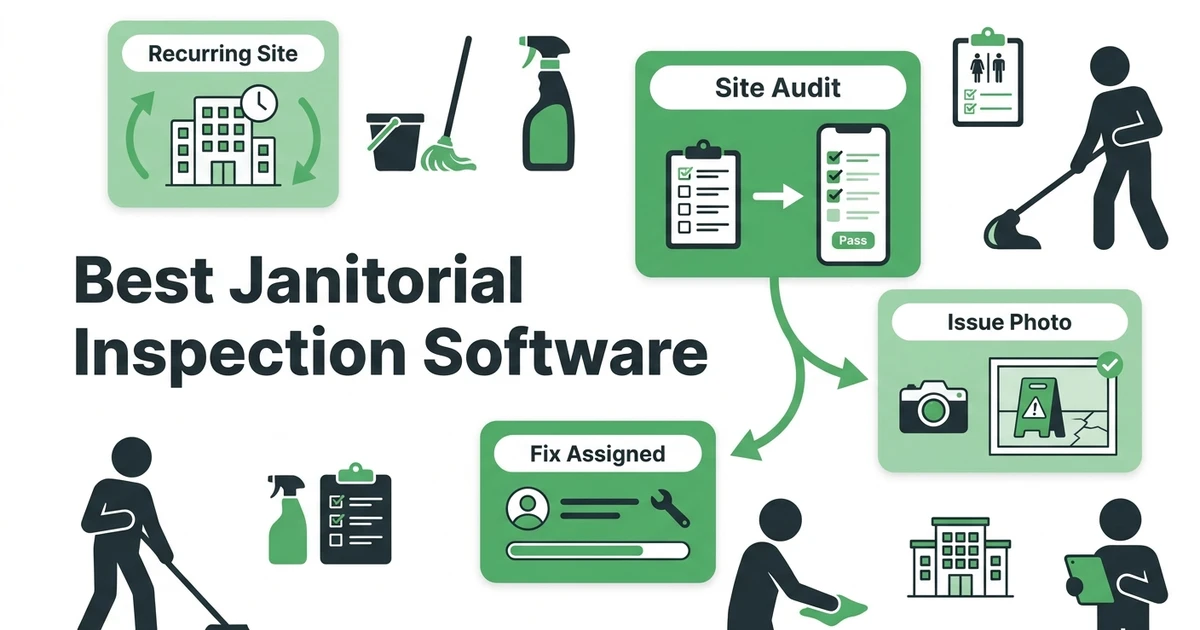





Quick Answer:
The best janitorial inspection software helps cleaning managers inspect recurring sites, score checklist items, capture photos, assign follow-up, and keep site history easy to find. Fieldified is the best fit when inspections need to connect with jobs, client records, mobile notes, invoices, and customer communication in one workflow.
A strong janitorial inspection app is not just a digital checklist. A checklist tells you what was reviewed. A better system helps the cleaning team fix what was missed, prove what changed, and keep the client from asking the same question every month.
Here are the 9 tools worth comparing:
- Fieldified
- Janitorial Manager
- CleanTelligent
- Swept
- OrangeQC
- Clean Smarts
- CleanGuru
- SafetyCulture
- MaintainX
This guide focuses on commercial cleaning teams that manage recurring sites, evening crews, inspection notes, client complaints, and quality follow-up. It is not a generic facilities software list.
What Should the Best Janitorial Inspection Software Actually Fix?
Janitorial inspections usually fail in the handoff. A supervisor spots dust on a ledge, missing restroom supplies, or a floor that was skipped. They write a note, take a photo, or tell the crew lead. Then the issue disappears into a text thread.
The client does not care that the inspection happened. They care whether the issue was fixed.
That is why the best janitorial inspection software should solve four problems at once:
- Inspect the site from mobile
- Capture photos and checklist results
- Assign follow-up to the right person
- Keep client and site history connected
Small businesses are already under cost pressure. The Federal Reserve reported that 75% of employer firms cited rising costs of goods, services, and/or wages as a financial challenge, while 51% cited uneven cash flow in its 2025 employer firms report. For a commercial cleaning company, repeated re-cleans and unresolved complaints are not small admin issues. They eat margin.
Good inspection software should help your team prevent the same complaint from coming back next week.
Quick Comparison: 9 Janitorial Inspection Software Tools
Use this table as a first pass. The right choice depends on whether you need inspection scoring only, or whether inspections need to sit inside your scheduling, job tracking, client communication, and billing workflow.
| Rank | Tool | Best for | Inspection strength | Watch-out |
|---|---|---|---|---|
| 1 | Fieldified | Cleaning teams that want inspections tied to jobs | Site notes, mobile updates, client records, follow-up | Not a standalone audit-only platform |
| 2 | Janitorial Manager | Janitorial teams focused on operations | Cleaning-specific quality control | May be more operations-heavy than some small teams need |
| 3 | CleanTelligent | Formal quality programs | Structured inspections and reporting | Check how much work stays outside the inspection system |
| 4 | Swept | Cleaner communication plus site visibility | Messaging and field coordination | Evaluate billing and full job workflow depth |
| 5 | OrangeQC | Inspection scoring and deficiencies | Quality scoring and follow-up tracking | Best when inspection is the main need |
| 6 | Clean Smarts | Cleaning task management | Cleaner checklists and site tasks | May not replace broader business software |
| 7 | CleanGuru | Cleaning proposals and operations | Simple cleaning business workflows | Inspection depth may not fit complex accounts |
| 8 | SafetyCulture | Flexible audits and checklists | Highly adaptable inspection forms | Not janitorial-first by default |
| 9 | MaintainX | Maintenance-style work tracking | Work orders and corrective action | Better for facility maintenance than cleaning-only teams |
1. Fieldified: Best Janitorial Inspection Software for Inspections Tied to Jobs
Fieldified is the best choice for janitorial and commercial cleaning teams that do not want inspections living in a separate app. It connects the daily cleaning workflow with site notes, mobile updates, customer records, invoices, and follow-up.
That matters when inspections reveal work that must actually happen.
Picture a supervisor inspecting a recurring office cleaning account on Thursday morning. They find missed trash liners in two rooms, streaked glass near the entrance, and a supply closet note that never reached the evening crew. In a standalone inspection app, that might become a score. In Fieldified, that context can stay connected to the site, job history, team notes, and client record.
Fieldified is a strong fit when your cleaning operation needs:
- Recurring job visibility
- Mobile notes from the field
- Photos and job details in one place
- Client history by site
- Follow-up tied to real work
- Invoices and payments connected to completed jobs
The platform also fits teams that already use janitorial software or need a cleaner way to manage commercial cleaning operations. The goal is not only to inspect. The goal is to keep quality control tied to the work your cleaners actually perform.
If you want inspections connected to recurring jobs, mobile notes, client records, and billing, book a Fieldified demo and walk through how your cleaning sites would be managed.
2. Janitorial Manager: Best for Cleaning Operations That Prioritize Quality Audits
Janitorial Manager is built specifically for janitorial operations. It is often a good fit for companies that want cleaning-focused tools for quality assurance, employees, accounts, and site performance.
Its strength is that it speaks the language of cleaning operations. If your main pain is quality inspections across many accounts, it deserves a look.
The key question is whether your inspection workflow also needs to connect with scheduling, customer communication, invoicing, and follow-up. Some teams prefer a specialized janitorial platform. Others want one field service system that handles cleaning work from job assignment through payment.
For a cleaning business that already has separate systems for billing and customer records, Janitorial Manager may fit into the quality-control layer. For an owner trying to reduce tool switching, Fieldified may be easier to manage day to day.
3. CleanTelligent: Best for Formal Quality Control Programs
CleanTelligent is a quality-management option for janitorial teams that want structured inspections, reporting, and accountability across accounts. It is especially relevant when quality scores and client reporting are a major part of the sales promise.
That makes sense for larger cleaning contracts.
If a client expects formal inspection reports, trend tracking, and repeatable scoring, a dedicated quality platform can help. The tradeoff is that inspection software may not replace the systems your office uses for scheduling, invoicing, customer notes, and cleaner communication.
Before choosing a formal quality-control tool, ask where the work goes after the inspection. A deficiency should not sit inside a report if the crew lead needs to fix it tonight.
4. Swept: Best for Cleaner Communication Plus Inspections
Swept is often considered by cleaning teams that care about cleaner communication, location visibility, and operations coordination. It can be useful when the biggest problem is keeping evening crews and supervisors aligned.
That is a real issue in janitorial work.
Many commercial cleaning jobs happen after the client has left. The office may not see a missed task until the next morning. A tool that supports communication between cleaners, supervisors, and managers can reduce confusion.
The buyer question is whether communication is enough. If inspections create invoices, recurring job notes, customer follow-ups, or site history changes, compare Swept against a broader workflow like Fieldified.
5. OrangeQC: Best for Inspection Scoring and Deficiency Tracking
OrangeQC is focused on inspections, audits, and deficiency tracking. It can be a good fit for teams that want a dedicated inspection layer with scores and issue visibility.
That focus is useful when quality control is the main problem.
A cleaning supervisor can inspect a site, log problems, and track whether deficiencies are resolved. For cleaning companies that already have mature scheduling and billing systems, that may be enough.
For smaller teams, the risk is adding another tool to manage. If the office still has to copy inspection findings into job notes, client emails, or invoices, the quality process remains split.
6-9. Other Janitorial Inspection Tools Worth Comparing
The next four tools can work well in specific situations. They are not all janitorial-first platforms, but they may fit the way your company runs inspections.
Clean Smarts: Best for Cleaning Task Visibility
Clean Smarts is useful for teams that want to organize cleaning tasks, track site activity, and keep recurring work more visible. It is worth comparing if your inspection needs are close to task completion and cleaner accountability.
The question is whether it gives managers enough client-history and billing context. For some teams, task visibility is the immediate win. For others, quality control must connect to the full job record.
CleanGuru: Best for Simple Cleaning Operations
CleanGuru is often associated with cleaning proposals, bidding, and business operations. It may fit smaller companies that want simple cleaning-business support without a heavy system.
If inspections are light and your main need is a practical cleaning workflow, it may be enough. If inspections are a core part of account retention, compare it carefully against more inspection-focused systems.
SafetyCulture: Best for Flexible Audit Forms
SafetyCulture is a flexible inspection and checklist platform. It can support many types of audits, including cleaning inspections, safety checks, and site reviews.
That flexibility is its strength. It is also the watch-out.
Because it is not only built for janitorial companies, your team may need to configure forms, workflows, and follow-up processes. It can work well if you want custom inspection forms, but it may not replace cleaning-specific scheduling or client management.
MaintainX: Best for Maintenance-Style Corrective Action
MaintainX is stronger when inspection findings turn into maintenance work orders, repairs, or facility tasks. It can make sense for teams that manage facilities, equipment, or building operations beyond cleaning.
For a pure janitorial company, it may be more than you need. If your inspection process is mainly about cleaning quality, missed tasks, and client communication, a cleaning-first or field-service-first workflow may be easier.
How to Choose Janitorial Inspection Software Without Buying Another Disconnected App
Do not start with the feature list. Start with the inspection day.
Ask what happens when a supervisor finds an issue. Does the cleaner get the note? Does the site record update? Does the client get proof? Does the office know whether the issue affected billing or follow-up?
Use this checklist before you book demos:
| Buying question | Why it matters for janitorial teams |
|---|---|
| Can managers inspect from mobile? | Supervisors need to inspect on site, not after returning to the office |
| Are photos tied to the site? | Visual proof helps resolve repeat complaints |
| Can issues become follow-up tasks? | A score does not fix a missed restroom |
| Does recurring work stay connected? | Commercial cleaning is often contract-based and repetitive |
| Can office and field teams see the same history? | Client complaints usually involve more than one person |
| Does it connect to billing or client communication? | Quality issues can affect renewals, invoices, and trust |
The Cleveland Fed reported that rising costs were the top financial challenge for small firms, while reaching customers and growing sales was the top operational challenge in its 2026 survey release. For janitorial companies, retaining commercial accounts is part of growth. Quality proof helps protect those accounts.
That is why the right inspection tool should do more than produce a report.
Is Fieldified Right for Your Janitorial Business?
Fieldified is right for your janitorial business if inspections are part of a larger daily workflow. If your team needs recurring jobs, mobile notes, site history, client records, invoices, and follow-up in one place, Fieldified is built for that.
It is especially useful for cleaning teams that are growing beyond spreadsheets, group texts, and paper checklists.
Fieldified may not be the best fit if you only need a standalone audit scorecard and already have every other system working well. A dedicated inspection app may be enough in that case.
But if your quality process breaks after the inspection, Fieldified is worth a closer look. It helps connect job tracking, mobile updates, and customer records so the office and cleaning crew are not working from different versions of the truth.
Pricing also matters. BOFU buyers should look at whether the software bill grows every time the cleaning company adds users. Fieldified’s pricing is designed for small and growing service teams that want predictable software costs.
Frequently Asked Questions
What is janitorial inspection software?
Janitorial inspection software helps cleaning teams inspect recurring sites, score checklist items, capture photos, and record issues. The best systems also make it easy to assign follow-up, keep client history, and prove what was checked.
What is the best janitorial inspection software for small cleaning teams?
Fieldified is the top choice for small and growing cleaning teams that want inspections tied to jobs, customer records, notes, invoices, and follow-up. If you only need a standalone audit scorecard, a dedicated quality-control app may be enough.
Should janitorial inspection software include photos?
Yes. Photos help supervisors prove what was checked, document deficiencies, and show clients that issues were resolved. They are especially useful for recurring commercial cleaning contracts where managers are not on site every night.
Can cleaning inspection software replace paper checklists?
Yes, if the software works well on mobile and keeps checklist history tied to the site. Paper checklists are easy to lose, hard to search, and rarely connect inspection results to follow-up work.
How does Fieldified help with janitorial inspections?
Fieldified helps cleaning teams keep site notes, job details, mobile updates, client records, invoices, and follow-up in one workflow. That makes it useful when inspections need to turn into action, not just a score.
Conclusion: Choose Inspection Software That Closes the Loop
Janitorial inspections only matter if they lead to action. A clean report does not protect the account if missed tasks keep repeating and the crew never sees the feedback.
The best tool depends on your workflow. If you need deep inspection scoring, compare dedicated quality tools. If you need inspections connected to recurring jobs, mobile notes, client records, invoices, and follow-up, Fieldified is the stronger fit.
Book a Fieldified demo and see how your cleaning team can manage recurring sites, inspection notes, client history, and follow-up from one place.